> ## Documentation Index
> Fetch the complete documentation index at: https://docs.crossmint.com/llms.txt
> Use this file to discover all available pages before exploring further.
# Card Rails and PCI Compliance
> The rails that an order intent pays on, and how to stay PCI compliant with Agent Checkouts or with your own checkout
An order intent lets an agent pay with a user's saved card, within a limit that the user approved. This page explains the rails that an order intent pays on, and how to stay PCI compliant.
## Card Rails
A rail is the way an order intent gives a payment credential to a merchant. One order intent can have several rails, and the agent gets a new credential for each payment. The card network rails give the strongest protection, because the network enforces the limit:
| Rail | What the merchant gets | Who enforces the limit |
| - | - | - |
| Visa Intelligent Commerce | A one-time card number for each payment | Visa |
| Mastercard Agent Pay | A one-time card number for each payment | Mastercard |
| Stripe shared payment token (SPT) | A Stripe token for one seller | Stripe |
| Encrypted card | The saved card | Crossmint in Agent Checkouts; your code in your own checkout |
A card gets a network rail when it is enrolled in Visa Intelligent Commerce or Mastercard Agent Pay. See the eligible cards in the [Agent Cards Quickstart](/agents/cards-quickstart#prerequisites). The Stripe shared payment token works only at sellers that accept it. The encrypted card is the fallback for every other card.
## How to Stay PCI Compliant
Collect cards only with the Crossmint card form. A card that a user types into your own form, or into a chat message, goes through your systems. Then pay in one of two ways.
### With Agent Checkouts
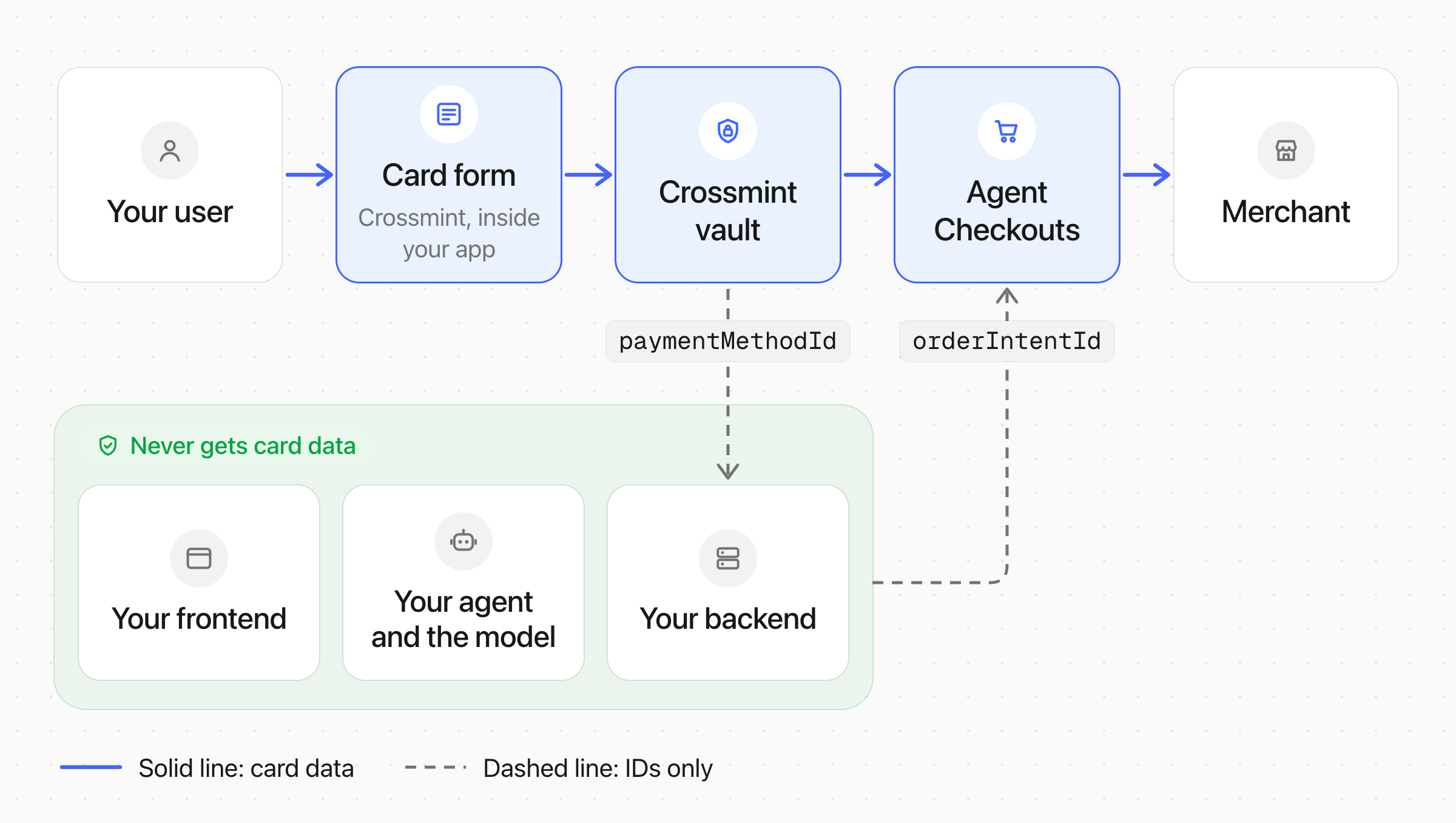
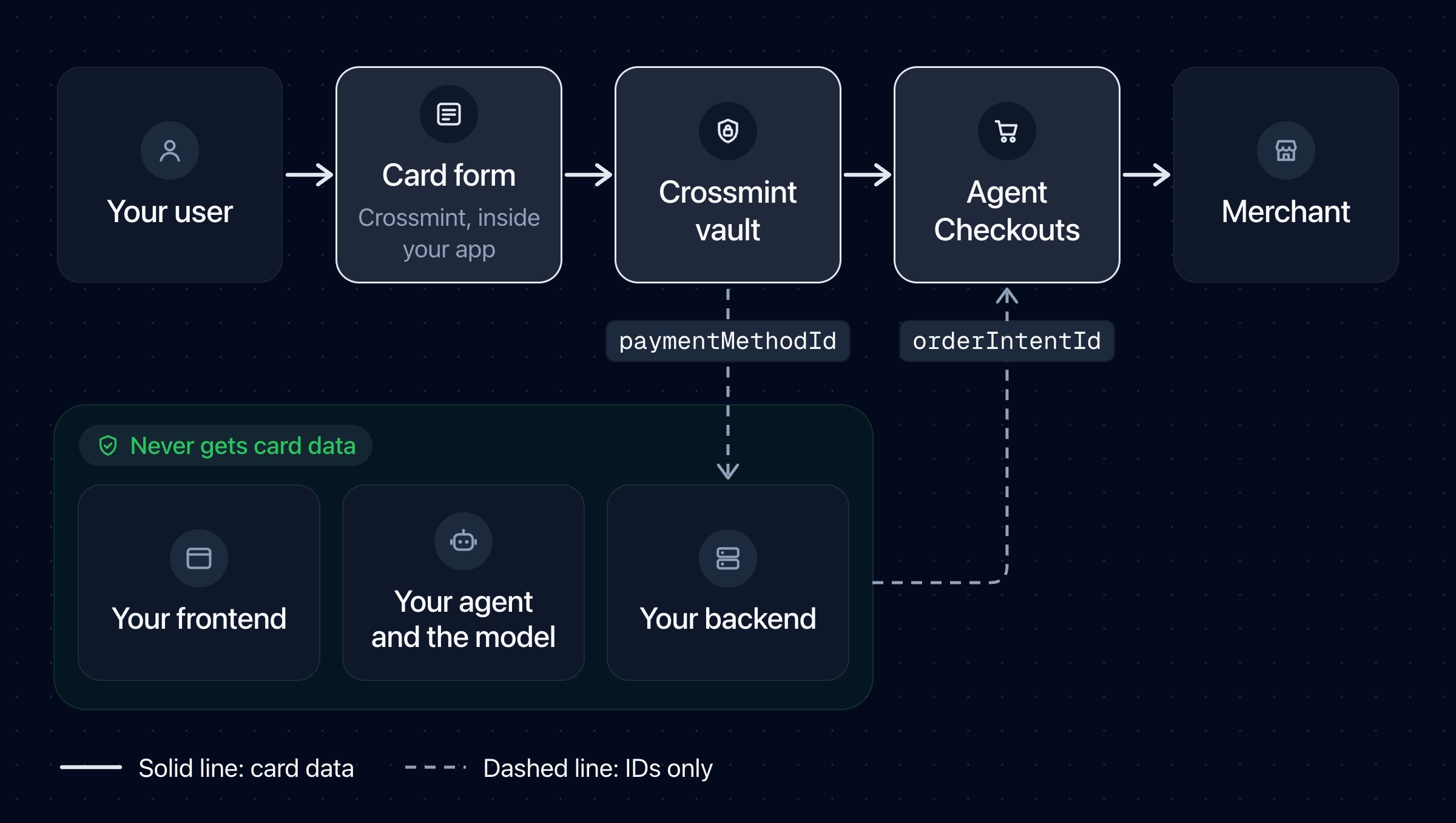
[Agent Checkouts](/agents/checkouts/overview) is the Crossmint API that buys on merchant websites for your user. When the checkout asks for payment, your app sends only the `orderIntentId`. The checkout gets the credential and enters it at the merchant inside Crossmint's PCI-compliant systems. So the checkout can use any rail, including the encrypted card, and your app, your agent, and the model never get card data. Every saved card works, and you do not enable anything.
 | Part | What it handles |
| - | - |
| Your frontend | Shows the Crossmint card form. It never gets the card number. |
| Your backend | Stores a `paymentMethodId` and an `orderIntentId`. It never gets the card number. |
| Your agent and the model | Send the `orderIntentId`. They never get the card number. |
| Crossmint vault | Stores the saved card in a PCI-compliant vault. |
| Agent Checkouts | Gets a card credential for one payment step and enters it in the merchant's card fields. |
| Merchant | Gets a network credential, or the saved card, to charge the purchase. |
Agent Checkouts does not accept card details in the `task`, in messages, in buyer profiles, or in form answers.
#### How Agent Checkouts Picks the Rail
| Part | What it handles |
| - | - |
| Your frontend | Shows the Crossmint card form. It never gets the card number. |
| Your backend | Stores a `paymentMethodId` and an `orderIntentId`. It never gets the card number. |
| Your agent and the model | Send the `orderIntentId`. They never get the card number. |
| Crossmint vault | Stores the saved card in a PCI-compliant vault. |
| Agent Checkouts | Gets a card credential for one payment step and enters it in the merchant's card fields. |
| Merchant | Gets a network credential, or the saved card, to charge the purchase. |
Agent Checkouts does not accept card details in the `task`, in messages, in buyer profiles, or in form answers.
#### How Agent Checkouts Picks the Rail
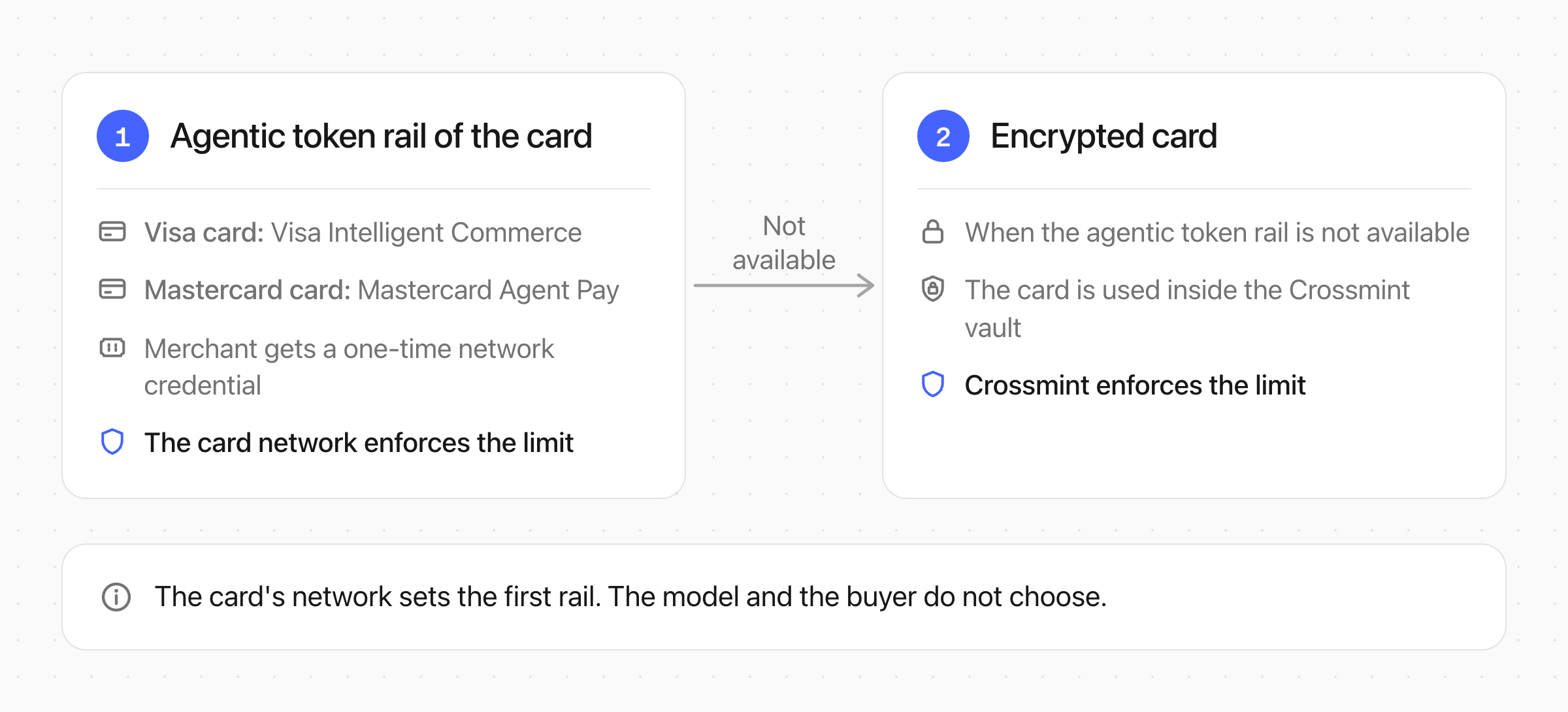
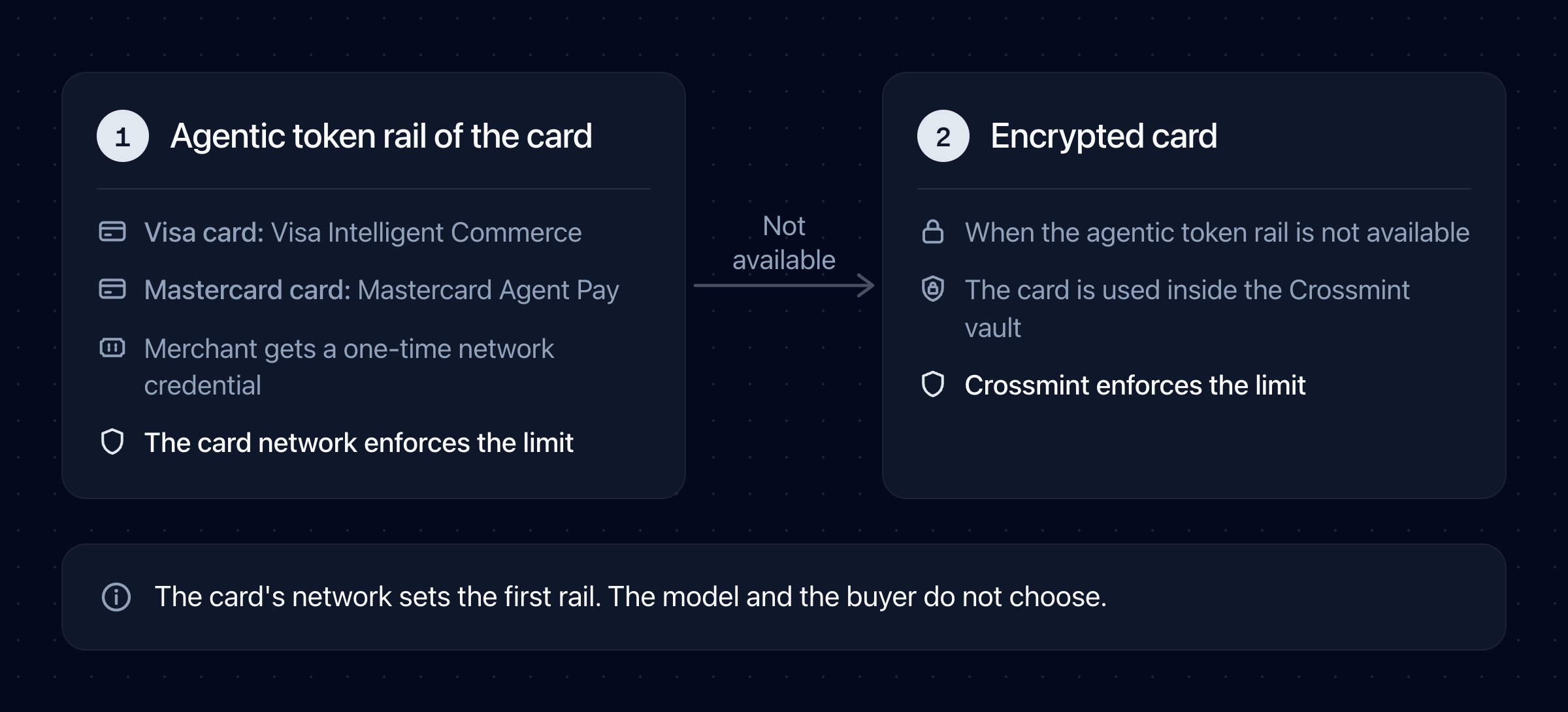 Agent Checkouts first uses the agentic token rail of the card's network: Visa Intelligent Commerce for a Visa card, and Mastercard Agent Pay for a Mastercard card. When that rail is not available, Agent Checkouts uses the encrypted card. The model and the buyer do not choose the rail.
When Agent Checkouts uses the encrypted card, the card stays inside the Crossmint vault: the checkout enters it in the merchant's card fields, and Crossmint keeps the purchase within the order intent's amount. You do not need encrypted card access for this.
The encrypted card needs the card's security code (CVC). Crossmint keeps the CVC for a limited time after the user saves the card. After that time, the user must type it again. See [Ask for the CVC Again](/agents/payment-methods/cards/recollect-cvc).
### With Your Own Checkout
With your own automation, such as your own browser agent or a merchant API, your code gets a credential from the order intent for each payment and enters it at the merchant. See [Get a Card Number](/agents/payment-methods/cards/retrieve-agent-card) for the requests.
Agent Checkouts first uses the agentic token rail of the card's network: Visa Intelligent Commerce for a Visa card, and Mastercard Agent Pay for a Mastercard card. When that rail is not available, Agent Checkouts uses the encrypted card. The model and the buyer do not choose the rail.
When Agent Checkouts uses the encrypted card, the card stays inside the Crossmint vault: the checkout enters it in the merchant's card fields, and Crossmint keeps the purchase within the order intent's amount. You do not need encrypted card access for this.
The encrypted card needs the card's security code (CVC). Crossmint keeps the CVC for a limited time after the user saves the card. After that time, the user must type it again. See [Ask for the CVC Again](/agents/payment-methods/cards/recollect-cvc).
### With Your Own Checkout
With your own automation, such as your own browser agent or a merchant API, your code gets a credential from the order intent for each payment and enters it at the merchant. See [Get a Card Number](/agents/payment-methods/cards/retrieve-agent-card) for the requests.
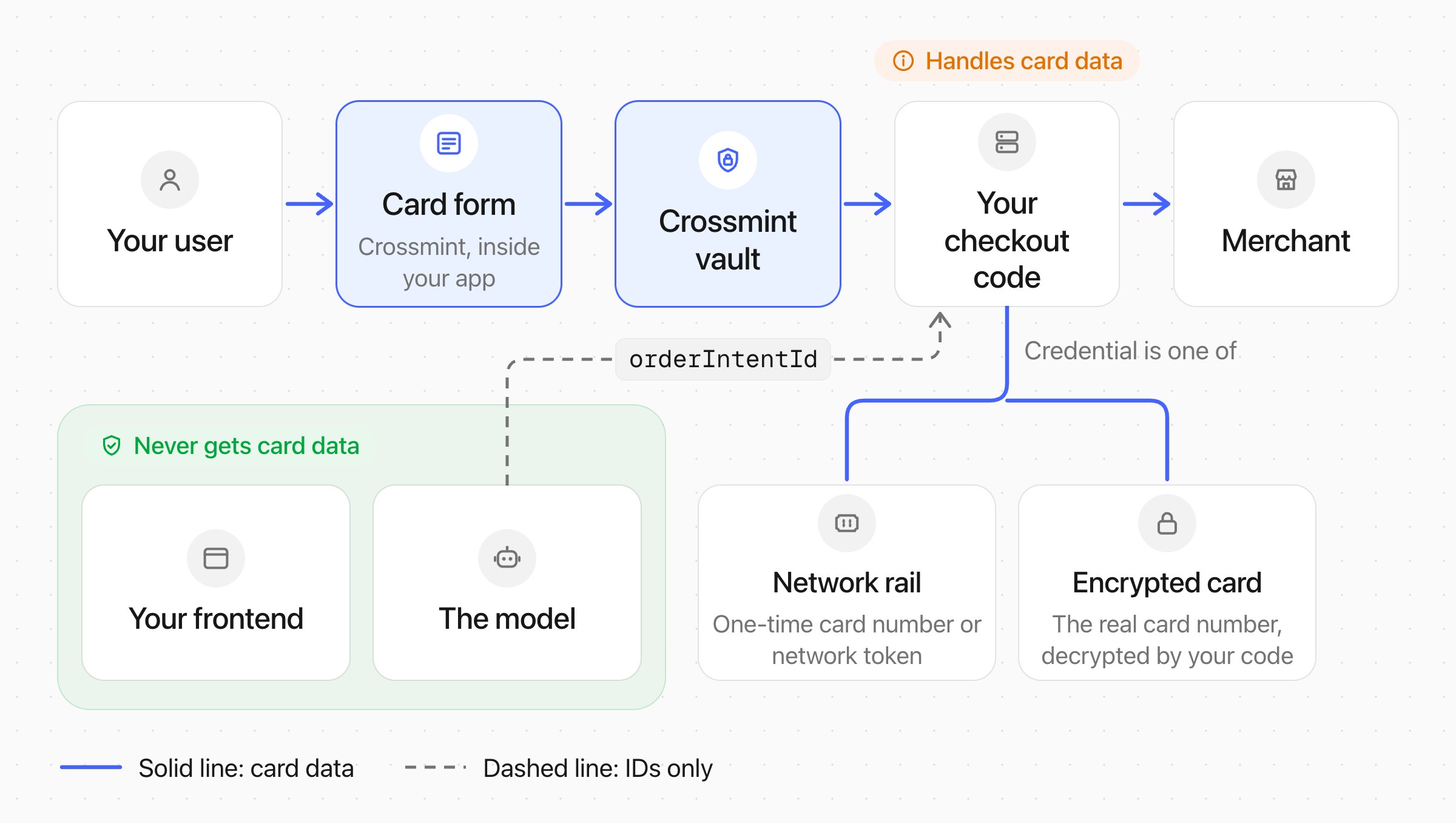
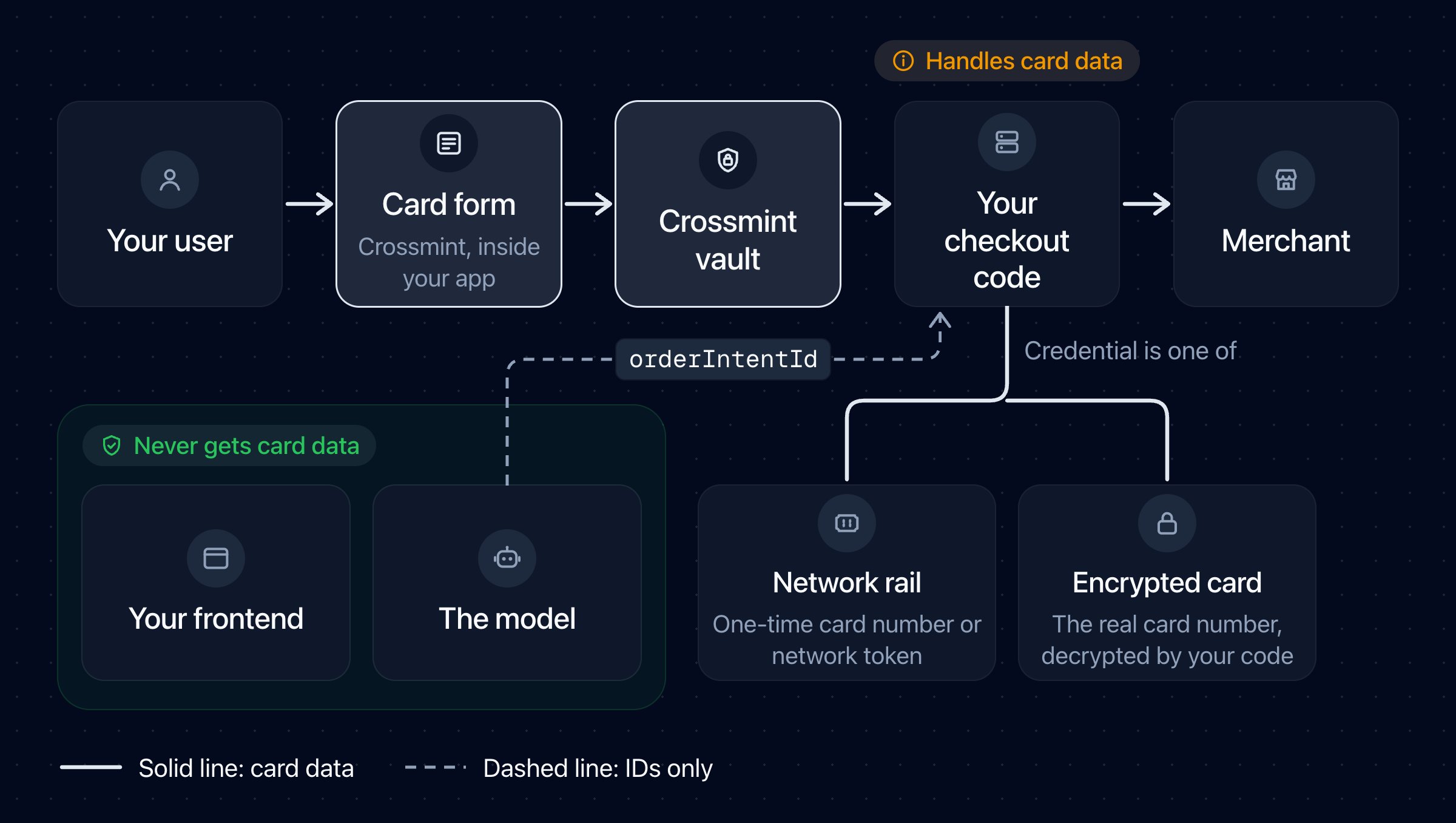 Your PCI scope depends on the rail:
* **A network rail** (`rail: "agentic-token"`, with `provider` `vic` or `agentpay`). Your code gets a one-time card number for the amount that you request, and the card network enforces the amount and the merchant. Visa considers network tokens and single-use card numbers out of PCI DSS scope.
* **A Stripe shared payment token** (`rail: "spt"`). Your code gets a token for one seller that accepts it, not card data.
* **The encrypted card** (`rail: "encrypted-card"`). Your code gets the real card number, encrypted to your RSA public key, so your setup must be PCI compliant. In production, your project also needs encrypted card access. The card network does not enforce the limit, so your code must keep each purchase within the amount that it got and the order intent's merchant. To set up the encrypted card for your own automation, contact us.
Choose a network rail when it is `active`, and the encrypted card only when no network rail can be used. Let your code, not the model, enter the credential in the merchant's card fields. Give the model only the `orderIntentId`, and do not log or store the credential. Your qualified security assessor (QSA) confirms your final PCI scope.
## See Also
Create an order intent and verify its rail
Answer a payment request with an order intent
Get a credential for your own checkout
Your PCI scope depends on the rail:
* **A network rail** (`rail: "agentic-token"`, with `provider` `vic` or `agentpay`). Your code gets a one-time card number for the amount that you request, and the card network enforces the amount and the merchant. Visa considers network tokens and single-use card numbers out of PCI DSS scope.
* **A Stripe shared payment token** (`rail: "spt"`). Your code gets a token for one seller that accepts it, not card data.
* **The encrypted card** (`rail: "encrypted-card"`). Your code gets the real card number, encrypted to your RSA public key, so your setup must be PCI compliant. In production, your project also needs encrypted card access. The card network does not enforce the limit, so your code must keep each purchase within the amount that it got and the order intent's merchant. To set up the encrypted card for your own automation, contact us.
Choose a network rail when it is `active`, and the encrypted card only when no network rail can be used. Let your code, not the model, enter the credential in the merchant's card fields. Give the model only the `orderIntentId`, and do not log or store the credential. Your qualified security assessor (QSA) confirms your final PCI scope.
## See Also
Create an order intent and verify its rail
Answer a payment request with an order intent
Get a credential for your own checkout