> ## Documentation Index
> Fetch the complete documentation index at: https://docs.crossmint.com/llms.txt
> Use this file to discover all available pages before exploring further.
# Common Questions
> Answers to common questions about merchants, cost, testing, card data, and what happens after a purchase
Answers to the questions that teams ask most about Agent Cards and Agent Checkouts.
## Merchants
Agent Checkouts works on any merchant website where a person can buy online. There is no list of supported merchants, and you do not set up merchants. When a merchant supports an agentic commerce protocol, the checkout uses the protocol. On other merchants, the checkout uses a browser.
Some merchants block automated browsers, or ask for a human check that the checkout cannot complete. Then the checkout ends as `blocked`, with a code that says why. See [Statuses, Results, and Errors](/agents/checkouts/statuses#blocked-codes).
To test a merchant before you depend on it, start a checkout that only adds an item to the cart. See [Manage a Store Cart](/agents/checkouts/use-cases/manage-a-cart). If a merchant fails often, contact us.
Yes. The checkout opens `request.startUrl` exactly as you send it, with all its query parameters. The merchant's tracking then works as for a normal visit. Check your affiliate reports after your first purchases.
Yes. A browser profile keeps the user signed in at the merchant, with the saved addresses, payment methods, and cart. See [Sign In to Stores](/agents/checkouts/merchant-sessions).
## Cost and Testing
* **Agent Checkouts** — each project gets 1,000 checkouts free each month. After that, each checkout costs 0.05 USD.
* **Saved cards** — a project can save up to 50 cards without contacting Crossmint. To save more, contact our sales team. The first 1,000 saved cards are free, and after that each saved card costs 0.05 USD.
Yes. Crossmint bills a checkout when it starts, because the checkout uses models and a browser from the start. A create request that fails costs nothing.
On real merchants, with production keys. The first 1,000 checkouts each month are free, and you can test it without a purchase: change a cart, or stop at the payment step. Agent Cards also works in staging, with [test cards](/agents/payment-methods/cards/test-agent-cards). See [Test Agent Checkouts](/agents/checkouts/test-agent-checkouts).
## After the Purchase
The merchant. Your user is the buyer, and the merchant is the seller and merchant of record. Agent Checkouts shops and checks out for your user, in a browser or through the merchant's protocol.
The merchant sends them directly to your user, as for any other online order. Your app also gets the receipt in the checkout result, with the total and the merchant order ID.
The merchant and your user, under the merchant's policy. Use `result.purchase.receipt.merchantOrderId` to find the order. When you cancel a checkout, you cancel only the checkout, not an order that the merchant has already confirmed.
The purchase is on your user's own card. The card issuer handles a dispute with the merchant, as for any other card purchase. Your user keeps the card's rewards and protections.
## Card Data and Users
No. Your users sign in to your app with your own sign-in. Agent Cards is a card vault inside your app: you control the screens and the design, and your users never sign in to Crossmint. See [Agent Cards](/agents/cards/overview#your-app-your-brand).
Not with a card that the user saves in your app. For that card, the user enters it in the Crossmint card form, and approves each order intent in your app, with a client key and the user's JWT.
Other payment methods can work without a card form. When the user is signed in to Shop Pay, or to their account at the merchant, the checkout can pay with the payment method saved there. The checkout can ask for a one-time code to sign in. See [Pay With Other Methods](/agents/checkouts/payments#pay-with-other-methods) and [Sign In to Stores](/agents/checkouts/merchant-sessions). The checkout itself can run on your server.
No. Your app, your agent, and the model work only with IDs. See [Card Rails and PCI Compliance](/agents/cards/rails-and-pci).
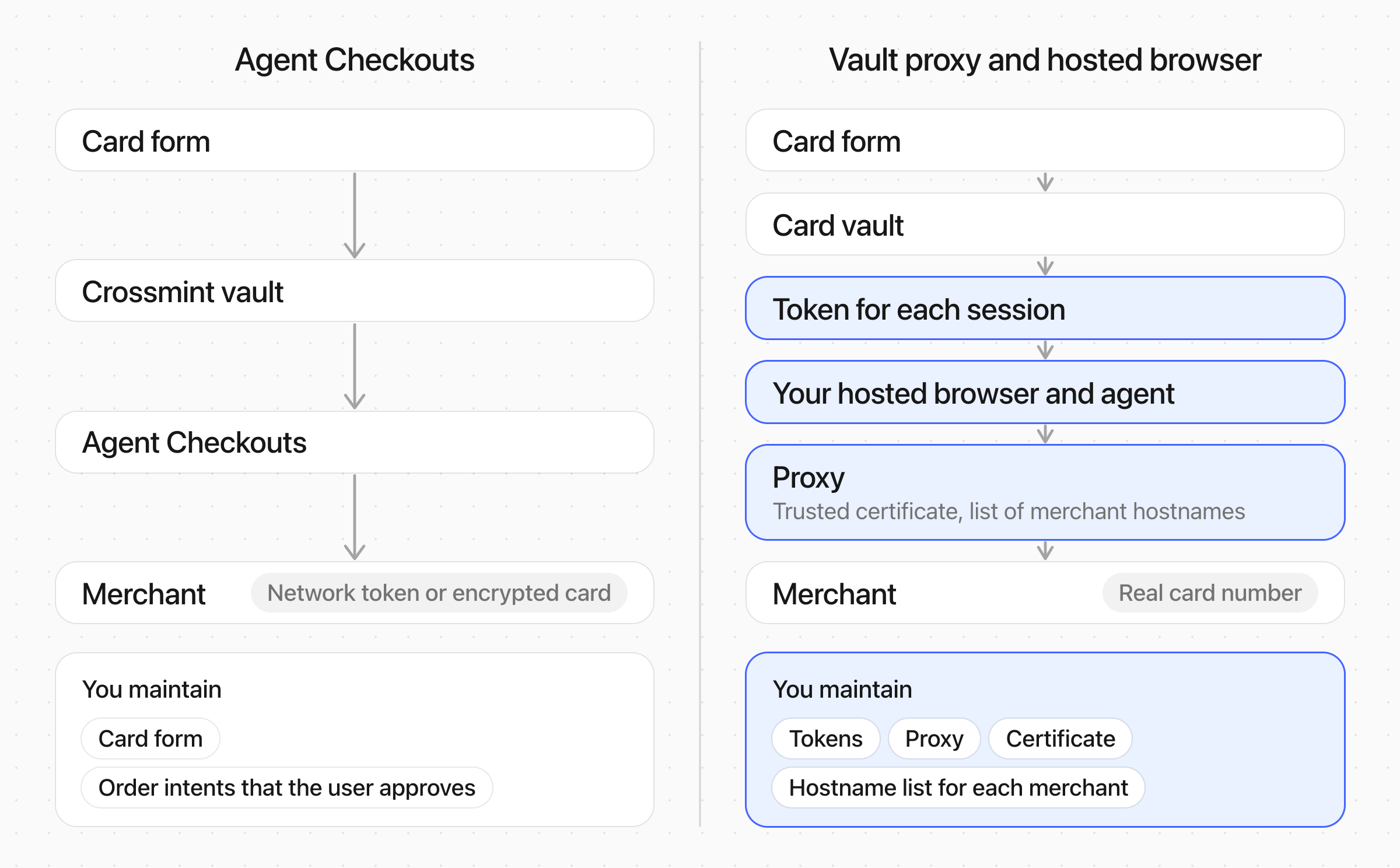
With a vault and a browser proxy, you run the browser and the agent yourself. The proxy sits between the browser and the merchant, and puts the real card number into the network traffic in place of a token. You keep a token for each session, a proxy with a trusted certificate, and a list of the card-entry hostnames of each merchant.
The proxy does not work at every merchant. Some merchants protect card details end to end: their payment form encrypts the card in the browser before it is sent, or their payment provider checks that no one intercepts the connection. Then the proxy cannot put the card number in. The merchant also gets the real card number, and the token has no spending limit.
With Agent Checkouts, Crossmint runs the checkout and enters the card in the merchant's own payment form, so it also works at those merchants. The merchant gets a network credential when the card supports one, and every purchase stays within an order intent's amount, merchant, and expiration. See [How Agents Pay](/agents/how-agents-pay#problems).
 ## See Also
Test a merchant with OCA, call the API, or add it to your app with one prompt
Test at low cost
The parts, the questions, and the statuses
## See Also
Test a merchant with OCA, call the API, or add it to your app with one prompt
Test at low cost
The parts, the questions, and the statuses