> ## Documentation Index
> Fetch the complete documentation index at: https://docs.crossmint.com/llms.txt
> Use this file to discover all available pages before exploring further.
# Inventory
> Purchase 1B+ products from Amazon, Shopify, flights all via a single API
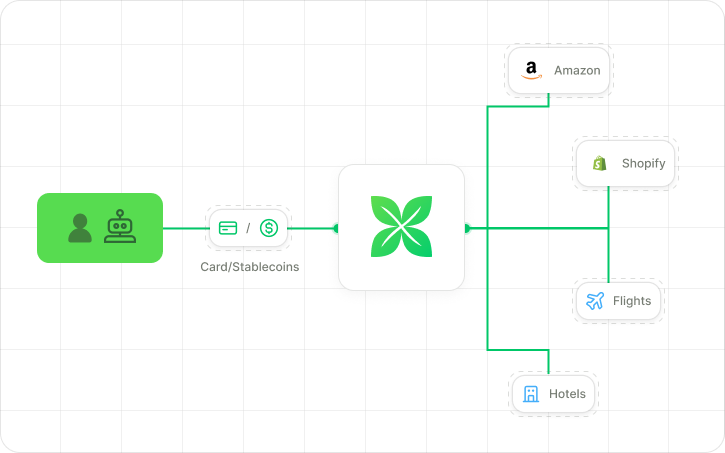 Agents can purchase 1B+ products from Amazon, Shopify, airlines and more all via Crossmint's Checkout API. Crossmint is the Merchant of Record (MoR) for these transactions, handling payments, shipping costs, taxes, and customer support.
Orders below are performed using USDC assuming an already-funded agent wallet. Check the [payments
page](/agents/how-agents-pay) to explore other supported payment methods.
## Integration Steps
Create a project in the Crossmint Console (staging environment)
Obtain a server-side API key from the Overview page and save it for later use
Use an LLM or third-party API provider to search available Amazon products and obtain the product's Amazon URL or ASIN. Extract the ASIN from the Amazon URL, i.e. [https://www.amazon.com/Sparkling-Naturally-Essenced-Calories-Sweeteners/dp/B00O79SKV6](https://www.amazon.com/Sparkling-Naturally-Essenced-Calories-Sweeteners/dp/B00O79SKV6) has ASIN `B00O79SKV6`.
Use the [Headless Checkout API](/api-reference/headless/create-order) to create a payment order, specifying the recipient details and payment method.
```javascript theme={null}
const baseUrl = 'staging'; // or 'www' for prod environment
const crossmintOrder = await fetch(`https://${baseUrl}.crossmint.com/api/2022-06-09/orders`, {
method: 'POST',
headers: {
'X-API-KEY': `${API_KEY}`,
'Content-Type': 'application/json'
},
body: JSON.stringify({
recipient: {
email: "john@example.com",
physicalAddress: {
name: "John Doe",
line1: "ABC Street",
city: "New York",
state: "NY",
postalCode: "10007",
country: "US"
}
},
locale: "en-US",
payment: {
receiptEmail: "john@example.com",
method: "base-sepolia",
currency: "usdc",
// Agent's wallet that pays for the transaction
payerAddress: "0x..."
},
lineItems: [{ productLocator: "amazon:B00O79SKV6" }]
})
});
const { order: paymentOrder } = await crossmintOrder.json();
```
This returns a valid order with payment preparation details including the serialized transaction.
You can add multiple productLocators from Amazon as part of the same order.
Sign the transaction with Crossmint's [Create Transaction API](/api-reference/wallets/create-transaction) using the agent's wallet to complete the purchase.
```javascript theme={null}
const baseUrl = 'staging'; // or 'www' for prod environment
const transaction = await fetch(`https://${baseUrl}.crossmint.com/api/2022-06-09/wallets/${userWallet}/transactions`, {
method: 'POST',
headers: {
'X-API-KEY': `${API_KEY}`,
'Content-Type': 'application/json'
},
body: JSON.stringify({
params: {
calls: [{
transaction: paymentOrder.payment.preparation.serializedTransaction
}],
chain: "base-sepolia"
}
})
});
```
```javascript theme={null}
import { ethers } from "ethers";
async function processPayment(order, privateKey, rpcUrl) {
const isInsufficientFunds = order.payment.status === "crypto-payer-insufficient-funds";
if (isInsufficientFunds) {
throw new Error("Insufficient funds");
}
const serializedTransaction =
order.payment.preparation != null && "serializedTransaction" in order.payment.preparation
? order.payment.preparation.serializedTransaction
: undefined;
if (!serializedTransaction) {
throw new Error(
`No serialized transaction found for order, this item may not be available for purchase:\n\n ${JSON.stringify(
order,
null,
2,
)}`,
);
}
const provider = new ethers.providers.JsonRpcProvider(rpcUrl);
const wallet = new ethers.Wallet(privateKey, provider);
try {
const parsedTx = ethers.utils.parseTransaction(serializedTransaction);
// Rebuild the transaction object without gasLimit
const txRequest = {
to: parsedTx.to,
value: parsedTx.value,
data: parsedTx.data,
nonce: parsedTx.nonce,
chainId: parsedTx.chainId,
type: parsedTx.type ?? 2,
maxFeePerGas: parsedTx.maxFeePerGas,
maxPriorityFeePerGas: parsedTx.maxPriorityFeePerGas,
accessList: parsedTx.accessList || [],
};
// Estimate gas
const estimatedGasLimit = await provider.estimateGas({
...txRequest,
from: wallet.address, // ensure correct estimation context
});
// Attach estimated gas
const finalTx = {
...txRequest,
gasLimit: estimatedGasLimit,
};
const tx = await wallet.sendTransaction(finalTx);
console.log("Transaction sent! Hash:", tx.hash);
const receipt = await tx.wait();
console.log("Transaction confirmed in block:", receipt.blockNumber);
return receipt;
} catch (error) {
console.error("Error sending transaction:", error);
throw error;
}
}
// Usage example
const baseUrl = 'staging'; // or 'www' for prod environment
const rpcUrl = "https://base-sepolia.g.alchemy.com/v2/YOUR_API_KEY"; // or 'mainnet' for prod
const walletPrivateKey = "YOUR_PRIVATE_KEY";
// Call the function with your order, private key, and RPC URL
processPayment(paymentOrder, walletPrivateKey, rpcUrl);
```
Poll the order status with Crossmint's [Get Order API](/api-reference/headless/get-order) to track delivery and present updates to your agent or end user.
```javascript theme={null}
const baseUrl = 'staging'; // or 'www' for prod environment
const checkStatus = async (orderId) => {
const response = await fetch(`https://${baseUrl}.crossmint.com/api/2022-06-09/orders/${orderId}`, {
headers: {
'X-API-KEY': `${API_KEY}`
}
});
const { order } = await response.json();
switch(order.phase) {
case 'completed':
console.log('Amazon order confirmed!');
break;
case 'pending':
console.log('Processing order...');
break;
case 'failed':
console.log('Order failed:', order.delivery.status);
break;
}
return order;
};
const pollStatus = setInterval(async () => {
const order = await checkStatus(paymentOrder.orderId);
if (order.phase === 'completed' || order.phase === 'failed') {
clearInterval(pollStatus);
}
}, 30000);
```
Crossmint automatically sends a purchase receipt to the buyer's email with the order confirmation number, product details, and cost breakdown.
## Integration Steps
Create a project in the Crossmint Console (staging environment)
Obtain a server-side API key from the Overview page and save it for later use
Use an LLM or third-party API provider to fetch Shopify stores or products within such stores.
Once a product is identified, call Crossmint's WS Search API to check the product variants available for sale.
```javascript theme={null}
const baseUrl = 'staging'; // or 'www' for prod environment
const response = await fetch(`https://${baseUrl}.crossmint.com/api/unstable/ws/search`, {
method: 'POST',
headers: {
'X-API-KEY': `${API_KEY}`,
'Content-Type': 'application/json'
},
body: JSON.stringify({
uid: {
productUrl: "https://elwoodclothing.com/collections/sweatshirts/products/oversized-core-crewneck-vintage-grey"
}
})
});
const { listings } = await response.json();
```
The response contains a `variants` array from which the variantId can be extracted.
Use the [Headless Checkout API](/api-reference/headless/create-order) to create a payment order, specifying the recipient details, productLocator, and payment method.
```javascript theme={null}
const baseUrl = 'staging'; // or 'www' for prod environment
const crossmintOrder = await fetch(`https://${baseUrl}.crossmint.com/api/2022-06-09/orders`, {
method: 'POST',
headers: {
'X-API-KEY': `${API_KEY}`,
'Content-Type': 'application/json'
},
body: JSON.stringify({
recipient: {
email: "john@example.com",
physicalAddress: {
name: "John Doe",
line1: "ABC Street",
city: "New York",
state: "NY",
postalCode: "10007",
country: "US"
}
},
locale: "en-US",
payment: {
receiptEmail: "john@example.com",
method: "base-sepolia",
currency: "usdc",
payerAddress: "0x..."
},
lineItems: [{ productLocator: "shopify:https://elwoodclothing.com/collections/sweatshirts/products/oversized-core-crewneck-vintage-grey:" }]
})
});
const { order: paymentOrder } = await crossmintOrder.json();
```
This returns a valid order with payment preparation details including the serialized transaction.
You can add multiple productLocators from the same or separate Shopify stores as part of the same order.
Sign the transaction with Crossmint's [Create Transaction API](/api-reference/wallets/create-transaction) using your agent's wallet to complete the purchase.
**Using Crossmint Wallets**
```javascript theme={null}
const baseUrl = 'staging'; // or 'www' for prod environment
const transaction = await fetch(`https://${baseUrl}.crossmint.com/api/2022-06-09/wallets/${userWallet}/transactions`, {
method: 'POST',
headers: {
'X-API-KEY': `${API_KEY}`,
'Content-Type': 'application/json'
},
body: JSON.stringify({
params: {
calls: [{
transaction: paymentOrder.payment.preparation.serializedTransaction
}],
chain: "base-sepolia"
}
})
});
```
Poll the order status with Crossmint's [Get Order API](/api-reference/headless/get-order) to track delivery and present updates to your agent or end user.
```javascript theme={null}
const baseUrl = 'staging'; // or 'www' for prod environment
const checkStatus = async (orderId) => {
const response = await fetch(`https://${baseUrl}.crossmint.com/api/2022-06-09/orders/${orderId}`, {
headers: {
'X-API-KEY': `${API_KEY}`
}
});
const { order } = await response.json();
switch(order.phase) {
case 'completed':
console.log('Shopify order confirmed!');
break;
case 'pending':
console.log('Processing order...');
break;
case 'failed':
console.log('Order failed:', order.delivery.status);
break;
}
return order;
};
const pollStatus = setInterval(async () => {
const order = await checkStatus(paymentOrder.orderId);
if (order.phase === 'completed' || order.phase === 'failed') {
clearInterval(pollStatus);
}
}, 30000);
```
Crossmint automatically sends a purchase receipt to the buyer's email with the order confirmation number, product details, and cost breakdown.
## Integration Steps
Note: buying flights in production requires approval from the Crossmint team prior to launching. Reach out to Crossmint's sales team to discuss.
Create a project in the Crossmint Console (staging environment)
Obtain a server-side API key from the Overview page and save it for later use
Use an LLM or third-party API provider to fetch available flights based on your agent's requirements (origin, destination, dates, passenger count).
Flight listings are available on Worldstore. Call Crossmint's Worldstore Search API to check a flight's availability and get pricing details.
```javascript theme={null}
const baseUrl = 'staging'; // or 'www' for prod environment
const response = await fetch(`https://${baseUrl}.crossmint.com/api/unstable/ws/search`, {
method: 'POST',
headers: {
'X-API-KEY': `${API_KEY}`,
'Content-Type': 'application/json'
},
body: JSON.stringify({
uid: {
originIATA: "JFK",
destinationIATA: "ATH",
cabinClass: "economy",
passenger_number: 1,
departureFlightDetails: {
departureDate: "2025-07-19",
flightIds: ["AY4161"]
}
}
})
});
const { listings } = await response.json();
```
The response contains available flights with pricing and required passenger information schema.
Create a Worldstore order with passenger details to get a signed commitment from the flight seller.
```javascript theme={null}
const baseUrl = 'staging'; // or 'www' for prod environment
const wsOrder = await fetch(`https://${baseUrl}.crossmint.com/api/unstable/ws/orders`, {
method: 'POST',
headers: {
'X-API-KEY': `${API_KEY}`,
'Content-Type': 'application/json'
},
body: JSON.stringify({
sellerId: "1",
items: [{
listingId: "ws_flights-off_0000AvtB1fGEU1sZUjSIJm",
listingParameters: {
passengers: [{
title: "mr",
given_name: "John",
family_name: "Doe",
born_on: "1980-01-01",
gender: "m",
email: "john@example.com",
phone_number: "+14155552671",
identity_documents: [{
type: "passport",
unique_identifier: "123456789",
issuing_country_code: "US",
expires_on: "2030-04-24"
}]
}]
}
}],
orderParameters: {}
})
});
const { order } = await wsOrder.json();
```
This returns the order hash and signature confirming the seller's commitment.
Use the [Headless Checkout API](/api-reference/headless/create-order) to create a payment order, specifying the recipient details and payment method.
```javascript theme={null}
const baseUrl = 'staging'; // or 'www' for test environment
const crossmintOrder = await fetch(`https://${baseUrl}.crossmint.com/api/2022-06-09/orders`, {
method: 'POST',
headers: {
'X-API-KEY': `${API_KEY}`,
'Content-Type': 'application/json'
},
body: JSON.stringify({
recipient: {
email: "john@example.com"
},
locale: "en-US",
payment: {
receiptEmail: "john@example.com",
method: "base-sepolia",
currency: "usdc",
payerAddress: "0x..."
},
// Pass the previous step's entire response object here
externalOrder: order
})
});
const { order: paymentOrder } = await crossmintOrder.json();
```
This returns a valid order with payment preparation details including the serialized transaction.
Sign the transaction with Crossmint's [Create Transaction API](/api-reference/wallets/create-transaction) using your agent's wallet to complete the purchase.
**Using Crossmint Wallets**
```javascript theme={null}
const baseUrl = 'staging'; // or 'www' for test environment
const transaction = await fetch(`https://${baseUrl}.crossmint.com/api/2022-06-09/wallets/${userWallet}/transactions`, {
method: 'POST',
headers: {
'X-API-KEY': `${API_KEY}`,
'Content-Type': 'application/json'
},
body: JSON.stringify({
params: {
calls: [{
transaction: paymentOrder.payment.preparation.serializedTransaction
}],
chain: "base-sepolia"
}
})
});
```
```javascript theme={null}
import { ethers } from "ethers";
async function processPayment(order, privateKey, rpcUrl) {
const isInsufficientFunds = order.payment.status === "crypto-payer-insufficient-funds";
if (isInsufficientFunds) {
throw new Error("Insufficient funds");
}
const serializedTransaction =
order.payment.preparation != null && "serializedTransaction" in order.payment.preparation
? order.payment.preparation.serializedTransaction
: undefined;
if (!serializedTransaction) {
throw new Error(
`No serialized transaction found for order, this item may not be available for purchase:\n\n ${JSON.stringify(
order,
null,
2,
)}`,
);
}
const provider = new ethers.providers.JsonRpcProvider(rpcUrl);
const wallet = new ethers.Wallet(privateKey, provider);
try {
const parsedTx = ethers.utils.parseTransaction(serializedTransaction);
// Rebuild the transaction object without gasLimit
const txRequest = {
to: parsedTx.to,
value: parsedTx.value,
data: parsedTx.data,
nonce: parsedTx.nonce,
chainId: parsedTx.chainId,
type: parsedTx.type ?? 2,
maxFeePerGas: parsedTx.maxFeePerGas,
maxPriorityFeePerGas: parsedTx.maxPriorityFeePerGas,
accessList: parsedTx.accessList || [],
};
// Estimate gas
const estimatedGasLimit = await provider.estimateGas({
...txRequest,
from: wallet.address, // ensure correct estimation context
});
// Attach estimated gas
const finalTx = {
...txRequest,
gasLimit: estimatedGasLimit,
};
const tx = await wallet.sendTransaction(finalTx);
console.log("Transaction sent! Hash:", tx.hash);
const receipt = await tx.wait();
console.log("Transaction confirmed in block:", receipt.blockNumber);
return receipt;
} catch (error) {
console.error("Error sending transaction:", error);
throw error;
}
}
// Usage example
const baseUrl = 'staging'; // or 'www' for prod environment
const rpcUrl = "https://base-sepolia.g.alchemy.com/v2/YOUR_API_KEY"; // or 'mainnet' for prod
const walletPrivateKey = "YOUR_PRIVATE_KEY";
// Call the function with your order, private key, and RPC URL
processPayment(paymentOrder, walletPrivateKey, rpcUrl);
```
Poll the order status with Crossmint's [Get Order API](/api-reference/headless/get-order) to track delivery and present updates to your agent or end user.
```javascript theme={null}
const baseUrl = 'staging'; // or 'www' for prod environment
const checkStatus = async (orderId) => {
const response = await fetch(`https://${baseUrl}.crossmint.com/api/2022-06-09/orders/${orderId}`, {
headers: {
'X-API-KEY': `${API_KEY}`
}
});
const { order } = await response.json();
switch(order.phase) {
case 'completed':
console.log('Flight booking confirmed!');
break;
case 'pending':
console.log('Processing booking...');
break;
case 'failed':
console.log('Booking failed:', order.delivery.status);
break;
}
return order;
};
const pollStatus = setInterval(async () => {
const order = await checkStatus(paymentOrder.orderId);
if (order.phase === 'completed' || order.phase === 'failed') {
clearInterval(pollStatus);
}
}, 30000);
```
Crossmint automatically sends a purchase receipt to the buyer's email with the booking's confirmation number, passenger details, and cost breakdown.
## Integration Steps
Create a project in the Crossmint Console (staging environment)
Obtain a server-side API key from the Overview page and save it for later use
**Production Environment:**
Currently supported websites (more being added regularly):
* adidas.com
* crocs.com
* gymshark.com
* on.com
* nike.com
**Staging Environment:**
* 300+ websites supported for testing (including SHEIN, Walmart, eBay and more)
* Contact us for the complete list of supported websites in staging
The list of supported websites will keep growing as more merchants are added.
Use the [Headless Checkout API](/api-reference/headless/create-order) to create a payment order, specifying the recipient details and payment method. The productLocator format is `url::`.
**Variant Description Examples:**
* Size: `:size-medium`, `:size-9`, `:size-large`
* Color: `:color-black`, `:color-red`
* Combined: `:size-medium-color-black`
```javascript theme={null}
const baseUrl = 'staging'; // or 'www' for prod environment
const crossmintOrder = await fetch(`https://${baseUrl}.crossmint.com/api/2022-06-09/orders`, {
method: 'POST',
headers: {
'X-API-KEY': `${API_KEY}`,
'Content-Type': 'application/json'
},
body: JSON.stringify({
recipient: {
email: "john@example.com",
physicalAddress: {
name: "John Doe",
line1: "ABC Street",
city: "New York",
state: "NY",
postalCode: "10007",
country: "US"
}
},
locale: "en-US",
payment: {
receiptEmail: "john@example.com",
method: "card-token",
},
lineItems: [{ productLocator: "url:https://www.nike.com/t/downshifter-13-mens-road-running-shoes-extra-wide-4M0LNf:size-9" }]
})
});
const { order: paymentOrder } = await crossmintOrder.json();
```
Orders may take a few minutes (\~5 minutes) due the multiple steps a browser operator agent must go through to complete a purchase.
If you haven't already, tokenize a user's credit card by following instructions in [this page](/agents/how-agents-pay).
Obtain the orderId from the previous step's response and call the following Crossmint API assuming you have already tokenized a card with Crossmint:
```json theme={null}
POST https://staging.crossmint.com/api/unstable/orders/{{orderId}}/payment
{
"token": "9f243106-d4a4-4327-a7cb-e3ec22031ed2" // credit card token
}
```
The response will show that the payment is successful. Check the recipient's email for a purchase receipt.
Poll the order status with Crossmint's [Get Order API](/api-reference/headless/get-order) to track delivery and present updates to your agent or end user.
```javascript theme={null}
const baseUrl = 'staging'; // or 'www' for prod environment
const checkStatus = async (orderId) => {
const response = await fetch(`https://${baseUrl}.crossmint.com/api/2022-06-09/orders/${orderId}`, {
headers: {
'X-API-KEY': `${API_KEY}`
}
});
const { order } = await response.json();
switch(order.phase) {
case 'completed':
console.log('Browser automation order confirmed!');
break;
case 'pending':
console.log('Processing order...');
break;
case 'failed':
console.log('Order failed:', order.delivery.status);
break;
}
return order;
};
const pollStatus = setInterval(async () => {
const order = await checkStatus(paymentOrder.orderId);
if (order.phase === 'completed' || order.phase === 'failed') {
clearInterval(pollStatus);
}
}, 30000);
```
Crossmint automatically sends a purchase receipt to the buyer's email with the order confirmation number, product details, and cost breakdown.
Agents can purchase 1B+ products from Amazon, Shopify, airlines and more all via Crossmint's Checkout API. Crossmint is the Merchant of Record (MoR) for these transactions, handling payments, shipping costs, taxes, and customer support.
Orders below are performed using USDC assuming an already-funded agent wallet. Check the [payments
page](/agents/how-agents-pay) to explore other supported payment methods.
## Integration Steps
Create a project in the Crossmint Console (staging environment)
Obtain a server-side API key from the Overview page and save it for later use
Use an LLM or third-party API provider to search available Amazon products and obtain the product's Amazon URL or ASIN. Extract the ASIN from the Amazon URL, i.e. [https://www.amazon.com/Sparkling-Naturally-Essenced-Calories-Sweeteners/dp/B00O79SKV6](https://www.amazon.com/Sparkling-Naturally-Essenced-Calories-Sweeteners/dp/B00O79SKV6) has ASIN `B00O79SKV6`.
Use the [Headless Checkout API](/api-reference/headless/create-order) to create a payment order, specifying the recipient details and payment method.
```javascript theme={null}
const baseUrl = 'staging'; // or 'www' for prod environment
const crossmintOrder = await fetch(`https://${baseUrl}.crossmint.com/api/2022-06-09/orders`, {
method: 'POST',
headers: {
'X-API-KEY': `${API_KEY}`,
'Content-Type': 'application/json'
},
body: JSON.stringify({
recipient: {
email: "john@example.com",
physicalAddress: {
name: "John Doe",
line1: "ABC Street",
city: "New York",
state: "NY",
postalCode: "10007",
country: "US"
}
},
locale: "en-US",
payment: {
receiptEmail: "john@example.com",
method: "base-sepolia",
currency: "usdc",
// Agent's wallet that pays for the transaction
payerAddress: "0x..."
},
lineItems: [{ productLocator: "amazon:B00O79SKV6" }]
})
});
const { order: paymentOrder } = await crossmintOrder.json();
```
This returns a valid order with payment preparation details including the serialized transaction.
You can add multiple productLocators from Amazon as part of the same order.
Sign the transaction with Crossmint's [Create Transaction API](/api-reference/wallets/create-transaction) using the agent's wallet to complete the purchase.
```javascript theme={null}
const baseUrl = 'staging'; // or 'www' for prod environment
const transaction = await fetch(`https://${baseUrl}.crossmint.com/api/2022-06-09/wallets/${userWallet}/transactions`, {
method: 'POST',
headers: {
'X-API-KEY': `${API_KEY}`,
'Content-Type': 'application/json'
},
body: JSON.stringify({
params: {
calls: [{
transaction: paymentOrder.payment.preparation.serializedTransaction
}],
chain: "base-sepolia"
}
})
});
```
```javascript theme={null}
import { ethers } from "ethers";
async function processPayment(order, privateKey, rpcUrl) {
const isInsufficientFunds = order.payment.status === "crypto-payer-insufficient-funds";
if (isInsufficientFunds) {
throw new Error("Insufficient funds");
}
const serializedTransaction =
order.payment.preparation != null && "serializedTransaction" in order.payment.preparation
? order.payment.preparation.serializedTransaction
: undefined;
if (!serializedTransaction) {
throw new Error(
`No serialized transaction found for order, this item may not be available for purchase:\n\n ${JSON.stringify(
order,
null,
2,
)}`,
);
}
const provider = new ethers.providers.JsonRpcProvider(rpcUrl);
const wallet = new ethers.Wallet(privateKey, provider);
try {
const parsedTx = ethers.utils.parseTransaction(serializedTransaction);
// Rebuild the transaction object without gasLimit
const txRequest = {
to: parsedTx.to,
value: parsedTx.value,
data: parsedTx.data,
nonce: parsedTx.nonce,
chainId: parsedTx.chainId,
type: parsedTx.type ?? 2,
maxFeePerGas: parsedTx.maxFeePerGas,
maxPriorityFeePerGas: parsedTx.maxPriorityFeePerGas,
accessList: parsedTx.accessList || [],
};
// Estimate gas
const estimatedGasLimit = await provider.estimateGas({
...txRequest,
from: wallet.address, // ensure correct estimation context
});
// Attach estimated gas
const finalTx = {
...txRequest,
gasLimit: estimatedGasLimit,
};
const tx = await wallet.sendTransaction(finalTx);
console.log("Transaction sent! Hash:", tx.hash);
const receipt = await tx.wait();
console.log("Transaction confirmed in block:", receipt.blockNumber);
return receipt;
} catch (error) {
console.error("Error sending transaction:", error);
throw error;
}
}
// Usage example
const baseUrl = 'staging'; // or 'www' for prod environment
const rpcUrl = "https://base-sepolia.g.alchemy.com/v2/YOUR_API_KEY"; // or 'mainnet' for prod
const walletPrivateKey = "YOUR_PRIVATE_KEY";
// Call the function with your order, private key, and RPC URL
processPayment(paymentOrder, walletPrivateKey, rpcUrl);
```
Poll the order status with Crossmint's [Get Order API](/api-reference/headless/get-order) to track delivery and present updates to your agent or end user.
```javascript theme={null}
const baseUrl = 'staging'; // or 'www' for prod environment
const checkStatus = async (orderId) => {
const response = await fetch(`https://${baseUrl}.crossmint.com/api/2022-06-09/orders/${orderId}`, {
headers: {
'X-API-KEY': `${API_KEY}`
}
});
const { order } = await response.json();
switch(order.phase) {
case 'completed':
console.log('Amazon order confirmed!');
break;
case 'pending':
console.log('Processing order...');
break;
case 'failed':
console.log('Order failed:', order.delivery.status);
break;
}
return order;
};
const pollStatus = setInterval(async () => {
const order = await checkStatus(paymentOrder.orderId);
if (order.phase === 'completed' || order.phase === 'failed') {
clearInterval(pollStatus);
}
}, 30000);
```
Crossmint automatically sends a purchase receipt to the buyer's email with the order confirmation number, product details, and cost breakdown.
## Integration Steps
Create a project in the Crossmint Console (staging environment)
Obtain a server-side API key from the Overview page and save it for later use
Use an LLM or third-party API provider to fetch Shopify stores or products within such stores.
Once a product is identified, call Crossmint's WS Search API to check the product variants available for sale.
```javascript theme={null}
const baseUrl = 'staging'; // or 'www' for prod environment
const response = await fetch(`https://${baseUrl}.crossmint.com/api/unstable/ws/search`, {
method: 'POST',
headers: {
'X-API-KEY': `${API_KEY}`,
'Content-Type': 'application/json'
},
body: JSON.stringify({
uid: {
productUrl: "https://elwoodclothing.com/collections/sweatshirts/products/oversized-core-crewneck-vintage-grey"
}
})
});
const { listings } = await response.json();
```
The response contains a `variants` array from which the variantId can be extracted.
Use the [Headless Checkout API](/api-reference/headless/create-order) to create a payment order, specifying the recipient details, productLocator, and payment method.
```javascript theme={null}
const baseUrl = 'staging'; // or 'www' for prod environment
const crossmintOrder = await fetch(`https://${baseUrl}.crossmint.com/api/2022-06-09/orders`, {
method: 'POST',
headers: {
'X-API-KEY': `${API_KEY}`,
'Content-Type': 'application/json'
},
body: JSON.stringify({
recipient: {
email: "john@example.com",
physicalAddress: {
name: "John Doe",
line1: "ABC Street",
city: "New York",
state: "NY",
postalCode: "10007",
country: "US"
}
},
locale: "en-US",
payment: {
receiptEmail: "john@example.com",
method: "base-sepolia",
currency: "usdc",
payerAddress: "0x..."
},
lineItems: [{ productLocator: "shopify:https://elwoodclothing.com/collections/sweatshirts/products/oversized-core-crewneck-vintage-grey:" }]
})
});
const { order: paymentOrder } = await crossmintOrder.json();
```
This returns a valid order with payment preparation details including the serialized transaction.
You can add multiple productLocators from the same or separate Shopify stores as part of the same order.
Sign the transaction with Crossmint's [Create Transaction API](/api-reference/wallets/create-transaction) using your agent's wallet to complete the purchase.
**Using Crossmint Wallets**
```javascript theme={null}
const baseUrl = 'staging'; // or 'www' for prod environment
const transaction = await fetch(`https://${baseUrl}.crossmint.com/api/2022-06-09/wallets/${userWallet}/transactions`, {
method: 'POST',
headers: {
'X-API-KEY': `${API_KEY}`,
'Content-Type': 'application/json'
},
body: JSON.stringify({
params: {
calls: [{
transaction: paymentOrder.payment.preparation.serializedTransaction
}],
chain: "base-sepolia"
}
})
});
```
Poll the order status with Crossmint's [Get Order API](/api-reference/headless/get-order) to track delivery and present updates to your agent or end user.
```javascript theme={null}
const baseUrl = 'staging'; // or 'www' for prod environment
const checkStatus = async (orderId) => {
const response = await fetch(`https://${baseUrl}.crossmint.com/api/2022-06-09/orders/${orderId}`, {
headers: {
'X-API-KEY': `${API_KEY}`
}
});
const { order } = await response.json();
switch(order.phase) {
case 'completed':
console.log('Shopify order confirmed!');
break;
case 'pending':
console.log('Processing order...');
break;
case 'failed':
console.log('Order failed:', order.delivery.status);
break;
}
return order;
};
const pollStatus = setInterval(async () => {
const order = await checkStatus(paymentOrder.orderId);
if (order.phase === 'completed' || order.phase === 'failed') {
clearInterval(pollStatus);
}
}, 30000);
```
Crossmint automatically sends a purchase receipt to the buyer's email with the order confirmation number, product details, and cost breakdown.
## Integration Steps
Note: buying flights in production requires approval from the Crossmint team prior to launching. Reach out to Crossmint's sales team to discuss.
Create a project in the Crossmint Console (staging environment)
Obtain a server-side API key from the Overview page and save it for later use
Use an LLM or third-party API provider to fetch available flights based on your agent's requirements (origin, destination, dates, passenger count).
Flight listings are available on Worldstore. Call Crossmint's Worldstore Search API to check a flight's availability and get pricing details.
```javascript theme={null}
const baseUrl = 'staging'; // or 'www' for prod environment
const response = await fetch(`https://${baseUrl}.crossmint.com/api/unstable/ws/search`, {
method: 'POST',
headers: {
'X-API-KEY': `${API_KEY}`,
'Content-Type': 'application/json'
},
body: JSON.stringify({
uid: {
originIATA: "JFK",
destinationIATA: "ATH",
cabinClass: "economy",
passenger_number: 1,
departureFlightDetails: {
departureDate: "2025-07-19",
flightIds: ["AY4161"]
}
}
})
});
const { listings } = await response.json();
```
The response contains available flights with pricing and required passenger information schema.
Create a Worldstore order with passenger details to get a signed commitment from the flight seller.
```javascript theme={null}
const baseUrl = 'staging'; // or 'www' for prod environment
const wsOrder = await fetch(`https://${baseUrl}.crossmint.com/api/unstable/ws/orders`, {
method: 'POST',
headers: {
'X-API-KEY': `${API_KEY}`,
'Content-Type': 'application/json'
},
body: JSON.stringify({
sellerId: "1",
items: [{
listingId: "ws_flights-off_0000AvtB1fGEU1sZUjSIJm",
listingParameters: {
passengers: [{
title: "mr",
given_name: "John",
family_name: "Doe",
born_on: "1980-01-01",
gender: "m",
email: "john@example.com",
phone_number: "+14155552671",
identity_documents: [{
type: "passport",
unique_identifier: "123456789",
issuing_country_code: "US",
expires_on: "2030-04-24"
}]
}]
}
}],
orderParameters: {}
})
});
const { order } = await wsOrder.json();
```
This returns the order hash and signature confirming the seller's commitment.
Use the [Headless Checkout API](/api-reference/headless/create-order) to create a payment order, specifying the recipient details and payment method.
```javascript theme={null}
const baseUrl = 'staging'; // or 'www' for test environment
const crossmintOrder = await fetch(`https://${baseUrl}.crossmint.com/api/2022-06-09/orders`, {
method: 'POST',
headers: {
'X-API-KEY': `${API_KEY}`,
'Content-Type': 'application/json'
},
body: JSON.stringify({
recipient: {
email: "john@example.com"
},
locale: "en-US",
payment: {
receiptEmail: "john@example.com",
method: "base-sepolia",
currency: "usdc",
payerAddress: "0x..."
},
// Pass the previous step's entire response object here
externalOrder: order
})
});
const { order: paymentOrder } = await crossmintOrder.json();
```
This returns a valid order with payment preparation details including the serialized transaction.
Sign the transaction with Crossmint's [Create Transaction API](/api-reference/wallets/create-transaction) using your agent's wallet to complete the purchase.
**Using Crossmint Wallets**
```javascript theme={null}
const baseUrl = 'staging'; // or 'www' for test environment
const transaction = await fetch(`https://${baseUrl}.crossmint.com/api/2022-06-09/wallets/${userWallet}/transactions`, {
method: 'POST',
headers: {
'X-API-KEY': `${API_KEY}`,
'Content-Type': 'application/json'
},
body: JSON.stringify({
params: {
calls: [{
transaction: paymentOrder.payment.preparation.serializedTransaction
}],
chain: "base-sepolia"
}
})
});
```
```javascript theme={null}
import { ethers } from "ethers";
async function processPayment(order, privateKey, rpcUrl) {
const isInsufficientFunds = order.payment.status === "crypto-payer-insufficient-funds";
if (isInsufficientFunds) {
throw new Error("Insufficient funds");
}
const serializedTransaction =
order.payment.preparation != null && "serializedTransaction" in order.payment.preparation
? order.payment.preparation.serializedTransaction
: undefined;
if (!serializedTransaction) {
throw new Error(
`No serialized transaction found for order, this item may not be available for purchase:\n\n ${JSON.stringify(
order,
null,
2,
)}`,
);
}
const provider = new ethers.providers.JsonRpcProvider(rpcUrl);
const wallet = new ethers.Wallet(privateKey, provider);
try {
const parsedTx = ethers.utils.parseTransaction(serializedTransaction);
// Rebuild the transaction object without gasLimit
const txRequest = {
to: parsedTx.to,
value: parsedTx.value,
data: parsedTx.data,
nonce: parsedTx.nonce,
chainId: parsedTx.chainId,
type: parsedTx.type ?? 2,
maxFeePerGas: parsedTx.maxFeePerGas,
maxPriorityFeePerGas: parsedTx.maxPriorityFeePerGas,
accessList: parsedTx.accessList || [],
};
// Estimate gas
const estimatedGasLimit = await provider.estimateGas({
...txRequest,
from: wallet.address, // ensure correct estimation context
});
// Attach estimated gas
const finalTx = {
...txRequest,
gasLimit: estimatedGasLimit,
};
const tx = await wallet.sendTransaction(finalTx);
console.log("Transaction sent! Hash:", tx.hash);
const receipt = await tx.wait();
console.log("Transaction confirmed in block:", receipt.blockNumber);
return receipt;
} catch (error) {
console.error("Error sending transaction:", error);
throw error;
}
}
// Usage example
const baseUrl = 'staging'; // or 'www' for prod environment
const rpcUrl = "https://base-sepolia.g.alchemy.com/v2/YOUR_API_KEY"; // or 'mainnet' for prod
const walletPrivateKey = "YOUR_PRIVATE_KEY";
// Call the function with your order, private key, and RPC URL
processPayment(paymentOrder, walletPrivateKey, rpcUrl);
```
Poll the order status with Crossmint's [Get Order API](/api-reference/headless/get-order) to track delivery and present updates to your agent or end user.
```javascript theme={null}
const baseUrl = 'staging'; // or 'www' for prod environment
const checkStatus = async (orderId) => {
const response = await fetch(`https://${baseUrl}.crossmint.com/api/2022-06-09/orders/${orderId}`, {
headers: {
'X-API-KEY': `${API_KEY}`
}
});
const { order } = await response.json();
switch(order.phase) {
case 'completed':
console.log('Flight booking confirmed!');
break;
case 'pending':
console.log('Processing booking...');
break;
case 'failed':
console.log('Booking failed:', order.delivery.status);
break;
}
return order;
};
const pollStatus = setInterval(async () => {
const order = await checkStatus(paymentOrder.orderId);
if (order.phase === 'completed' || order.phase === 'failed') {
clearInterval(pollStatus);
}
}, 30000);
```
Crossmint automatically sends a purchase receipt to the buyer's email with the booking's confirmation number, passenger details, and cost breakdown.
## Integration Steps
Create a project in the Crossmint Console (staging environment)
Obtain a server-side API key from the Overview page and save it for later use
**Production Environment:**
Currently supported websites (more being added regularly):
* adidas.com
* crocs.com
* gymshark.com
* on.com
* nike.com
**Staging Environment:**
* 300+ websites supported for testing (including SHEIN, Walmart, eBay and more)
* Contact us for the complete list of supported websites in staging
The list of supported websites will keep growing as more merchants are added.
Use the [Headless Checkout API](/api-reference/headless/create-order) to create a payment order, specifying the recipient details and payment method. The productLocator format is `url::`.
**Variant Description Examples:**
* Size: `:size-medium`, `:size-9`, `:size-large`
* Color: `:color-black`, `:color-red`
* Combined: `:size-medium-color-black`
```javascript theme={null}
const baseUrl = 'staging'; // or 'www' for prod environment
const crossmintOrder = await fetch(`https://${baseUrl}.crossmint.com/api/2022-06-09/orders`, {
method: 'POST',
headers: {
'X-API-KEY': `${API_KEY}`,
'Content-Type': 'application/json'
},
body: JSON.stringify({
recipient: {
email: "john@example.com",
physicalAddress: {
name: "John Doe",
line1: "ABC Street",
city: "New York",
state: "NY",
postalCode: "10007",
country: "US"
}
},
locale: "en-US",
payment: {
receiptEmail: "john@example.com",
method: "card-token",
},
lineItems: [{ productLocator: "url:https://www.nike.com/t/downshifter-13-mens-road-running-shoes-extra-wide-4M0LNf:size-9" }]
})
});
const { order: paymentOrder } = await crossmintOrder.json();
```
Orders may take a few minutes (\~5 minutes) due the multiple steps a browser operator agent must go through to complete a purchase.
If you haven't already, tokenize a user's credit card by following instructions in [this page](/agents/how-agents-pay).
Obtain the orderId from the previous step's response and call the following Crossmint API assuming you have already tokenized a card with Crossmint:
```json theme={null}
POST https://staging.crossmint.com/api/unstable/orders/{{orderId}}/payment
{
"token": "9f243106-d4a4-4327-a7cb-e3ec22031ed2" // credit card token
}
```
The response will show that the payment is successful. Check the recipient's email for a purchase receipt.
Poll the order status with Crossmint's [Get Order API](/api-reference/headless/get-order) to track delivery and present updates to your agent or end user.
```javascript theme={null}
const baseUrl = 'staging'; // or 'www' for prod environment
const checkStatus = async (orderId) => {
const response = await fetch(`https://${baseUrl}.crossmint.com/api/2022-06-09/orders/${orderId}`, {
headers: {
'X-API-KEY': `${API_KEY}`
}
});
const { order } = await response.json();
switch(order.phase) {
case 'completed':
console.log('Browser automation order confirmed!');
break;
case 'pending':
console.log('Processing order...');
break;
case 'failed':
console.log('Order failed:', order.delivery.status);
break;
}
return order;
};
const pollStatus = setInterval(async () => {
const order = await checkStatus(paymentOrder.orderId);
if (order.phase === 'completed' || order.phase === 'failed') {
clearInterval(pollStatus);
}
}, 30000);
```
Crossmint automatically sends a purchase receipt to the buyer's email with the order confirmation number, product details, and cost breakdown.