> ## Documentation Index
> Fetch the complete documentation index at: https://docs.crossmint.com/llms.txt
> Use this file to discover all available pages before exploring further.
# How It Works
> How your users convert USDC into fiat and withdraw to their bank account
Crossmint Offramp lets your users convert USDC into fiat and withdraw it to their own bank account without leaving your app. You integrate once, and Crossmint handles compliance, conversion, and the bank payout. This page explains how the flow works end to end before you build it.
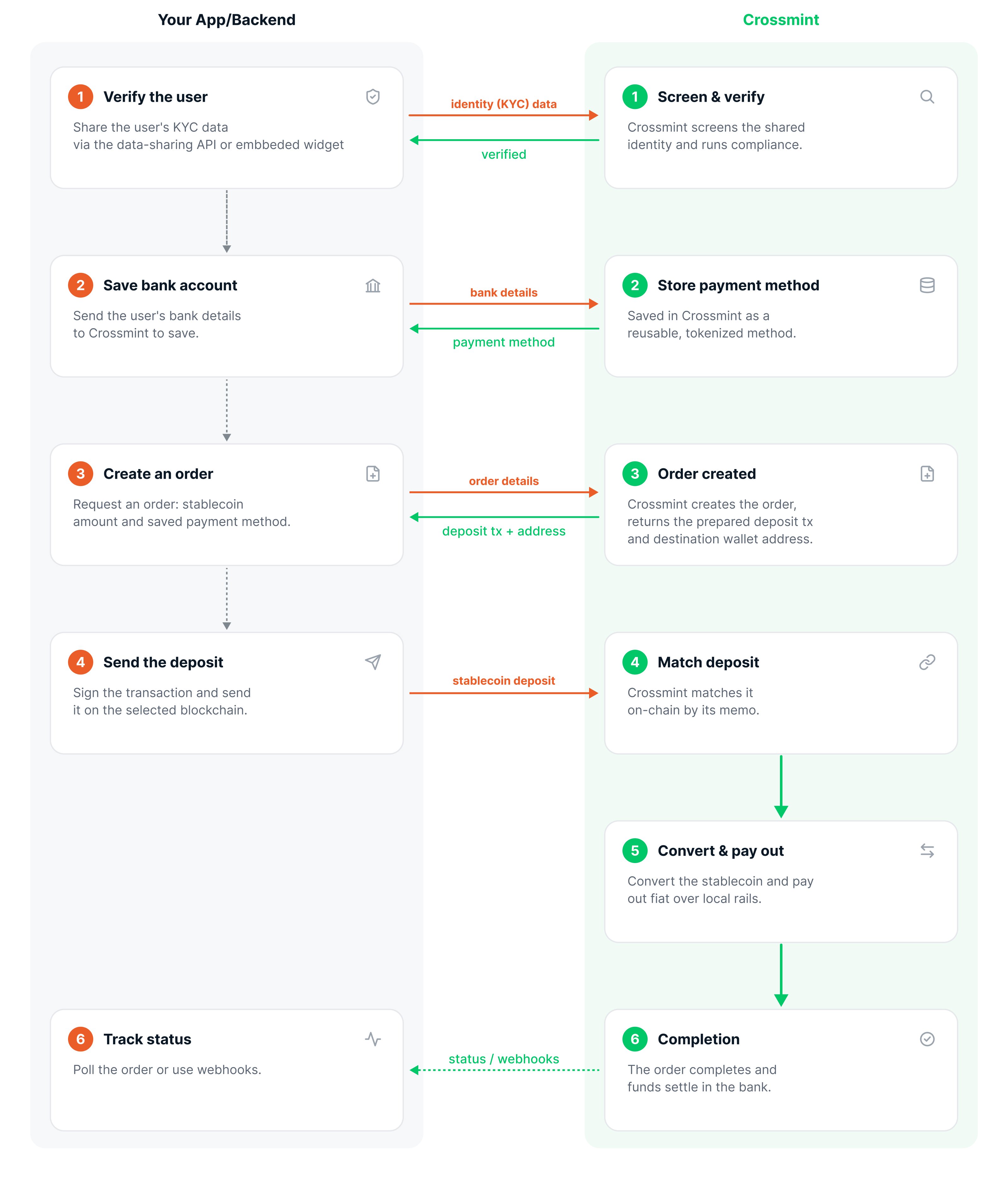 ## The offramp flow
Each user completes identity verification once. Verification runs asynchronously, so you trigger it and then poll until the user is verified. If your users are already KYC'd, you can bring them over by passing their identity data, so they skip the in-flow verification. See [KYC & Compliance](/offramp/concepts/kyc-and-compliance).
The user's bank details are saved as a reusable payment method. Sensitive fields are tokenized at capture, so raw account numbers never touch your servers or Crossmint's.
Your backend creates an order specifying the amount of USDC to cash out and the bank account to pay. The order comes back with a prepared deposit transaction that already carries a memo tying the deposit to this order.
Your app broadcasts the prepared transaction from the user's wallet. Crossmint matches the on-chain deposit to the order by its memo, so no extra confirmation call is needed.
Crossmint converts the USDC and pays out fiat to the user's bank account over local rails.
The order completes and the funds settle in the user's bank. You can track status by polling the order or via webhooks.
## Key concepts
### Exact-in amounts
You specify the **amount of USDC the user sends** (`exact-in`). The user sends exactly that amount of crypto, and the equivalent fiat, minus any applicable fees, is deposited into their bank account.
### First-party payouts
The destination bank account must belong to the same user who owns the wallet and completed verification. The wallet the user pays from is linked to that verified identity, and the order resolves KYC through it. Offramp pays users out to **their own** bank accounts, never to third parties.
### Settlement timing
Once the USDC deposit is confirmed, fiat arrival depends on the payout rail, ranging from minutes to a few business days. Crossmint selects the fastest available rail for the destination. See [Payment Schemes](/offramp/payment-methods) for rail-specific settlement times.
In the staging environment, payouts are **simulated**, so you can run the full flow end to end without funds moving. Funds only move in production.
## What Crossmint handles vs. what you build
| Crossmint handles | You build |
| :-------------------------------- | :------------------------------------------- |
| Identity screening and compliance | The in-app cash-out experience |
| Converting USDC to fiat | Collecting the user's bank account |
| Paying out over local bank rails | Creating orders and tracking status |
| Regulatory and licensing coverage | (Optional) passing KYC data you already hold |
## Next steps
Build your first offramp end to end
How verification works for offramp
## The offramp flow
Each user completes identity verification once. Verification runs asynchronously, so you trigger it and then poll until the user is verified. If your users are already KYC'd, you can bring them over by passing their identity data, so they skip the in-flow verification. See [KYC & Compliance](/offramp/concepts/kyc-and-compliance).
The user's bank details are saved as a reusable payment method. Sensitive fields are tokenized at capture, so raw account numbers never touch your servers or Crossmint's.
Your backend creates an order specifying the amount of USDC to cash out and the bank account to pay. The order comes back with a prepared deposit transaction that already carries a memo tying the deposit to this order.
Your app broadcasts the prepared transaction from the user's wallet. Crossmint matches the on-chain deposit to the order by its memo, so no extra confirmation call is needed.
Crossmint converts the USDC and pays out fiat to the user's bank account over local rails.
The order completes and the funds settle in the user's bank. You can track status by polling the order or via webhooks.
## Key concepts
### Exact-in amounts
You specify the **amount of USDC the user sends** (`exact-in`). The user sends exactly that amount of crypto, and the equivalent fiat, minus any applicable fees, is deposited into their bank account.
### First-party payouts
The destination bank account must belong to the same user who owns the wallet and completed verification. The wallet the user pays from is linked to that verified identity, and the order resolves KYC through it. Offramp pays users out to **their own** bank accounts, never to third parties.
### Settlement timing
Once the USDC deposit is confirmed, fiat arrival depends on the payout rail, ranging from minutes to a few business days. Crossmint selects the fastest available rail for the destination. See [Payment Schemes](/offramp/payment-methods) for rail-specific settlement times.
In the staging environment, payouts are **simulated**, so you can run the full flow end to end without funds moving. Funds only move in production.
## What Crossmint handles vs. what you build
| Crossmint handles | You build |
| :-------------------------------- | :------------------------------------------- |
| Identity screening and compliance | The in-app cash-out experience |
| Converting USDC to fiat | Collecting the user's bank account |
| Paying out over local bank rails | Creating orders and tracking status |
| Regulatory and licensing coverage | (Optional) passing KYC data you already hold |
## Next steps
Build your first offramp end to end
How verification works for offramp