> ## Documentation Index
> Fetch the complete documentation index at: https://docs.crossmint.com/llms.txt
> Use this file to discover all available pages before exploring further.
# Import User KYC Data
> Pass your users' existing KYC data to Crossmint so they skip verification
If your platform already verifies your users, share that data with Crossmint so they skip in-flow verification and are ready to cash out. This guide covers passing that data and confirming the user is verified. For how verification works in depth, see [KYC & Compliance](/offramp/concepts/kyc-and-compliance).
## Register and verify the user
Each call uses a `userId:` locator, where `` is a unique identifier you choose for the user and reuse across the calls below.
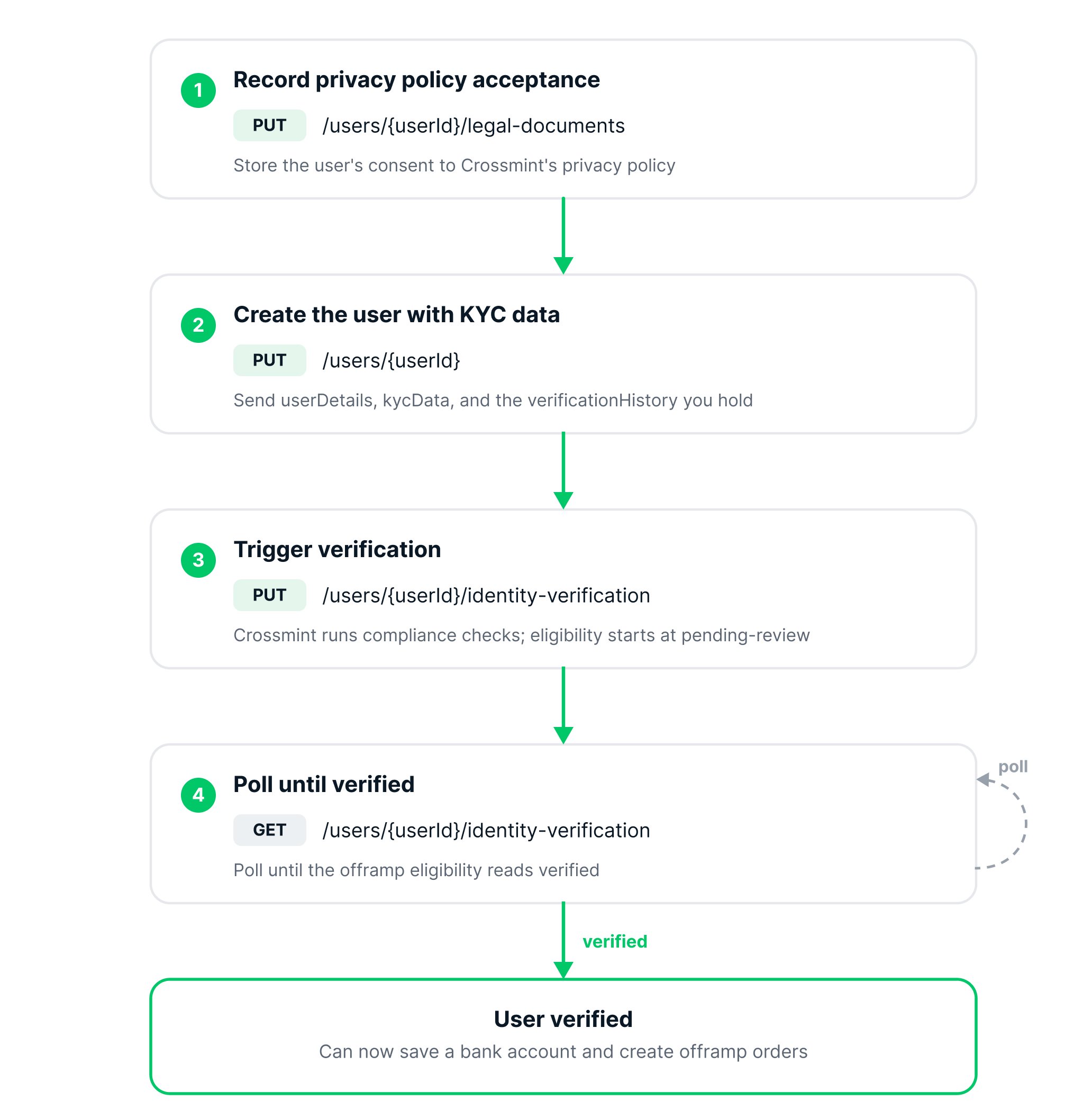 Record the user's consent to Crossmint's privacy policy.
```bash theme={null}
curl -X PUT 'https://staging.crossmint.com/api/2025-06-09/users/userId:/legal-documents' \
-H 'X-API-KEY: ' \
-H 'Content-Type: application/json' \
-d '{ "type": "crossmint-privacy-policy", "acceptedAt": "2026-01-01T00:00:00.000Z" }'
```
```json theme={null}
{
"acceptedAt": "2026-01-01T00:00:00.000Z"
}
```
Send the user's details along with the KYC data you already hold.
```bash theme={null}
curl -X PUT 'https://staging.crossmint.com/api/2025-06-09/users/userId:' \
-H 'X-API-KEY: ' \
-H 'Content-Type: application/json' \
-d '{
"userDetails": {
"firstName": "Alice",
"lastName": "Smith",
"dateOfBirth": "1990-01-15",
"countryOfResidence": "US"
},
"kycData": {
"email": "alice@example.com",
"phoneNumber": "+13055551234",
"nationality": "US",
"addressOfResidence": {
"line1": "701 S Miami Ave",
"city": "Miami",
"postalCode": "33156",
"stateOrRegion": "FL"
},
"identityDocument": {
"type": "ssn",
"number": "123-45-6789",
"issuingCountryCode": "US"
},
"ipAddresses": ["203.0.113.1"]
},
"verificationHistory": {
"idVerificationTimestamp": "2026-01-01T00:00:00.000Z",
"livenessVerificationTimestamp": "2026-01-01T00:00:00.000Z"
}
}'
```
The booleans in the response show which sections were stored.
**US residents:** include `kycData.phoneNumber` (required), and provide identity via SSN in `kycData.identityDocument` (no document upload is needed for standard offramp). The `dueDiligence` object is not required for standard US offramp in most states — include it only where required (see [Data Requirements](/identity/data-requirements)) or for Enhanced Due Diligence, which adds document checks.
```json theme={null}
{
"userId": "",
"userDetails": true,
"kycData": true,
"dueDiligence": false,
"verificationHistory": true
}
```
Trigger verification so Crossmint runs its compliance checks against the data you provided.
```bash theme={null}
curl -X PUT 'https://staging.crossmint.com/api/2025-06-09/users/userId:/identity-verification' \
-H 'X-API-KEY: '
```
The response returns the eligibility status per product, starting at `pending-review`.
```json theme={null}
{
"eligibility": [
{ "type": "onramp", "status": "pending-review" },
{ "type": "onramp-light", "status": "pending-review" },
{ "type": "offramp", "status": "pending-review" },
{ "type": "regulated-transfer", "status": "pending-review" }
]
}
```
Verification is asynchronous. Poll until the `offramp` eligibility reads `verified`. Only a verified user can save a payment method or create an order.
```bash theme={null}
curl -X GET 'https://staging.crossmint.com/api/2025-06-09/users/userId:/identity-verification' \
-H 'X-API-KEY: '
```
```json theme={null}
{
"eligibility": [
{ "type": "onramp", "status": "verified" },
{ "type": "onramp-light", "status": "verified" },
{ "type": "offramp", "status": "verified" },
{ "type": "regulated-transfer", "status": "verified" }
]
}
```
The exact fields required vary by region. See the [Identity data requirements](/identity/data-requirements) for the full list, and the [Identity quickstart](/identity/quickstart) for uploading documents when a region requires them.
The account holder name on the user's saved bank account must match this verified identity. Offramp supports first-party payouts only.
## Next steps
Save the verified user's bank account
Build the full flow
Record the user's consent to Crossmint's privacy policy.
```bash theme={null}
curl -X PUT 'https://staging.crossmint.com/api/2025-06-09/users/userId:/legal-documents' \
-H 'X-API-KEY: ' \
-H 'Content-Type: application/json' \
-d '{ "type": "crossmint-privacy-policy", "acceptedAt": "2026-01-01T00:00:00.000Z" }'
```
```json theme={null}
{
"acceptedAt": "2026-01-01T00:00:00.000Z"
}
```
Send the user's details along with the KYC data you already hold.
```bash theme={null}
curl -X PUT 'https://staging.crossmint.com/api/2025-06-09/users/userId:' \
-H 'X-API-KEY: ' \
-H 'Content-Type: application/json' \
-d '{
"userDetails": {
"firstName": "Alice",
"lastName": "Smith",
"dateOfBirth": "1990-01-15",
"countryOfResidence": "US"
},
"kycData": {
"email": "alice@example.com",
"phoneNumber": "+13055551234",
"nationality": "US",
"addressOfResidence": {
"line1": "701 S Miami Ave",
"city": "Miami",
"postalCode": "33156",
"stateOrRegion": "FL"
},
"identityDocument": {
"type": "ssn",
"number": "123-45-6789",
"issuingCountryCode": "US"
},
"ipAddresses": ["203.0.113.1"]
},
"verificationHistory": {
"idVerificationTimestamp": "2026-01-01T00:00:00.000Z",
"livenessVerificationTimestamp": "2026-01-01T00:00:00.000Z"
}
}'
```
The booleans in the response show which sections were stored.
**US residents:** include `kycData.phoneNumber` (required), and provide identity via SSN in `kycData.identityDocument` (no document upload is needed for standard offramp). The `dueDiligence` object is not required for standard US offramp in most states — include it only where required (see [Data Requirements](/identity/data-requirements)) or for Enhanced Due Diligence, which adds document checks.
```json theme={null}
{
"userId": "",
"userDetails": true,
"kycData": true,
"dueDiligence": false,
"verificationHistory": true
}
```
Trigger verification so Crossmint runs its compliance checks against the data you provided.
```bash theme={null}
curl -X PUT 'https://staging.crossmint.com/api/2025-06-09/users/userId:/identity-verification' \
-H 'X-API-KEY: '
```
The response returns the eligibility status per product, starting at `pending-review`.
```json theme={null}
{
"eligibility": [
{ "type": "onramp", "status": "pending-review" },
{ "type": "onramp-light", "status": "pending-review" },
{ "type": "offramp", "status": "pending-review" },
{ "type": "regulated-transfer", "status": "pending-review" }
]
}
```
Verification is asynchronous. Poll until the `offramp` eligibility reads `verified`. Only a verified user can save a payment method or create an order.
```bash theme={null}
curl -X GET 'https://staging.crossmint.com/api/2025-06-09/users/userId:/identity-verification' \
-H 'X-API-KEY: '
```
```json theme={null}
{
"eligibility": [
{ "type": "onramp", "status": "verified" },
{ "type": "onramp-light", "status": "verified" },
{ "type": "offramp", "status": "verified" },
{ "type": "regulated-transfer", "status": "verified" }
]
}
```
The exact fields required vary by region. See the [Identity data requirements](/identity/data-requirements) for the full list, and the [Identity quickstart](/identity/quickstart) for uploading documents when a region requires them.
The account holder name on the user's saved bank account must match this verified identity. Offramp supports first-party payouts only.
## Next steps
Save the verified user's bank account
Build the full flow