> ## Documentation Index
> Fetch the complete documentation index at: https://docs.crossmint.com/llms.txt
> Use this file to discover all available pages before exploring further.
# REST API Quickstart
> Allow users to offramp stablecoins to fiat
In this guide, you will run a full USDC to USD offramp in the Staging environment. You will:
* Confirm Offramp eligibility
* Save the user's payout method
* Set up the wallet the user pays from
* Create an Offramp order and read its deposit instructions
* Broadcast the deposit and track the order to completion
## Prerequisites
* A **server-side API key** with the `orders` and `payment-methods` scopes (Crossmint console).
* A user **KYC-verified for Offramp**. To verify a user, follow [Import User KYC Data](/offramp/guides/import-user-kyc-data) or the [Identity quickstart](/identity/quickstart). This quickstart uses `userId:` in examples, but the API accepts any supported `userLocator`.
* **USDC** to cash out. On staging, get testnet USDC from the Circle faucet.
* **Native gas tokens** in the sender wallet to broadcast the deposit transaction (e.g., ETH on Base, SOL on Solana). This does not apply if the wallet sponsors gas.
Offramp uses Crossmint's user KYC API. Contact sales to enable it for your project.
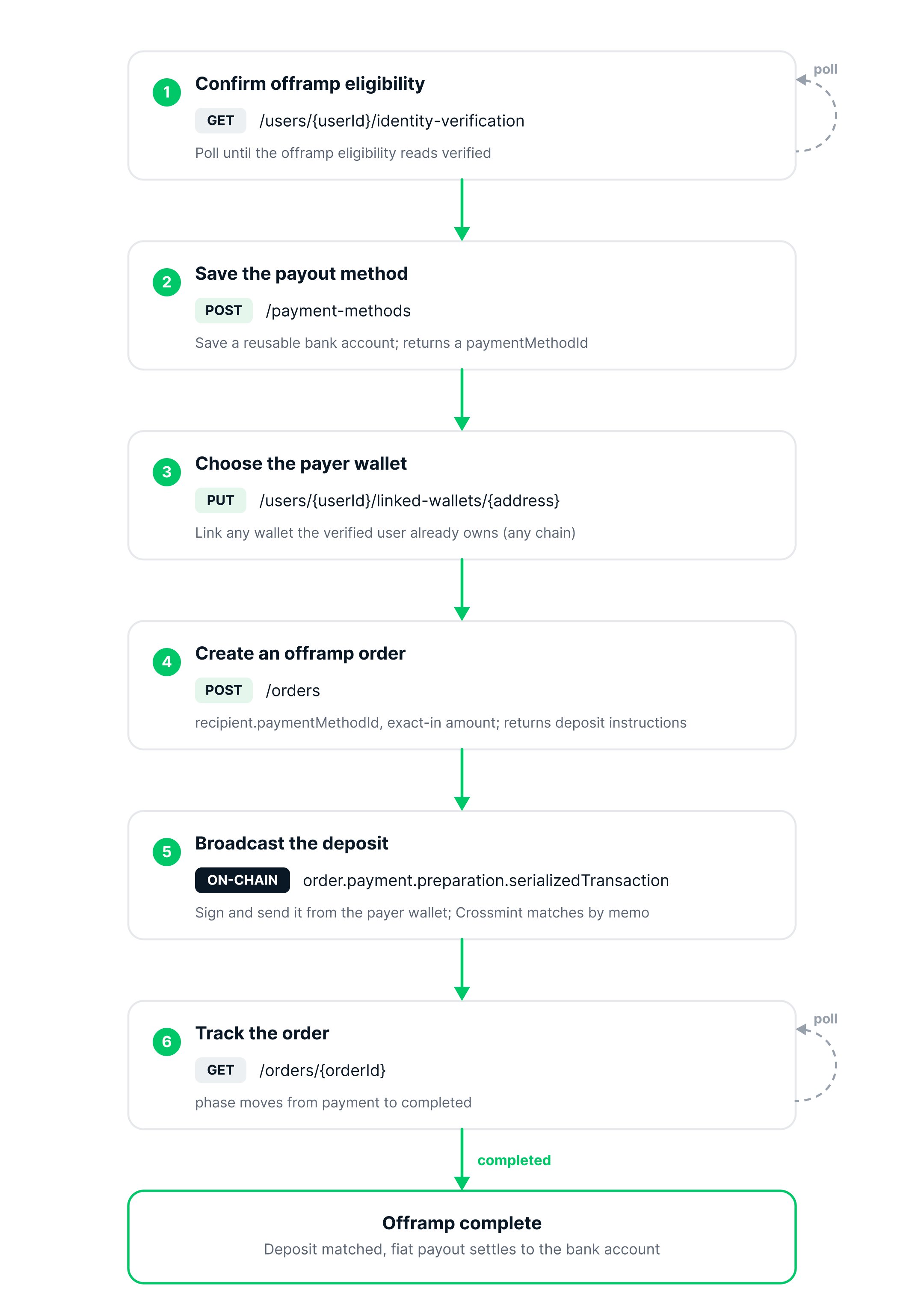 Before creating an order, confirm that the user is verified for Offramp. Verification is asynchronous. Poll the user's status with the Get Identity Verification endpoint until the `offramp` eligibility reads `verified`:
```bash theme={null}
curl -X GET 'https://staging.crossmint.com/api/2025-06-09/users//identity-verification' \
-H 'X-API-KEY: '
```
`` is the Crossmint user locator for the verified user, for example `userId:` or `email:`. See the Get Identity Verification API reference for all supported locator formats.
```json theme={null}
{
"eligibility": [
{ "type": "onramp", "status": "verified" },
{ "type": "onramp-light", "status": "verified" },
{ "type": "offramp", "status": "verified" },
{ "type": "regulated-transfer", "status": "verified" }
]
}
```
Save the user's payout destination as a reusable payment method. The example below saves a US bank account. Sensitive fields are saved securely.
See the Create Payment Method API reference for the full request schema and supported payment method types.
```bash theme={null}
curl -X POST 'https://vault.staging.crossmint.com/api/unstable/payment-methods' \
-H 'X-API-KEY: ' \
-H 'Content-Type: application/json' \
-d '{
"type": "bank-account-us",
"userLocator": "",
"bankAccount": {
"accountNumber": "6349881141",
"routingNumber": "026009593",
"accountType": "checking",
"bankName": "Chase",
"bankAddress": {
"line1": "420 Montgomery St",
"city": "San Francisco",
"stateOrRegion": "CA",
"postalCode": "94104",
"country": "US"
},
"currency": "usd",
"country": "US",
"entityType": "individual",
"billing": {
"name": "Alice Smith",
"phone": "+13055551234",
"address": {
"line1": "701 S Miami Ave",
"city": "Miami",
"stateOrRegion": "FL",
"postalCode": "33156",
"country": "US"
}
}
}
}'
```
The response returns the saved payment method. Banks expose a masked `accountSuffix` (not `last4`). Save the `paymentMethodId` for the order step.
```json theme={null}
{
"paymentMethodId": "d5e5c48a-7dec-44b1-8cf4-4615bf00c8fc",
"default": false,
"displayName": "Chase ••1141",
"createdAt": "2026-06-17T21:25:56.542Z",
"updatedAt": "2026-06-17T21:25:56.542Z",
"type": "bank-account-us",
"bankAccount": {
"billing": {
"name": "Alice Smith",
"phone": "+13055551234",
"address": {
"line1": "701 S Miami Ave",
"city": "Miami",
"stateOrRegion": "FL",
"postalCode": "33156",
"country": "US"
}
},
"bankName": "Chase",
"accountSuffix": "1141",
"currency": "usd",
"country": "US",
"entityType": "individual",
"bankAddress": {
"line1": "420 Montgomery St",
"city": "San Francisco",
"stateOrRegion": "CA",
"postalCode": "94104",
"country": "US"
},
"routingNumber": "026009593",
"accountType": "checking"
}
}
```
For listing, updating, and removing saved accounts, see [Collect Bank Accounts](/offramp/guides/collect-bank-accounts).
Choose the wallet the user will send USDC from. The payer wallet must belong to the same verified user who owns the payout method.
Create a wallet owned by the verified user, with a `server` signer so your backend can sign. Ownership links the wallet to the user, so there is no separate linking step, and deposits are gasless.
```typescript theme={null}
import { createCrossmint, CrossmintWallets } from "@crossmint/wallets-sdk";
const wallets = CrossmintWallets.from(
createCrossmint({ apiKey: process.env.CROSSMINT_SERVER_API_KEY })
);
const wallet = await wallets.createWallet({
chain: "base-sepolia",
owner: "userId:", // the user you verified
recovery: { type: "server", secret: process.env.CROSSMINT_SIGNER_SECRET }, // server admin signer
alias: "offramp-", // idempotent per (owner, alias)
});
```
* **`owner`** ties the wallet to the verified user via their locator (e.g., `userId:`). This ownership means no separate linking step is needed.
* **`recovery`** sets a `server` signer from your `CROSSMINT_SIGNER_SECRET`, a secret you generate and keep on your server (the SDK derives the signing key from it locally). See [Server Signer](/wallets/guides/signers/server-signer) to create one.
* **`alias`** is an optional label that makes the call idempotent, so re-running it with the same owner and alias returns the same wallet.
For all wallet options, see [Create a Wallet](/wallets/guides/create-wallet). Then fund `wallet.address` with USDC and use it as the payer. No native gas is needed.
Link the user's own wallet to the verified user. Make sure it holds USDC plus a little native gas for the deposit.
```bash theme={null}
curl -X PUT 'https://staging.crossmint.com/api/2025-06-09/users//linked-wallets/' \
-H 'X-API-KEY: ' \
-H 'Content-Type: application/json' \
-d '{ "chain": "base-sepolia" }'
```
```json theme={null}
{
"address": "0xAa266270cf90FEEA9760617d9c7B5083e9f08984",
"chain": "base-sepolia",
"type": "external-wallet",
"ownership": {
"verified": false,
"verificationChallenge": "crossmint.com wants you to sign in with your blockchain account..."
}
}
```
Each wallet links to one user, so use a separate wallet per user. The response returns an ownership challenge; on staging you do not need to sign it to proceed.
Create the order with the amount of USDC to cash out (`exact-in`), the chain you will pay from, and the saved bank account as the recipient. Use the payer wallet from the previous step as `payerAddress`.
```bash theme={null}
curl -X POST 'https://staging.crossmint.com/api/2022-06-09/orders' \
-H 'X-API-KEY: ' \
-H 'Content-Type: application/json' \
-d '{
"recipient": {
"paymentMethodId": ""
},
"payment": {
"method": "base-sepolia",
"currency": "usdc",
"payerAddress": "",
"receiptEmail": "alice@example.com"
},
"lineItems": {
"currencyLocator": "fiat:usd",
"executionParameters": {
"mode": "exact-in",
"amount": "1"
}
}
}'
```
The order comes back in the `payment` phase. Its **deposit instructions** live under `order.payment.preparation`: a ready to broadcast `serializedTransaction` (a USDC transfer that already carries the matching memo in its calldata) and the same memo in `transactionParameters.memo`. Keep the `order.orderId`.
```json theme={null}
{
"clientSecret": "eyJhbGciOiJIUzI1NiIsInR5cCI6IkpXVCJ9.eyJvcmRlcklkZW50aWZpZXIiOiI0MGY0OTgxMi0xMjNiLTRkMTAtYmRhZS01NjFlNGVkMmI5OTAiLCJjb2xsZWN0aW9uSWQiOiJjMjI0MGQ2Yy00NGM0LTQ1OTMtOGM4Yy1jZDRkYzJiZjE4MzUiLCJpYXQiOjE3ODE3MzI5MzQsImV4cCI6MTc4MTgxOTMzNH0.Na-AHOlge6-pYhpMszvITqe3ry49fk-o66i3gfz9a3I",
"order": {
"orderId": "40f49812-123b-4d10-bdae-561e4ed2b990",
"phase": "payment",
"locale": "en-US",
"lineItems": [
{
"metadata": {
"name": "USD",
"description": "United States Dollar",
"imageUrl": "https://www.crossmint.com/assets/ui/flags/us.svg"
},
"quote": {
"status": "valid",
"charges": {
"unit": { "amount": "1", "currency": "usdc" },
"fees": { "type": "exact", "amount": "0.002", "currency": "usdc" }
},
"totalPrice": { "amount": "1", "currency": "usdc" },
"quantityRange": { "lowerBound": "1", "upperBound": "1" }
},
"delivery": {
"status": "awaiting-payment",
"recipient": {
"locator": "paymentMethodId:d5e5c48a-7dec-44b1-8cf4-4615bf00c8fc",
"paymentMethodId": "d5e5c48a-7dec-44b1-8cf4-4615bf00c8fc"
}
},
"executionMode": "exact-in",
"callData": {
"mode": "exact-in",
"amount": "1",
"outFiatCurrency": "usd",
"effectiveAmount": "0.998"
},
"quantity": 1
}
],
"quote": {
"status": "valid",
"quotedAt": "2026-06-17T21:48:49.059Z",
"expiresAt": "2026-06-17T21:58:49.059Z",
"totalPrice": { "amount": "1", "currency": "usdc" }
},
"payment": {
"status": "awaiting-payment",
"method": "base-sepolia",
"currency": "usdc",
"preparation": {
"chain": "base-sepolia",
"payerAddress": "0xAa266270cf90FEEA9760617d9c7B5083e9f08984",
"serializedTransaction": "0x02f9018e83014a348083171dd9837ec1d582c3be94036cbd53842c5426634e7929541ec2318f3dcf7e80b90164a9059cbb000000000000000000000000bd1af733aed9d9f472a15a4ce13f42097bbc9eaa00000000000000000000000000000000000000000000000000000000000f42400a0a2d2d2d2d2d2d424547494e204d454d4f2d2d2d2d2d2d65794a68624763694f694a49557a49314e694973496e523563434936496b705856434a392e65794a756232356a5a534936496a4d774d57566d5a5467344c5755324d6a49744e444d30595330344e4459324c5467774e57517a4e5751345a54466a59694973496d39795a4756795357526c626e52705a6d6c6c63694936496a51775a6a51354f4445794c5445794d3249744e4751784d4331695a47466c4c5455324d5755305a575179596a6b354d434973496d6c68644349364d5463344d54637a4d6a6b794f58302e5a6f6b68766e30626e796a4c734f70754a797a5131666e73465a486b4d36456d3965724c7a6678576443492d2d2d2d2d2d454e44204d454d4f2d2d2d2d2d2dc0",
"transactionParameters": {
"amount": "1000000",
"memo": "------BEGIN MEMO------eyJhbGciOiJIUzI1NiIsInR5cCI6IkpXVCJ9.eyJub25jZSI6IjMwMWVmZTg4LWU2MjItNDM0YS04NDY2LTgwNWQzNWQ4ZTFjYiIsIm9yZGVySWRlbnRpZmllciI6IjQwZjQ5ODEyLTEyM2ItNGQxMC1iZGFlLTU2MWU0ZWQyYjk5MCIsImlhdCI6MTc4MTczMjkyOX0.Zokhvn0bnyjLsOpuJyzQ1fnsFZHkM6Em9erLzfxWdCI------END MEMO------"
}
},
"receiptEmail": "alice@example.com"
},
"legal": {
"requirements": [
{ "display": "show-checkbox", "type": "crossmint-terms-of-service", "url": "https://staging.crossmint.com/legal/crossmint-terms-of-service/TRGUSAALLALLALL" },
{ "display": "show-text", "type": "crossmint-privacy-policy", "url": "https://staging.crossmint.com/legal/crossmint-privacy-policy/ALLALLALLALLALL" }
]
}
}
}
```
The order's `payment.preparation.serializedTransaction` is a prepared USDC transfer that already carries the order's memo in its calldata. Sign and broadcast it from the payer wallet. Crossmint matches the deposit to the order by that memo automatically, so no further call is needed.
Sign and send it from the wallet you created, using its `server` signer (a gasless transaction):
```typescript theme={null}
import { EVMWallet } from "@crossmint/wallets-sdk";
import { parseTransaction } from "viem";
// `wallet` from the setup step, `order` from the create-order step
await wallet.useSigner({ type: "server", secret: process.env.CROSSMINT_SIGNER_SECRET });
const { to, data } = parseTransaction(order.payment.preparation.serializedTransaction);
await EVMWallet.from(wallet).sendTransaction({ to, value: 0n, data });
```
See [Send a Transaction](/wallets/guides/send-transaction-evm) for signer setup and other platforms.
Sign and broadcast it with the payer's key using viem:
```typescript theme={null}
import { createWalletClient, http, parseTransaction } from "viem";
import { privateKeyToAccount } from "viem/accounts";
import { baseSepolia } from "viem/chains";
const account = privateKeyToAccount(process.env.PAYER_PRIVATE_KEY);
const walletClient = createWalletClient({ account, chain: baseSepolia, transport: http() });
// `order` from the create-order step
const { to, data } = parseTransaction(order.payment.preparation.serializedTransaction);
const hash = await walletClient.sendTransaction({ to, value: 0n, data });
```
Poll the order until the payout completes, or subscribe to webhooks (see [Manage Orders](/offramp/guides/manage-orders)).
```bash theme={null}
curl -X GET 'https://staging.crossmint.com/api/2022-06-09/orders/' \
-H 'X-API-KEY: '
```
`GET` returns the order flat at the top level (no `order` wrapper and no `clientSecret`, unlike the create response). Watch `phase`, which moves from `payment` to `completed`, along with `payment.status` and `lineItems[0].delivery.status`. When it completes, `payment.received` is populated with the matched on-chain transaction.
```json theme={null}
{
"orderId": "40f49812-123b-4d10-bdae-561e4ed2b990",
"phase": "completed",
"locale": "en-US",
"lineItems": [
{
"metadata": {
"name": "USD",
"description": "United States Dollar",
"imageUrl": "https://www.crossmint.com/assets/ui/flags/us.svg"
},
"quote": {
"status": "valid",
"charges": {
"unit": { "amount": "1", "currency": "usdc" },
"fees": { "type": "exact", "amount": "0.002", "currency": "usdc" }
},
"totalPrice": { "amount": "1", "currency": "usdc" },
"quantityRange": { "lowerBound": "1", "upperBound": "1" }
},
"delivery": {
"status": "completed",
"recipient": {
"locator": "paymentMethodId:d5e5c48a-7dec-44b1-8cf4-4615bf00c8fc",
"paymentMethodId": "d5e5c48a-7dec-44b1-8cf4-4615bf00c8fc"
}
},
"executionMode": "exact-in",
"callData": {
"mode": "exact-in",
"amount": "1",
"outFiatCurrency": "usd",
"effectiveAmount": "0.998"
},
"quantity": 1
}
],
"quote": {
"status": "valid",
"quotedAt": "2026-06-17T21:48:49.059Z",
"expiresAt": "2026-06-17T21:58:49.059Z",
"totalPrice": { "amount": "1", "currency": "usdc" }
},
"payment": {
"status": "completed",
"method": "base-sepolia",
"currency": "usdc",
"preparation": {
"chain": "base-sepolia",
"payerAddress": "0xAa266270cf90FEEA9760617d9c7B5083e9f08984",
"serializedTransaction": "0x02f9018e83014a348083171dd9837ec1d582c3be94036cbd53842c5426634e7929541ec2318f3dcf7e80b90164a9059cbb000000000000000000000000bd1af733aed9d9f472a15a4ce13f42097bbc9eaa00000000000000000000000000000000000000000000000000000000000f42400a0a2d2d2d2d2d2d424547494e204d454d4f2d2d2d2d2d2d65794a68624763694f694a49557a49314e694973496e523563434936496b705856434a392e65794a756232356a5a534936496a4d774d57566d5a5467344c5755324d6a49744e444d30595330344e4459324c5467774e57517a4e5751345a54466a59694973496d39795a4756795357526c626e52705a6d6c6c63694936496a51775a6a51354f4445794c5445794d3249744e4751784d4331695a47466c4c5455324d5755305a575179596a6b354d434973496d6c68644349364d5463344d54637a4d6a6b794f58302e5a6f6b68766e30626e796a4c734f70754a797a5131666e73465a486b4d36456d3965724c7a6678576443492d2d2d2d2d2d454e44204d454d4f2d2d2d2d2d2dc0",
"transactionParameters": {
"amount": "1000000",
"memo": "------BEGIN MEMO------eyJhbGciOiJIUzI1NiIsInR5cCI6IkpXVCJ9.eyJub25jZSI6IjMwMWVmZTg4LWU2MjItNDM0YS04NDY2LTgwNWQzNWQ4ZTFjYiIsIm9yZGVySWRlbnRpZmllciI6IjQwZjQ5ODEyLTEyM2ItNGQxMC1iZGFlLTU2MWU0ZWQyYjk5MCIsImlhdCI6MTc4MTczMjkyOX0.Zokhvn0bnyjLsOpuJyzQ1fnsFZHkM6Em9erLzfxWdCI------END MEMO------"
}
},
"received": {
"chain": "base-sepolia",
"txId": "0xc9537a0e4ee4794101514d30418bd20f09cf66c3ce86b82b0be916489a338e85",
"amount": "1",
"currency": "usdc"
},
"receiptEmail": "alice@example.com"
}
}
```
On staging the payout is simulated. To pay out to a bank in production, see [Launch in Production](/offramp/guides/going-to-production).
## Troubleshooting
Offramp's KYC endpoints are turned on per project. Contact sales to enable KYC for yours. The response `project not configured to support the users KYC endpoints` is the signal to reach out.
The user and KYC endpoints expect a `userId:` locator, for example `userId:alice-123`. The `email:` and other locator formats apply to Crossmint auth wallets, so use `userId:` for these endpoints.
Verification is asynchronous. Poll `GET /users/{userId}/identity-verification` until the `offramp` eligibility reads `verified`, then create the order.
Create the payer wallet with `owner: "userId:"`. With no owner it is company-owned, which the order does not accept. A wallet's owner is set once at creation.
After you broadcast the prepared transaction, Crossmint matches it to the order by its memo, so the deposit is already assigned. You do not need to call `POST /orders/{orderId}/payment`.
## Next steps
Status, webhooks, and failures
The end-to-end offramp flow
Before creating an order, confirm that the user is verified for Offramp. Verification is asynchronous. Poll the user's status with the Get Identity Verification endpoint until the `offramp` eligibility reads `verified`:
```bash theme={null}
curl -X GET 'https://staging.crossmint.com/api/2025-06-09/users//identity-verification' \
-H 'X-API-KEY: '
```
`` is the Crossmint user locator for the verified user, for example `userId:` or `email:`. See the Get Identity Verification API reference for all supported locator formats.
```json theme={null}
{
"eligibility": [
{ "type": "onramp", "status": "verified" },
{ "type": "onramp-light", "status": "verified" },
{ "type": "offramp", "status": "verified" },
{ "type": "regulated-transfer", "status": "verified" }
]
}
```
Save the user's payout destination as a reusable payment method. The example below saves a US bank account. Sensitive fields are saved securely.
See the Create Payment Method API reference for the full request schema and supported payment method types.
```bash theme={null}
curl -X POST 'https://vault.staging.crossmint.com/api/unstable/payment-methods' \
-H 'X-API-KEY: ' \
-H 'Content-Type: application/json' \
-d '{
"type": "bank-account-us",
"userLocator": "",
"bankAccount": {
"accountNumber": "6349881141",
"routingNumber": "026009593",
"accountType": "checking",
"bankName": "Chase",
"bankAddress": {
"line1": "420 Montgomery St",
"city": "San Francisco",
"stateOrRegion": "CA",
"postalCode": "94104",
"country": "US"
},
"currency": "usd",
"country": "US",
"entityType": "individual",
"billing": {
"name": "Alice Smith",
"phone": "+13055551234",
"address": {
"line1": "701 S Miami Ave",
"city": "Miami",
"stateOrRegion": "FL",
"postalCode": "33156",
"country": "US"
}
}
}
}'
```
The response returns the saved payment method. Banks expose a masked `accountSuffix` (not `last4`). Save the `paymentMethodId` for the order step.
```json theme={null}
{
"paymentMethodId": "d5e5c48a-7dec-44b1-8cf4-4615bf00c8fc",
"default": false,
"displayName": "Chase ••1141",
"createdAt": "2026-06-17T21:25:56.542Z",
"updatedAt": "2026-06-17T21:25:56.542Z",
"type": "bank-account-us",
"bankAccount": {
"billing": {
"name": "Alice Smith",
"phone": "+13055551234",
"address": {
"line1": "701 S Miami Ave",
"city": "Miami",
"stateOrRegion": "FL",
"postalCode": "33156",
"country": "US"
}
},
"bankName": "Chase",
"accountSuffix": "1141",
"currency": "usd",
"country": "US",
"entityType": "individual",
"bankAddress": {
"line1": "420 Montgomery St",
"city": "San Francisco",
"stateOrRegion": "CA",
"postalCode": "94104",
"country": "US"
},
"routingNumber": "026009593",
"accountType": "checking"
}
}
```
For listing, updating, and removing saved accounts, see [Collect Bank Accounts](/offramp/guides/collect-bank-accounts).
Choose the wallet the user will send USDC from. The payer wallet must belong to the same verified user who owns the payout method.
Create a wallet owned by the verified user, with a `server` signer so your backend can sign. Ownership links the wallet to the user, so there is no separate linking step, and deposits are gasless.
```typescript theme={null}
import { createCrossmint, CrossmintWallets } from "@crossmint/wallets-sdk";
const wallets = CrossmintWallets.from(
createCrossmint({ apiKey: process.env.CROSSMINT_SERVER_API_KEY })
);
const wallet = await wallets.createWallet({
chain: "base-sepolia",
owner: "userId:", // the user you verified
recovery: { type: "server", secret: process.env.CROSSMINT_SIGNER_SECRET }, // server admin signer
alias: "offramp-", // idempotent per (owner, alias)
});
```
* **`owner`** ties the wallet to the verified user via their locator (e.g., `userId:`). This ownership means no separate linking step is needed.
* **`recovery`** sets a `server` signer from your `CROSSMINT_SIGNER_SECRET`, a secret you generate and keep on your server (the SDK derives the signing key from it locally). See [Server Signer](/wallets/guides/signers/server-signer) to create one.
* **`alias`** is an optional label that makes the call idempotent, so re-running it with the same owner and alias returns the same wallet.
For all wallet options, see [Create a Wallet](/wallets/guides/create-wallet). Then fund `wallet.address` with USDC and use it as the payer. No native gas is needed.
Link the user's own wallet to the verified user. Make sure it holds USDC plus a little native gas for the deposit.
```bash theme={null}
curl -X PUT 'https://staging.crossmint.com/api/2025-06-09/users//linked-wallets/' \
-H 'X-API-KEY: ' \
-H 'Content-Type: application/json' \
-d '{ "chain": "base-sepolia" }'
```
```json theme={null}
{
"address": "0xAa266270cf90FEEA9760617d9c7B5083e9f08984",
"chain": "base-sepolia",
"type": "external-wallet",
"ownership": {
"verified": false,
"verificationChallenge": "crossmint.com wants you to sign in with your blockchain account..."
}
}
```
Each wallet links to one user, so use a separate wallet per user. The response returns an ownership challenge; on staging you do not need to sign it to proceed.
Create the order with the amount of USDC to cash out (`exact-in`), the chain you will pay from, and the saved bank account as the recipient. Use the payer wallet from the previous step as `payerAddress`.
```bash theme={null}
curl -X POST 'https://staging.crossmint.com/api/2022-06-09/orders' \
-H 'X-API-KEY: ' \
-H 'Content-Type: application/json' \
-d '{
"recipient": {
"paymentMethodId": ""
},
"payment": {
"method": "base-sepolia",
"currency": "usdc",
"payerAddress": "",
"receiptEmail": "alice@example.com"
},
"lineItems": {
"currencyLocator": "fiat:usd",
"executionParameters": {
"mode": "exact-in",
"amount": "1"
}
}
}'
```
The order comes back in the `payment` phase. Its **deposit instructions** live under `order.payment.preparation`: a ready to broadcast `serializedTransaction` (a USDC transfer that already carries the matching memo in its calldata) and the same memo in `transactionParameters.memo`. Keep the `order.orderId`.
```json theme={null}
{
"clientSecret": "eyJhbGciOiJIUzI1NiIsInR5cCI6IkpXVCJ9.eyJvcmRlcklkZW50aWZpZXIiOiI0MGY0OTgxMi0xMjNiLTRkMTAtYmRhZS01NjFlNGVkMmI5OTAiLCJjb2xsZWN0aW9uSWQiOiJjMjI0MGQ2Yy00NGM0LTQ1OTMtOGM4Yy1jZDRkYzJiZjE4MzUiLCJpYXQiOjE3ODE3MzI5MzQsImV4cCI6MTc4MTgxOTMzNH0.Na-AHOlge6-pYhpMszvITqe3ry49fk-o66i3gfz9a3I",
"order": {
"orderId": "40f49812-123b-4d10-bdae-561e4ed2b990",
"phase": "payment",
"locale": "en-US",
"lineItems": [
{
"metadata": {
"name": "USD",
"description": "United States Dollar",
"imageUrl": "https://www.crossmint.com/assets/ui/flags/us.svg"
},
"quote": {
"status": "valid",
"charges": {
"unit": { "amount": "1", "currency": "usdc" },
"fees": { "type": "exact", "amount": "0.002", "currency": "usdc" }
},
"totalPrice": { "amount": "1", "currency": "usdc" },
"quantityRange": { "lowerBound": "1", "upperBound": "1" }
},
"delivery": {
"status": "awaiting-payment",
"recipient": {
"locator": "paymentMethodId:d5e5c48a-7dec-44b1-8cf4-4615bf00c8fc",
"paymentMethodId": "d5e5c48a-7dec-44b1-8cf4-4615bf00c8fc"
}
},
"executionMode": "exact-in",
"callData": {
"mode": "exact-in",
"amount": "1",
"outFiatCurrency": "usd",
"effectiveAmount": "0.998"
},
"quantity": 1
}
],
"quote": {
"status": "valid",
"quotedAt": "2026-06-17T21:48:49.059Z",
"expiresAt": "2026-06-17T21:58:49.059Z",
"totalPrice": { "amount": "1", "currency": "usdc" }
},
"payment": {
"status": "awaiting-payment",
"method": "base-sepolia",
"currency": "usdc",
"preparation": {
"chain": "base-sepolia",
"payerAddress": "0xAa266270cf90FEEA9760617d9c7B5083e9f08984",
"serializedTransaction": "0x02f9018e83014a348083171dd9837ec1d582c3be94036cbd53842c5426634e7929541ec2318f3dcf7e80b90164a9059cbb000000000000000000000000bd1af733aed9d9f472a15a4ce13f42097bbc9eaa00000000000000000000000000000000000000000000000000000000000f42400a0a2d2d2d2d2d2d424547494e204d454d4f2d2d2d2d2d2d65794a68624763694f694a49557a49314e694973496e523563434936496b705856434a392e65794a756232356a5a534936496a4d774d57566d5a5467344c5755324d6a49744e444d30595330344e4459324c5467774e57517a4e5751345a54466a59694973496d39795a4756795357526c626e52705a6d6c6c63694936496a51775a6a51354f4445794c5445794d3249744e4751784d4331695a47466c4c5455324d5755305a575179596a6b354d434973496d6c68644349364d5463344d54637a4d6a6b794f58302e5a6f6b68766e30626e796a4c734f70754a797a5131666e73465a486b4d36456d3965724c7a6678576443492d2d2d2d2d2d454e44204d454d4f2d2d2d2d2d2dc0",
"transactionParameters": {
"amount": "1000000",
"memo": "------BEGIN MEMO------eyJhbGciOiJIUzI1NiIsInR5cCI6IkpXVCJ9.eyJub25jZSI6IjMwMWVmZTg4LWU2MjItNDM0YS04NDY2LTgwNWQzNWQ4ZTFjYiIsIm9yZGVySWRlbnRpZmllciI6IjQwZjQ5ODEyLTEyM2ItNGQxMC1iZGFlLTU2MWU0ZWQyYjk5MCIsImlhdCI6MTc4MTczMjkyOX0.Zokhvn0bnyjLsOpuJyzQ1fnsFZHkM6Em9erLzfxWdCI------END MEMO------"
}
},
"receiptEmail": "alice@example.com"
},
"legal": {
"requirements": [
{ "display": "show-checkbox", "type": "crossmint-terms-of-service", "url": "https://staging.crossmint.com/legal/crossmint-terms-of-service/TRGUSAALLALLALL" },
{ "display": "show-text", "type": "crossmint-privacy-policy", "url": "https://staging.crossmint.com/legal/crossmint-privacy-policy/ALLALLALLALLALL" }
]
}
}
}
```
The order's `payment.preparation.serializedTransaction` is a prepared USDC transfer that already carries the order's memo in its calldata. Sign and broadcast it from the payer wallet. Crossmint matches the deposit to the order by that memo automatically, so no further call is needed.
Sign and send it from the wallet you created, using its `server` signer (a gasless transaction):
```typescript theme={null}
import { EVMWallet } from "@crossmint/wallets-sdk";
import { parseTransaction } from "viem";
// `wallet` from the setup step, `order` from the create-order step
await wallet.useSigner({ type: "server", secret: process.env.CROSSMINT_SIGNER_SECRET });
const { to, data } = parseTransaction(order.payment.preparation.serializedTransaction);
await EVMWallet.from(wallet).sendTransaction({ to, value: 0n, data });
```
See [Send a Transaction](/wallets/guides/send-transaction-evm) for signer setup and other platforms.
Sign and broadcast it with the payer's key using viem:
```typescript theme={null}
import { createWalletClient, http, parseTransaction } from "viem";
import { privateKeyToAccount } from "viem/accounts";
import { baseSepolia } from "viem/chains";
const account = privateKeyToAccount(process.env.PAYER_PRIVATE_KEY);
const walletClient = createWalletClient({ account, chain: baseSepolia, transport: http() });
// `order` from the create-order step
const { to, data } = parseTransaction(order.payment.preparation.serializedTransaction);
const hash = await walletClient.sendTransaction({ to, value: 0n, data });
```
Poll the order until the payout completes, or subscribe to webhooks (see [Manage Orders](/offramp/guides/manage-orders)).
```bash theme={null}
curl -X GET 'https://staging.crossmint.com/api/2022-06-09/orders/' \
-H 'X-API-KEY: '
```
`GET` returns the order flat at the top level (no `order` wrapper and no `clientSecret`, unlike the create response). Watch `phase`, which moves from `payment` to `completed`, along with `payment.status` and `lineItems[0].delivery.status`. When it completes, `payment.received` is populated with the matched on-chain transaction.
```json theme={null}
{
"orderId": "40f49812-123b-4d10-bdae-561e4ed2b990",
"phase": "completed",
"locale": "en-US",
"lineItems": [
{
"metadata": {
"name": "USD",
"description": "United States Dollar",
"imageUrl": "https://www.crossmint.com/assets/ui/flags/us.svg"
},
"quote": {
"status": "valid",
"charges": {
"unit": { "amount": "1", "currency": "usdc" },
"fees": { "type": "exact", "amount": "0.002", "currency": "usdc" }
},
"totalPrice": { "amount": "1", "currency": "usdc" },
"quantityRange": { "lowerBound": "1", "upperBound": "1" }
},
"delivery": {
"status": "completed",
"recipient": {
"locator": "paymentMethodId:d5e5c48a-7dec-44b1-8cf4-4615bf00c8fc",
"paymentMethodId": "d5e5c48a-7dec-44b1-8cf4-4615bf00c8fc"
}
},
"executionMode": "exact-in",
"callData": {
"mode": "exact-in",
"amount": "1",
"outFiatCurrency": "usd",
"effectiveAmount": "0.998"
},
"quantity": 1
}
],
"quote": {
"status": "valid",
"quotedAt": "2026-06-17T21:48:49.059Z",
"expiresAt": "2026-06-17T21:58:49.059Z",
"totalPrice": { "amount": "1", "currency": "usdc" }
},
"payment": {
"status": "completed",
"method": "base-sepolia",
"currency": "usdc",
"preparation": {
"chain": "base-sepolia",
"payerAddress": "0xAa266270cf90FEEA9760617d9c7B5083e9f08984",
"serializedTransaction": "0x02f9018e83014a348083171dd9837ec1d582c3be94036cbd53842c5426634e7929541ec2318f3dcf7e80b90164a9059cbb000000000000000000000000bd1af733aed9d9f472a15a4ce13f42097bbc9eaa00000000000000000000000000000000000000000000000000000000000f42400a0a2d2d2d2d2d2d424547494e204d454d4f2d2d2d2d2d2d65794a68624763694f694a49557a49314e694973496e523563434936496b705856434a392e65794a756232356a5a534936496a4d774d57566d5a5467344c5755324d6a49744e444d30595330344e4459324c5467774e57517a4e5751345a54466a59694973496d39795a4756795357526c626e52705a6d6c6c63694936496a51775a6a51354f4445794c5445794d3249744e4751784d4331695a47466c4c5455324d5755305a575179596a6b354d434973496d6c68644349364d5463344d54637a4d6a6b794f58302e5a6f6b68766e30626e796a4c734f70754a797a5131666e73465a486b4d36456d3965724c7a6678576443492d2d2d2d2d2d454e44204d454d4f2d2d2d2d2d2dc0",
"transactionParameters": {
"amount": "1000000",
"memo": "------BEGIN MEMO------eyJhbGciOiJIUzI1NiIsInR5cCI6IkpXVCJ9.eyJub25jZSI6IjMwMWVmZTg4LWU2MjItNDM0YS04NDY2LTgwNWQzNWQ4ZTFjYiIsIm9yZGVySWRlbnRpZmllciI6IjQwZjQ5ODEyLTEyM2ItNGQxMC1iZGFlLTU2MWU0ZWQyYjk5MCIsImlhdCI6MTc4MTczMjkyOX0.Zokhvn0bnyjLsOpuJyzQ1fnsFZHkM6Em9erLzfxWdCI------END MEMO------"
}
},
"received": {
"chain": "base-sepolia",
"txId": "0xc9537a0e4ee4794101514d30418bd20f09cf66c3ce86b82b0be916489a338e85",
"amount": "1",
"currency": "usdc"
},
"receiptEmail": "alice@example.com"
}
}
```
On staging the payout is simulated. To pay out to a bank in production, see [Launch in Production](/offramp/guides/going-to-production).
## Troubleshooting
Offramp's KYC endpoints are turned on per project. Contact sales to enable KYC for yours. The response `project not configured to support the users KYC endpoints` is the signal to reach out.
The user and KYC endpoints expect a `userId:` locator, for example `userId:alice-123`. The `email:` and other locator formats apply to Crossmint auth wallets, so use `userId:` for these endpoints.
Verification is asynchronous. Poll `GET /users/{userId}/identity-verification` until the `offramp` eligibility reads `verified`, then create the order.
Create the payer wallet with `owner: "userId:"`. With no owner it is company-owned, which the order does not accept. A wallet's owner is set once at creation.
After you broadcast the prepared transaction, Crossmint matches it to the order by its memo, so the deposit is already assigned. You do not need to call `POST /orders/{orderId}/payment`.
## Next steps
Status, webhooks, and failures
The end-to-end offramp flow