> ## Documentation Index
> Fetch the complete documentation index at: https://docs.crossmint.com/llms.txt
> Use this file to discover all available pages before exploring further.

# Pay with Card - Memecoins (React Native)

> Create a fully customized embedded memecoin checkout experience for React Native that accepts credit cards

<Snippet file="enterprise-feature.mdx" />

# Crossmint Checkout React Native SDK Quickstart

<Note>
  For this quickstart we'll be using Expo. You can follow this [tutorial](https://docs.expo.dev/tutorial/create-your-first-app/) to create an expo app. **Only do steps 1 and 3**, plus the Crossmint-specific steps below.

  **Prerequisites:** Before starting, ensure you have completed the [Expo prerequisites](https://docs.expo.dev/tutorial/create-your-first-app/#prerequisites) including Node.js, Git, and your development environment setup.
</Note>

## Following Expo Tutorial + Crossmint SDK

<Steps>
  <Step title="Initialize a new Expo app">
    ```bash theme={null}
    npx create-expo-app@latest crossmint-checkout-quickstart

    cd crossmint-checkout-quickstart
    ```
  </Step>

  <Step title="Run reset-project script">
    ```bash theme={null}
    npm run reset-project
    ```
  </Step>

  <Step title="Install @crossmint/client-sdk-react-native-ui">
    <Snippet file="client-sdk-react-native-ui-installation-cmd.mdx" />
  </Step>

  <Step title="Add your .env.local environment variables">
    ```bash theme={null}
    EXPO_PUBLIC_CLIENT_CROSSMINT_API_KEY="your_client_side_api_key"
    EXPO_PUBLIC_RECIPIENT_WALLET_ADDRESS="your_solana_wallet_address" 
    EXPO_PUBLIC_RECEIPT_EMAIL="your-email@example.com"
    ```

    <Note>The `receiptEmail` field is **required** for delivering payment receipts to customers.</Note>
  </Step>

  <Step title="Replace index.tsx with">
    ```jsx theme={null}
    import { CrossmintEmbeddedCheckout, CrossmintProvider } from "@crossmint/client-sdk-react-native-ui";

    export default function Index() {
        return (
            <CrossmintProvider apiKey={process.env.EXPO_PUBLIC_CLIENT_CROSSMINT_API_KEY ?? ""}>
                <CrossmintEmbeddedCheckout
                    recipient={{
                        walletAddress: process.env.EXPO_PUBLIC_RECIPIENT_WALLET_ADDRESS ?? "",
                    }}
                    payment={{
                        crypto: {
                            enabled: false,
                        },
                        fiat: {
                            enabled: true,
                        },
                        receiptEmail: process.env.EXPO_PUBLIC_RECEIPT_EMAIL ?? "",
                    }}
                    lineItems={{
                        tokenLocator: "solana:7EivYFyNfgGj8xbUymR7J4LuxUHLKRzpLaERHLvi7Dgu", // XMEME token (staging)
                        executionParameters: {
                            mode: "exact-in", // Specifies exact USD amount to spend (vs exact-out for NFTs)
                            amount: "1", // USD amount to spend
                            maxSlippageBps: "500", // Maximum slippage tolerance in basis points (500 = 5%, default if not specified)
                        },
                    }}
                />
            </CrossmintProvider>
        );
    }
    ```
  </Step>

  <Step title="Run your project">
    <CodeGroup>
      ```bash npm theme={null}
      npm run ios
      # For Android:
      npm run android
      ```

      ```bash yarn theme={null}
      yarn ios
      # For Android:
      yarn android
      ```

      ```bash pnpm theme={null}
      pnpm ios
      # For Android:
      pnpm android
      ```

      ```bash bun theme={null}
      bun ios
      # For Android:
      bun android
      ```
    </CodeGroup>
  </Step>
</Steps>

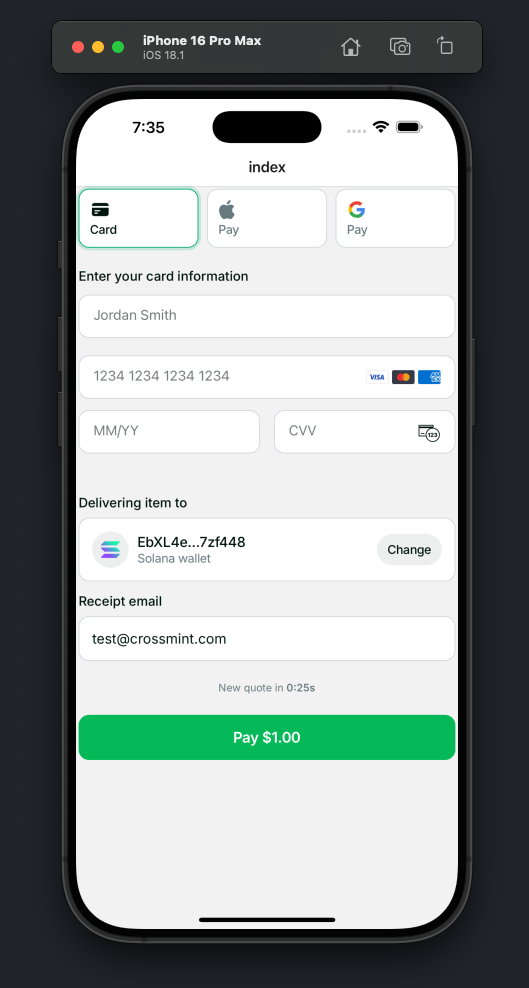
### Result

<img src="https://mintcdn.com/crossmint/QK6rWfcUCMmvIQPT/images/payments/embedded/quickstarts/react-native/checkout-result.png?fit=max&auto=format&n=QK6rWfcUCMmvIQPT&q=85&s=6603d26b9aa1a8c689ddcd6fa5dca039" alt="React Native Crossmint Checkout Result" width="529" height="988" data-path="images/payments/embedded/quickstarts/react-native/checkout-result.png" />