> ## Documentation Index
> Fetch the complete documentation index at: https://docs.crossmint.com/llms.txt
> Use this file to discover all available pages before exploring further.
# Pay with Card - Memecoins (React)
> Create a fully customized embedded memecoin checkout experience that accepts credit cards
## Introduction
This guide will show you how to accept credit card payments using Crossmint's Embedded Checkout for memecoin sales. You'll learn how to:
* Set up credit card payments for Solana memecoin purchases in JavaScript
* Implement an embedded checkout UI using Crossmint's React components
* Track order status and delivery
## Embedded Memecoin Checkout
The fastest way to start selling memecoins is to use our embedded checkout solution adapted for fungible tokens.
### Important Parameters
Before implementing the checkout, note these key parameters:
* `receiptEmail`: Optional. If the buyer pays with Apple Pay or Google Pay, Crossmint obtains the email automatically. Providing it improves fraud signal quality.
* `executionParameters.mode`: Set to "exact-in" for memecoin purchases (specifies exact USD amount to spend). "exact-out" is for NFTs, while "exact-in" is for fungible tokens.
* `maxSlippageBps`: Optional slippage tolerance (default is typically 500 BPS or 5% if not specified)
**Testing in Staging?** Use the XMEME test token: `solana:7EivYFyNfgGj8xbUymR7J4LuxUHLKRzpLaERHLvi7Dgu`. Production tokens will not work in the staging environment.
### Memecoin Embedded Integration
Next, we will set up a project file with Crossmint's embedded checkout to accept memecoin purchases.
Create `.env.local` in your project root:
```sh theme={null}
NEXT_PUBLIC_CLIENT_API_KEY="_YOUR_CLIENT_API_KEY_" # From API Keys page
NEXT_PUBLIC_TOKEN_ADDRESS="7EivYFyNfgGj8xbUymR7J4LuxUHLKRzpLaERHLvi7Dgu" # xmeme token for staging testing
NEXT_PUBLIC_RECIPIENT_WALLET_ADDRESS="YOUR_SOLANA_WALLET_ADDRESS" # Add desired recipient wallet
NEXT_PUBLIC_RECEIPT_EMAIL="YOUR_EMAIL" # Add desired recipient email
```
Create `/src/app/page.tsx` with:
```tsx theme={null}
"use client";
import { CrossmintProvider, CrossmintEmbeddedCheckout } from "@crossmint/client-sdk-react-ui";
export default function Home() {
const clientApiKey = process.env.NEXT_PUBLIC_CLIENT_API_KEY as string;
const tokenAddress = process.env.NEXT_PUBLIC_TOKEN_ADDRESS as string;
const recipientWalletAddress = process.env.NEXT_PUBLIC_RECIPIENT_WALLET_ADDRESS as string;
return (
);
}
```
For more details on tokenLocator formatting and other item selection options, see our [embedded item selection guide](/payments/embedded/guides/item-selection#item-selection-examples).
Test purchases in staging using test credit cards, like `4242424242424242` (Visa). More information on testing can be found [here](/payments/advanced/testing-tips#test-credit-card-numbers).
For production launch with live memecoin tokens, contact the Crossmint sales team — production Checkout requires a signed Order Form and successful KYB. See the [production launch guide](/payments/embedded/guides/production-launch) for the full sequence.
Here's how your embedded checkout will look after implementation:
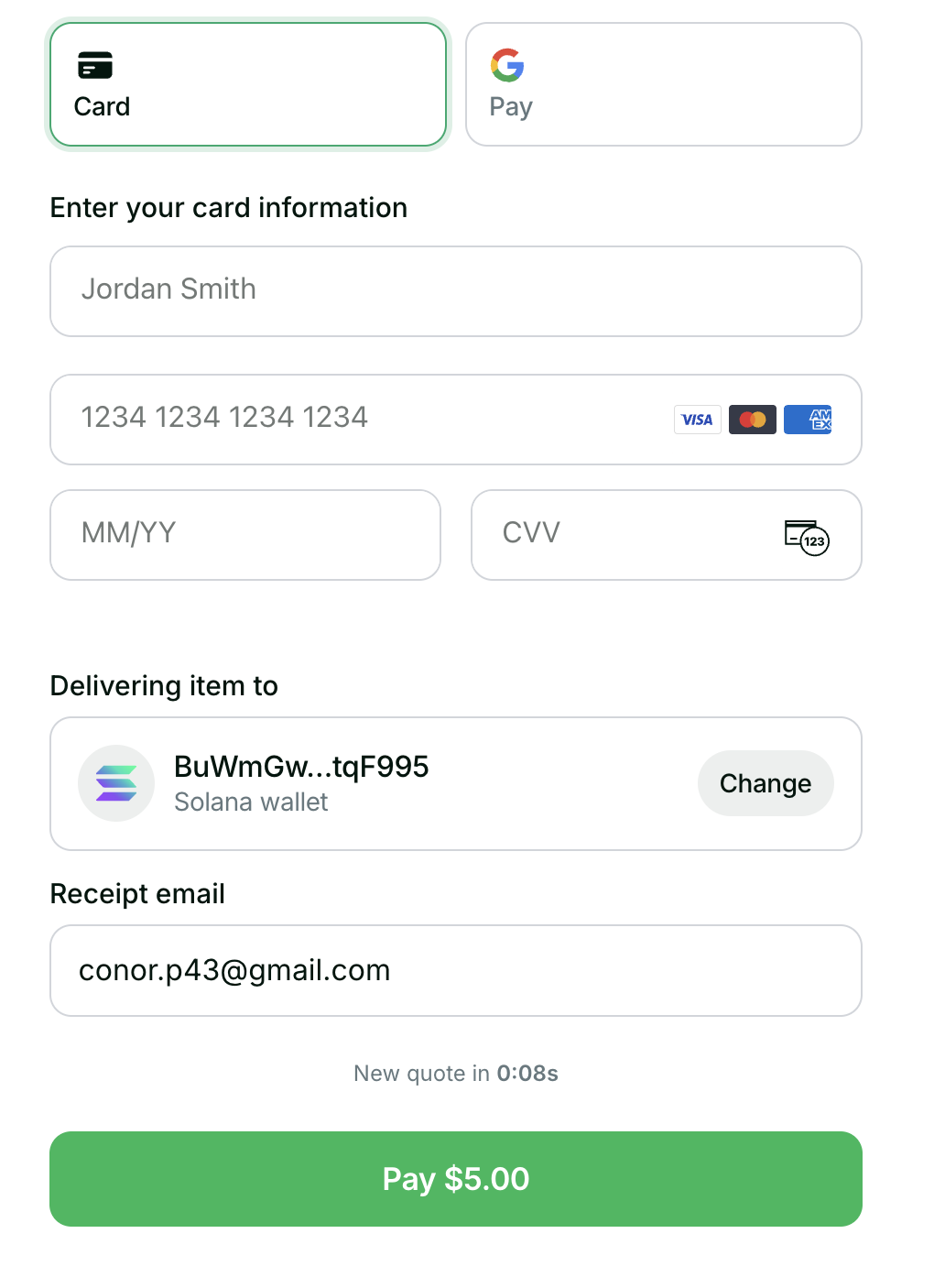 Note the quote expiration timer above the checkout button.
🎉 Congratulations! You've successfully set up your embedded memecoin checkout. Check out the [Next Steps](#next-steps) section below to learn how to customize your integration.
## Next Steps
Learn how to customize the embedded checkout experience
Implement webhook handling for order updates
If the quote expires (after 1 minute), the embedded checkout will automatically refresh the quote. You can
customize this behavior using the checkout hooks.
Note the quote expiration timer above the checkout button.
🎉 Congratulations! You've successfully set up your embedded memecoin checkout. Check out the [Next Steps](#next-steps) section below to learn how to customize your integration.
## Next Steps
Learn how to customize the embedded checkout experience
Implement webhook handling for order updates
If the quote expires (after 1 minute), the embedded checkout will automatically refresh the quote. You can
customize this behavior using the checkout hooks.