> ## Documentation Index
> Fetch the complete documentation index at: https://docs.crossmint.com/llms.txt
> Use this file to discover all available pages before exploring further.
# Client or Server
> Understand the reasons to use client-side or server-side API keys
The headless checkout supports both server-side and client-side API keys. It's important that you select the right key for your implementation.
## When to use a server-side API key
* Testing in the [API Playground](/api-reference/headless/create-order) of the documentation
* Testing with cURL requests or running scripts from your command line
* Building applications that make API calls to your own backend, which then make the actual API call to Crossmint
The key consideration here is if the API request is coming from a server environment.
### Server Side Example Code
```typescript route.ts (server-side) theme={null}
import { callCrossmintAPI } from "@/app/utils/crossmint";
import { NextRequest, NextResponse } from "next/server";
const crossmintBaseUrl = process.env.CROSSMINT_API_URL;
const crossmintApiKey = process.env.CROSSMINT_API_KEY;
const crossmintAPIHeaders = {
accept: "application/json",
"content-type": "application/json",
"x-api-key": crossmintApiKey,
};
const callCrossmintAPI = async (endpoint: string, options: { method: string; body?: any; params?: any }) => {
const url = `${crossmintBaseUrl}/${endpoint}`;
const { body, method } = options;
const response = await fetch(url, {
body: body ? JSON.stringify(body) : null,
method,
headers: crossmintAPIHeaders,
});
const json = await response.json();
return json;
};
export async function POST(req: NextRequest, res: NextResponse) {
try {
const body = await req.json();
console.log("create order: ", body);
const apiResponse = await callCrossmintAPI("/orders", {
method: "POST",
body,
});
return NextResponse.json(apiResponse, { status: 200 });
} catch (error) {
console.log("failed to create order");
return NextResponse.json({ message: "Error creating order" }, { status: 500 });
}
}
```
## When to use a client-side API key
* Your application will be making API requests to Crossmint directly from a browser
When you create client-side API keys you must add the authorized origins that can use the key. For example, in
testing you'll need to indicate `http://localhost:3000` (or similar local dev URLs) as authorized origins, or the
request will be denied.
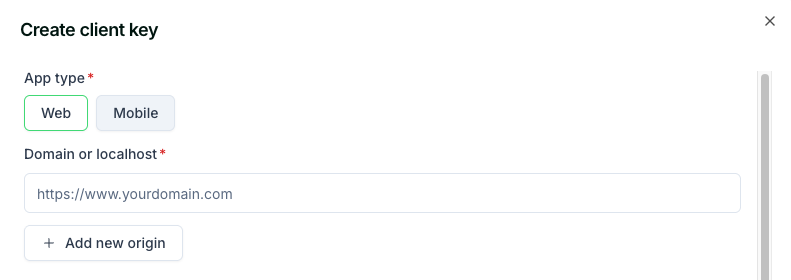 There is one additional step when using a client-side API key in your application with headless checkout. The first call will be to create the order. The response will include a `clientSecret` property that you must persist in state and then pass as an additional header in subsequent API requests to the [update-order](/api-reference/headless/edit-order) or [get-order](/api-reference/headless/get-order) routes.
### Client Side Example Code
The sample code below shows direct client-side API calls to Crossmint using a client-side API key. The `component.tsx` file is simplified to only show the relevant logic for making requests directly from the browser to Crossmint's API.
```tsx component.tsx (create-order) theme={null}
// note the end of try block where the clientSecret is saved to local state
const { setOrder, setClientSecret } = useLocalState();
const createOrder = async (orderInput: any) => {
try {
const res = await fetch(`https://staging.crossmint.com/api/2022-06-09/orders`, {
method: "POST",
headers: {
"Content-Type": "application/json",
"x-api-key": process.env.NEXT_PUBLIC_CLIENT_SIDE_KEY,
},
body: JSON.stringify(orderInput),
});
const order = await res.json();
setOrder(order.order);
setClientSecret(order.clientSecret);
} catch (e) {
console.error(e);
throw new Error("Failed to create order");
}
};
```
```tsx component.tsx (update-order) theme={null}
// note the `authorization` header, which contains previously saved clientSecret
const { order, clientSecret, setOrder } = useLocalState();
const updateOrder = async (orderInput: any) => {
try {
const res = await fetch(`https://staging.crossmint.com/api/2022-06-09/orders/${order.orderId}`, {
method: "PATCH",
headers: {
"Content-Type": "application/json",
"x-api-key": process.env.NEXT_PUBLIC_CLIENT_SIDE_KEY,
authorization: clientSecret,
},
body: JSON.stringify(orderInput),
});
const updatedOrder = await res.json();
setOrder(updatedOrder);
} catch (e) {
console.error(e);
throw new Error("Failed to update order");
}
};
```
```tsx component.tsx (get-order) theme={null}
// note the `authorization` header, which contains previously saved clientSecret
const { order, clientSecret, setOrder } = useLocalState();
const getOrder = async () => {
try {
const res = await fetch(`https://staging.crossmint.com/api/2022-06-09/orders/${order.orderId}`, {
method: "GET",
headers: {
"Content-Type": "application/json",
"x-api-key": process.env.NEXT_PUBLIC_CLIENT_SIDE_KEY,
authorization: clientSecret,
},
});
const refreshedOrder = await res.json();
setOrder(refreshedOrder);
return refreshedOrder.lineItems[0].delivery.status;
} catch (e) {
console.error(e);
throw new Error("Failed to fetch order");
}
};
```
### Mobile Applications
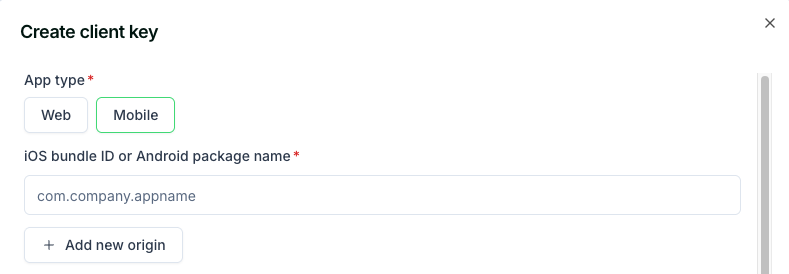
When using client-side API keys in mobile applications, you must include an additional `x-app-identifier` header in your requests. This header should contain the bundle identifier (iOS) or package name (Android) that you whitelisted when creating your API key.
There is one additional step when using a client-side API key in your application with headless checkout. The first call will be to create the order. The response will include a `clientSecret` property that you must persist in state and then pass as an additional header in subsequent API requests to the [update-order](/api-reference/headless/edit-order) or [get-order](/api-reference/headless/get-order) routes.
### Client Side Example Code
The sample code below shows direct client-side API calls to Crossmint using a client-side API key. The `component.tsx` file is simplified to only show the relevant logic for making requests directly from the browser to Crossmint's API.
```tsx component.tsx (create-order) theme={null}
// note the end of try block where the clientSecret is saved to local state
const { setOrder, setClientSecret } = useLocalState();
const createOrder = async (orderInput: any) => {
try {
const res = await fetch(`https://staging.crossmint.com/api/2022-06-09/orders`, {
method: "POST",
headers: {
"Content-Type": "application/json",
"x-api-key": process.env.NEXT_PUBLIC_CLIENT_SIDE_KEY,
},
body: JSON.stringify(orderInput),
});
const order = await res.json();
setOrder(order.order);
setClientSecret(order.clientSecret);
} catch (e) {
console.error(e);
throw new Error("Failed to create order");
}
};
```
```tsx component.tsx (update-order) theme={null}
// note the `authorization` header, which contains previously saved clientSecret
const { order, clientSecret, setOrder } = useLocalState();
const updateOrder = async (orderInput: any) => {
try {
const res = await fetch(`https://staging.crossmint.com/api/2022-06-09/orders/${order.orderId}`, {
method: "PATCH",
headers: {
"Content-Type": "application/json",
"x-api-key": process.env.NEXT_PUBLIC_CLIENT_SIDE_KEY,
authorization: clientSecret,
},
body: JSON.stringify(orderInput),
});
const updatedOrder = await res.json();
setOrder(updatedOrder);
} catch (e) {
console.error(e);
throw new Error("Failed to update order");
}
};
```
```tsx component.tsx (get-order) theme={null}
// note the `authorization` header, which contains previously saved clientSecret
const { order, clientSecret, setOrder } = useLocalState();
const getOrder = async () => {
try {
const res = await fetch(`https://staging.crossmint.com/api/2022-06-09/orders/${order.orderId}`, {
method: "GET",
headers: {
"Content-Type": "application/json",
"x-api-key": process.env.NEXT_PUBLIC_CLIENT_SIDE_KEY,
authorization: clientSecret,
},
});
const refreshedOrder = await res.json();
setOrder(refreshedOrder);
return refreshedOrder.lineItems[0].delivery.status;
} catch (e) {
console.error(e);
throw new Error("Failed to fetch order");
}
};
```
### Mobile Applications
When using client-side API keys in mobile applications, you must include an additional `x-app-identifier` header in your requests. This header should contain the bundle identifier (iOS) or package name (Android) that you whitelisted when creating your API key.
 ```swift iOS (Swift) theme={null}
let headers = [
"Content-Type": "application/json",
"x-api-key": "your-client-side-api-key",
"x-app-identifier": "com.yourcompany.yourapp", // iOS Bundle ID
"authorization": clientSecret // When updating/reading orders
]
```
```kotlin Android (Kotlin) theme={null}
val headers = mapOf(
"Content-Type" to "application/json",
"x-api-key" to "your-client-side-api-key",
"x-app-identifier" to "com.yourcompany.yourapp", // Android Package Name
"authorization" to clientSecret // When updating/reading orders
)
```
```javascript React Native theme={null}
const headers = {
"Content-Type": "application/json",
"x-api-key": "your-client-side-api-key",
"x-app-identifier": "com.yourcompany.yourapp", // Bundle ID or Package Name
authorization: clientSecret, // When updating/reading orders
};
```
The `x-app-identifier` must match one of the mobile app identifiers you whitelisted when creating your client-side
API key. For more information on setting up mobile app identifiers, see the [Client-side API
Keys](/introduction/platform/api-keys/client-side#mobile-app-identifiers) documentation.
```swift iOS (Swift) theme={null}
let headers = [
"Content-Type": "application/json",
"x-api-key": "your-client-side-api-key",
"x-app-identifier": "com.yourcompany.yourapp", // iOS Bundle ID
"authorization": clientSecret // When updating/reading orders
]
```
```kotlin Android (Kotlin) theme={null}
val headers = mapOf(
"Content-Type" to "application/json",
"x-api-key" to "your-client-side-api-key",
"x-app-identifier" to "com.yourcompany.yourapp", // Android Package Name
"authorization" to clientSecret // When updating/reading orders
)
```
```javascript React Native theme={null}
const headers = {
"Content-Type": "application/json",
"x-api-key": "your-client-side-api-key",
"x-app-identifier": "com.yourcompany.yourapp", // Bundle ID or Package Name
authorization: clientSecret, // When updating/reading orders
};
```
The `x-app-identifier` must match one of the mobile app identifiers you whitelisted when creating your client-side
API key. For more information on setting up mobile app identifiers, see the [Client-side API
Keys](/introduction/platform/api-keys/client-side#mobile-app-identifiers) documentation.