> ## Documentation Index
> Fetch the complete documentation index at: https://docs.crossmint.com/llms.txt
> Use this file to discover all available pages before exploring further.

# Client Wallets Quickstart ⚡

> Create client wallets and create your first NFT on Story in under 5 minutes

## Introduction

In this quickstart, you will create new user wallets on Story and use passkeys for sending transactions using this wallet. By the end of this guide, you'll be able to:

* Create client-side wallets on Story Protocol
* Configure multiple authentication methods
* Mint your first NFT using the wallet

## Preparation Steps

<Steps>
  <Step title="Create a developer account">
    <Snippet file="create-developer-account.mdx" />
  </Step>

  <Step title="Get an API Key">
    Create a client-side API key with these scopes:
    `wallets.create`,
    `wallets.read`,
    `wallets:balance.read`,
    `wallets:transactions.create`,
    `wallets:transactions.read`,
    `users.read`,
    `users.create`.

    Check the "JWT Auth" box.

    This allows your API key to create new client wallets.
  </Step>
</Steps>

## Create Client Wallets

<Steps>
  <Step title="Setup Application">
    Follow the [React Wallets Quickstart](/wallets/quickstarts/react) guide to use Crossmint's Wallets SDK in your application.
  </Step>

  <Step title="Configure Story's Chain">
    Set `story-testnet` as the `chain` property.

    <CodeGroup>
      ```tsx providers.tsx theme={null}
      "use client";

      import { CrossmintProvider, CrossmintAuthProvider, CrossmintWalletsProvider } from "@crossmint/client-sdk-react-ui";

      const clientApiKey = process.env.NEXT_PUBLIC_CROSSMINT_CLIENT_KEY as string;

      export default function Providers({ children }: { children: React.ReactNode }) {
          return (
              <CrossmintProvider apiKey={clientApiKey}>
                  <CrossmintAuthProvider
                      loginMethods={["google", "twitter", "farcaster", "email"]}
                  >
                      <CrossmintWalletProvider
                          createOnLogin={{
                              chain: "story-testnet",
                              signer: {
                                  type: "<your-signer-type>",
                              },
                          }}
                      >
                          {children}
                      </CrossmintWalletProvider>
                  </CrossmintAuthProvider>
              </CrossmintProvider>
          );
      }
      ```
    </CodeGroup>
  </Step>

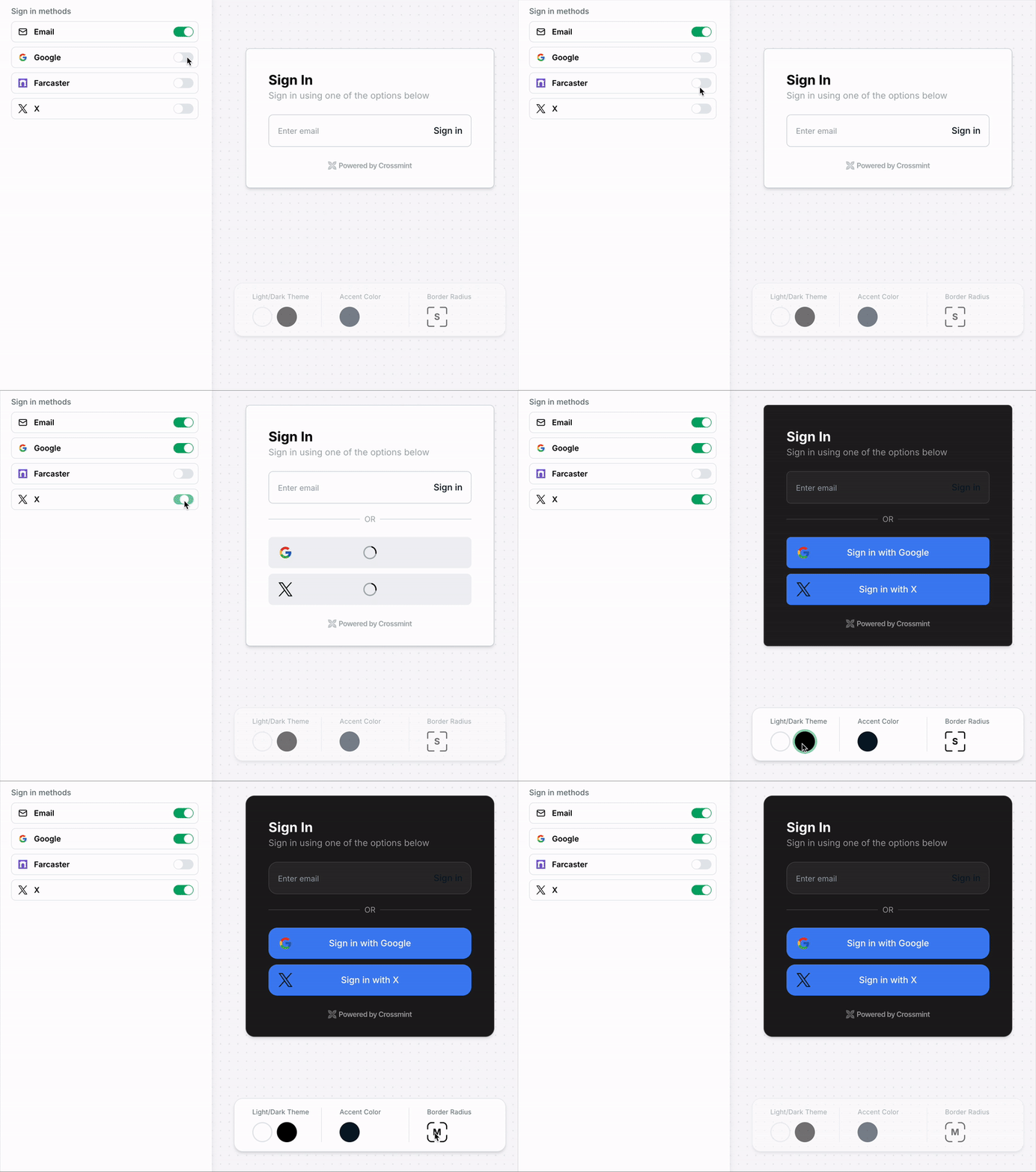
  <Step title="Format Login Component">
    Adjust the login component's style to match your application's design. You can experiment with it [here](https://playground.crossmint.com/wallets/auth).

    <Frame type="simple">
      <img src="https://mintcdn.com/crossmint/wfEo4Py0D7KOM99v/images/wallets/custom-auth.gif?s=43c99107135a5439851b969691b68c3f" alt="GIF of user login flow" width="800" height="604" data-path="images/wallets/custom-auth.gif" />
    </Frame>
  </Step>
</Steps>

<Note>
  This quickstart uses [Crossmint Auth](/authentication/introduction) for convenience. You can [bring your own auth provider](/wallets/guides/bring-your-own-auth), which is recommended for production scenarios.
</Note>

## Send Arbitrary Transaction

<Steps>
  <Step title="Specify the NFT Contract">
    Define the address and interface (ABI) of the NFT smart contract on Story Protocol.

    <CodeGroup>
      ```tsx components/utils.ts theme={null}
      export const NFT_CONTRACT_ADDRESS = "0x937bef10ba6fb941ed84b8d249abc76031429a9a" as const;
      export const NFT_CONTRACT_ABI = [
          {
              inputs: [
                  {
                      internalType: "address",
                      name: "recipient",
                      type: "address",
                  },
                  {
                      internalType: "string",
                      name: "tokenURI",
                      type: "string",
                  },
              ],
              name: "mintNFT",
              outputs: [
                  {
                      internalType: "uint256",
                      name: "",
                      type: "uint256",
                  },
              ],
              stateMutability: "nonpayable",
              type: "function",
          },
      ];
      ```
    </CodeGroup>
  </Step>

  <Step title="Create a React Component for the Transaction">
    Create a user-friendly interface that:

    * Displays the transaction status
    * Allows users to send an arbitrary transaction to the NFT contract
    * Displays the transaction hash and a link to the Story Explorer

    <CodeGroup>
      ```tsx components/SendTransactionComponent.tsx theme={null}
      import { EVMWallet, useWallet } from "@crossmint/client-sdk-react-ui";
      import React from "react";
      import { NFT_CONTRACT_ADDRESS, NFT_CONTRACT_ABI } from "./utils";
      import { encodeFunctionData } from "viem";

      export default function SendTransactionComponent() {
          const { wallet } = useWallet();
          const [txStatus, setTxStatus] = React.useState<'idle' | 'pending' | 'success' | 'error'>('idle');
          const [txError, setTxError] = React.useState<string | null>(null);
          const [tx, setTx] = React.useState<string | null>(null);

          if (wallet) {
              return (
                  <div className="max-w-md mx-auto bg-white rounded-xl  overflow-hidden p-6 space-y-4 ">

                      <button
                          onClick={async () => {
                              try {
                                  setTxStatus('pending');
                                  setTxError(null);
                                  const data = encodeFunctionData({
                                      abi: NFT_CONTRACT_ABI,
                                      functionName: "mintNFT",
                                      args: [wallet.address, "test-uri"],
                                  });

                                  const evmWallet = EVMWallet.from(wallet);
                                  const { hash: tx } = await evmWallet.sendTransaction({
                                      to: NFT_CONTRACT_ADDRESS,
                                      data: data,
                                  });
                                  setTx(tx);
                                  setTxStatus('success');
                              } catch (error) {
                                  setTxStatus('error');
                                  setTxError(error instanceof Error ? error.message : 'Transaction failed');
                                  setTx(null);
                              }
                          }}
                          disabled={txStatus === 'pending'}
                          className="w-full flex items-center justify-center space-x-2 bg-blue-600 hover:bg-blue-700 text-white px-4 py-2 rounded-lg transition-colors"
                      >
                          {txStatus === 'pending' ? (
                              <>
                                  <svg className="animate-spin -ml-1 mr-3 h-5 w-5 text-white" xmlns="http://www.w3.org/2000/svg" fill="none" viewBox="0 0 24 24">
                                      <circle className="opacity-25" cx="12" cy="12" r="10" stroke="currentColor" strokeWidth="4"></circle>
                                      <path className="opacity-75" fill="currentColor" d="M4 12a8 8 0 018-8V0C5.373 0 0 5.373 0 12h4zm2 5.291A7.962 7.962 0 014 12H0c0 3.042 1.135 5.824 3 7.938l3-2.647z"></path>
                                  </svg>
                                  <span>Processing...</span>
                              </>
                          ) : (
                              'Send Transaction'
                          )}
                      </button>

                      <div className="mt-4">
                          {txStatus === 'pending' && (
                              <div className="flex items-center space-x-2 text-amber-500">
                                  <svg className="animate-spin h-5 w-5" xmlns="http://www.w3.org/2000/svg" fill="none" viewBox="0 0 24 24">
                                      <circle className="opacity-25" cx="12" cy="12" r="10" stroke="currentColor" strokeWidth="4"></circle>
                                      <path className="opacity-75" fill="currentColor" d="M4 12a8 8 0 018-8V0C5.373 0 0 5.373 0 12h4zm2 5.291A7.962 7.962 0 014 12H0c0 3.042 1.135 5.824 3 7.938l3-2.647z"></path>
                                  </svg>
                                  <span>Transaction in progress...</span>
                              </div>
                          )}
                          {txStatus === 'success' && (
                              <div className="flex items-center space-x-2 text-emerald-600">
                                  <svg className="h-5 w-5" fill="none" stroke="currentColor" viewBox="0 0 24 24">
                                      <path strokeLinecap="round" strokeLinejoin="round" strokeWidth="2" d="M5 13l4 4L19 7"></path>
                                  </svg>
                                  <span>Transaction successful!</span>
                                  {tx && (
                                      <a
                                          href={`https://www.oklink.com/story-odyssey/tx/${tx}`}
                                          target="_blank"
                                          rel="noopener noreferrer"
                                          className="underline hover:text-emerald-700"
                                      >
                                          View in explorer
                                      </a>
                                  )}
                              </div>
                          )}
                          {txStatus === 'error' && (
                              <div className="flex items-center space-x-2 text-rose-500">
                                  <svg className="h-5 w-5" fill="none" stroke="currentColor" viewBox="0 0 24 24">
                                      <path strokeLinecap="round" strokeLinejoin="round" strokeWidth="2" d="M6 18L18 6M6 6l12 12"></path>
                                  </svg>
                                  <span>Transaction failed: {txError}</span>
                              </div>
                          )}
                      </div>
                  </div>
              );
          }
          return null;
      }
      ```
    </CodeGroup>
  </Step>

  <Step title="Add the Transaction Component to the App">
    Incorporate the transaction component into the main wallet interface, using the `useWallet` hook to manage wallet state and pass it to the transaction component.

    <CodeGroup>
      ```tsx app/components/WalletComponent.tsx theme={null}
      export default function WalletComponent() {
          const { wallet, status, error } = useWallet();
          return (
              <>
                  <Card className="p-4">
                      <Status wallet={wallet} status={status} error={error} />
                  </Card>
                  <SendTransactionComponent wallet={wallet} />
              </>
          );
      }
      ```
    </CodeGroup>
  </Step>
</Steps>