> ## Documentation Index
> Fetch the complete documentation index at: https://docs.crossmint.com/llms.txt
> Use this file to discover all available pages before exploring further.
# Cover Transaction Fees for Your Users
> Sponsor gas fees so users can transact without holding native tokens
Gas sponsorship lets you cover the transaction fees (gas) for your users' blockchain interactions. By removing the need for users to hold native tokens for gas, you can reduce friction and improve conversion rates for both human users and AI agents interacting with your application.
By default, gas sponsorship is **enabled** for all wallets without writing any code.
Crossmint handles:
* Sponsoring the transaction fees on your behalf
* Maintaining a treasury to cover the gas costs
* Securely verifying and rate-limiting each transaction to prevent abuse
* Protecting against common attack vectors when sponsoring gas on chains like Solana
* Calculating optimal fees to ensure transactions land without overpaying
## Prerequisites
* A Crossmint project with wallets enabled
* Access to the Crossmint Console
## Enable or Disable Gas Sponsorship
You can disable or re-enable gas sponsorship in the Console.
Open the Crossmint Console and go to **Wallets → Settings**.
Use the toggle to enable or disable gas sponsorship for your project.
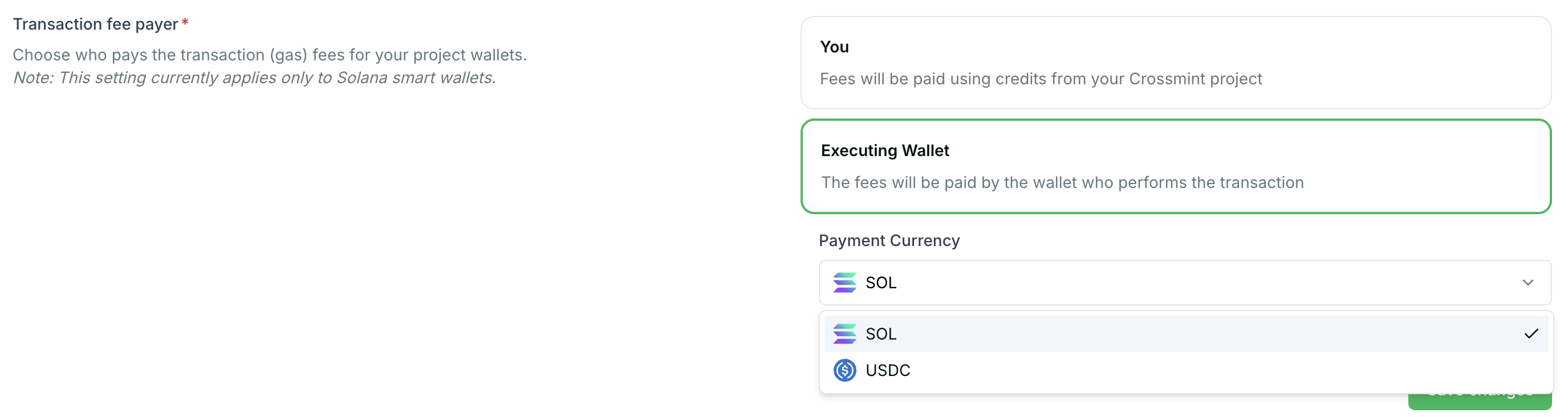
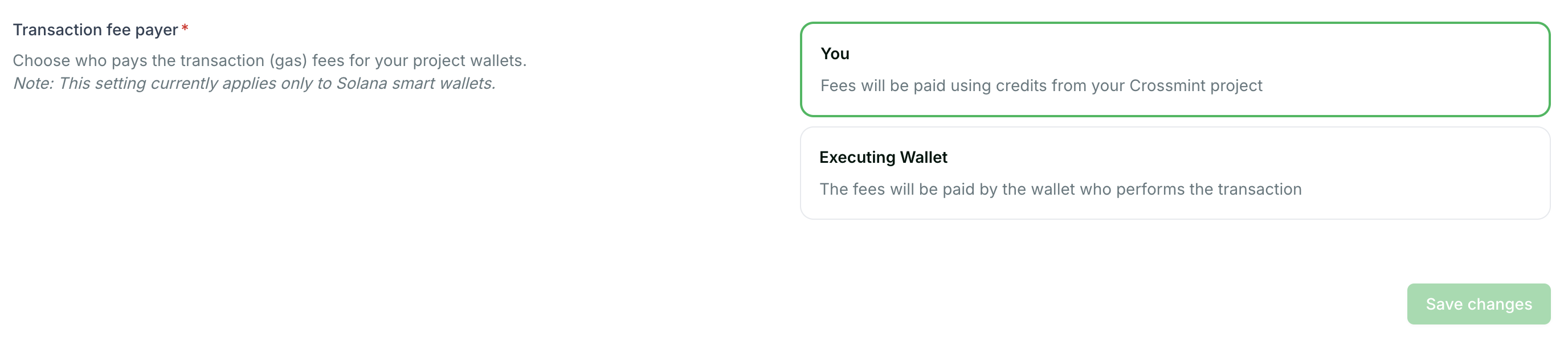 When using Solana as a chain, if you disable sponsorship, you can configure whether users pay gas in SOL or USDC.
 ## Set Spending Limits
Configuring per-user spending limits for gas sponsorship is available under private access. Contact Crossmint to enable this feature for your project.
## Monitor Sponsored Transactions
You can track gas sponsorship usage and costs through the Crossmint Console and webhooks.
### View usage in the Console
The Crossmint Console provides an overview of your gas sponsorship usage, including total gas sponsored, number of transactions, and costs over time. Navigate to **Wallets → Settings** to view your current usage statistics.
### Track transactions with webhooks
For real-time monitoring, set up webhooks to receive notifications when transactions are sponsored. The `wallets.transfer.out` event includes information about the transaction and its gas costs.
```typescript theme={null}
// Partial type showing fields used in this example.
// See /wallets/guides/webhooks for the full schema.
type TransferWebhookEvent = {
type: string;
data: {
status: string;
recipient: { address: string };
token: { amount: string; symbol: string };
onChain: { explorerLink: string };
};
};
async function processTransferEvent(
event: TransferWebhookEvent
) {
const { type, data } = event;
if (
type === "wallets.transfer.out" &&
data.status === "succeeded"
) {
console.log("Sponsored transaction completed:");
console.log(` To: ${data.recipient.address}`);
console.log(` Amount: ${data.token.amount} ${data.token.symbol}`);
console.log(` Explorer: ${data.onChain.explorerLink}`);
}
}
```
For complete webhook setup instructions, see the [Transfer Webhooks Setup](/wallets/guides/webhooks) guide.
## Best Practices
* **Start with sponsorship enabled**: Gas sponsorship significantly improves user experience and conversion rates, especially for users new to blockchain
* **Monitor usage regularly**: Keep track of your gas sponsorship costs to ensure they align with your budget
* **Set appropriate limits**: Once spending limits are enabled for your project, configure them based on your expected user behavior to prevent abuse
* **Use webhooks for real-time tracking**: Set up webhooks to monitor sponsored transactions and detect any unusual patterns
## Learn More
Set up real-time notifications for wallet transfers
Learn how to send tokens between wallets
Query token balances across your wallets
Learn about Crossmint webhooks
## Set Spending Limits
Configuring per-user spending limits for gas sponsorship is available under private access. Contact Crossmint to enable this feature for your project.
## Monitor Sponsored Transactions
You can track gas sponsorship usage and costs through the Crossmint Console and webhooks.
### View usage in the Console
The Crossmint Console provides an overview of your gas sponsorship usage, including total gas sponsored, number of transactions, and costs over time. Navigate to **Wallets → Settings** to view your current usage statistics.
### Track transactions with webhooks
For real-time monitoring, set up webhooks to receive notifications when transactions are sponsored. The `wallets.transfer.out` event includes information about the transaction and its gas costs.
```typescript theme={null}
// Partial type showing fields used in this example.
// See /wallets/guides/webhooks for the full schema.
type TransferWebhookEvent = {
type: string;
data: {
status: string;
recipient: { address: string };
token: { amount: string; symbol: string };
onChain: { explorerLink: string };
};
};
async function processTransferEvent(
event: TransferWebhookEvent
) {
const { type, data } = event;
if (
type === "wallets.transfer.out" &&
data.status === "succeeded"
) {
console.log("Sponsored transaction completed:");
console.log(` To: ${data.recipient.address}`);
console.log(` Amount: ${data.token.amount} ${data.token.symbol}`);
console.log(` Explorer: ${data.onChain.explorerLink}`);
}
}
```
For complete webhook setup instructions, see the [Transfer Webhooks Setup](/wallets/guides/webhooks) guide.
## Best Practices
* **Start with sponsorship enabled**: Gas sponsorship significantly improves user experience and conversion rates, especially for users new to blockchain
* **Monitor usage regularly**: Keep track of your gas sponsorship costs to ensure they align with your budget
* **Set appropriate limits**: Once spending limits are enabled for your project, configure them based on your expected user behavior to prevent abuse
* **Use webhooks for real-time tracking**: Set up webhooks to monitor sponsored transactions and detect any unusual patterns
## Learn More
Set up real-time notifications for wallet transfers
Learn how to send tokens between wallets
Query token balances across your wallets
Learn about Crossmint webhooks