> ## Documentation Index
> Fetch the complete documentation index at: https://docs.crossmint.com/llms.txt
> Use this file to discover all available pages before exploring further.

# Reap Card Issuance

> Issue virtual cards with Reap and fund them from Crossmint wallets

This guide explains how to issue a virtual card with the <a href="https://docs.reap.global/" target="_blank">Reap</a> Card Issuing API and fund it from a Crossmint wallet. Reap issues cards under a Program-Funded model: your program holds collateral in a Reap master account, and each user's spending power is tracked as a Reap balance that your backend credits after the user moves stablecoins out of their Crossmint wallet.

You will build a Next.js app where a user signs in with Crossmint, gets a wallet on Base Sepolia, passes Reap KYC, receives a virtual card, funds it by sending stablecoins to your program treasury, and views the card details through Reap's secure reveal. The same funding path works for wallets controlled by AI agents, which lets an agent top up a card from its stablecoin balance.

## Prerequisites

To use Reap with Crossmint wallets, you need:

* **Crossmint wallet:** a [wallet](/wallets/guides/create-wallet) on Base Sepolia
* **Crossmint API key:** a **staging** **Client API Key** with the scopes `users.create`, `users.read`, `wallets.create`, `wallets.read`, `wallets:transactions.create`, `wallets:transactions.sign`, `wallets:balance.read`, and `wallets.fund` (create in the <a href="https://console.crossmint.com/" target="_blank">Crossmint Console</a>). In staging, all scopes are included by default.
* **Reap API key:** a sandbox API key for a Program-Funded project, issued by Reap (see the <a href="https://docs.reap.global/api-reference/overview" target="_blank">Reap API overview</a>)
* **Next.js project:** an App Router project with the Crossmint React SDK installed

<Snippet file="client-sdk-react-ui-installation-cmd.mdx" />

This guide uses Base Sepolia and the Reap sandbox as examples. To follow along, you will also need:

* **Test tokens:** USDXM in the wallet from `wallet.stagingFund()` (see [Fund a Staging Wallet](/wallets/guides/fund-staging-wallet))
* **Program treasury:** an EVM address your program controls on Base Sepolia that receives user deposits
* **Gas:** ETH on Base Sepolia for gas fees (not required if [gas sponsorship](/wallets/guides/gas-sponsorship) is enabled)

In production, Reap collateralizes the master account with stablecoins or bank transfers, users complete Reap's hosted KYC, and your backend credits balances from real deposits. Contact <a href="https://www.crossmint.com/contact/sales" target="_blank">Crossmint Sales</a> to get connected with the Reap team.

## What You Will Build

High-level steps:

1. Set up Crossmint authentication and wallet providers.
2. Build a server-side Reap client.
3. Create the Reap user, complete KYC, and issue a virtual card.
4. Fund the card from the Crossmint wallet.
5. Simulate a purchase and reveal the card.

<Note>
  Reap's sandbox exposes `/simulation/*` endpoints for KYC approval, collateral deposits, and card authorizations. These
  endpoints do not exist in production and are marked as sandbox only below.
</Note>

## Set Up Crossmint

<Steps>
  <Step title="Configure the providers">
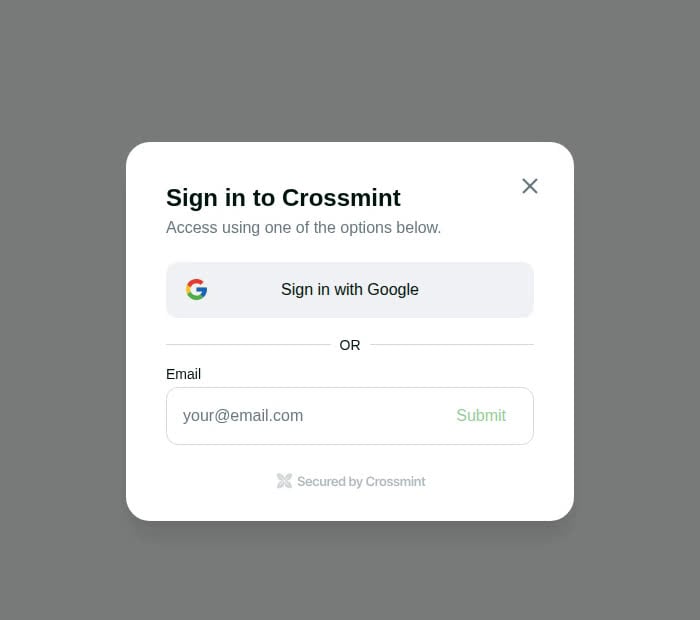
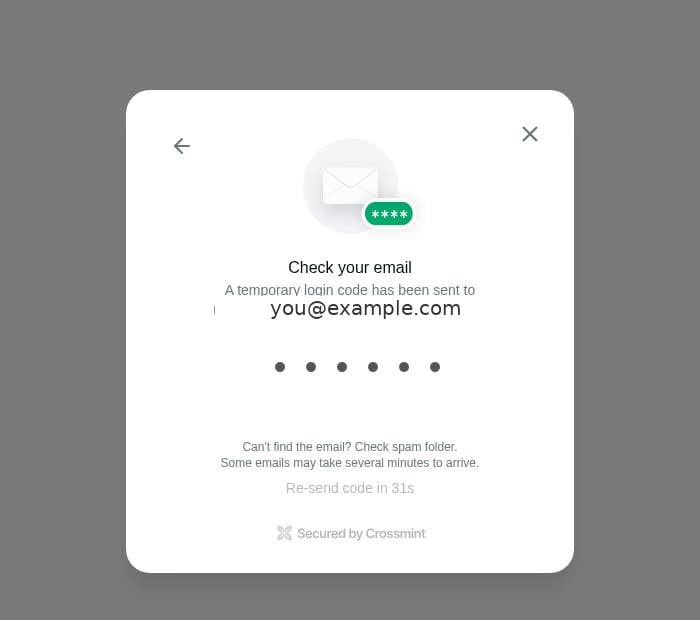
    Wrap your app with the Crossmint providers so users can sign in and receive a wallet on Base Sepolia. This example uses [Crossmint Auth](/authentication/introduction); for production you can also [bring your own auth](/wallets/guides/bring-your-own-auth).

    ```tsx app/providers.tsx theme={null}
    "use client";

    import {
        CrossmintProvider,
        CrossmintAuthProvider,
        CrossmintWalletProvider,
    } from "@crossmint/client-sdk-react-ui";

    export function Providers({ children }: { children: React.ReactNode }) {
        return (
            <CrossmintProvider apiKey={process.env.NEXT_PUBLIC_CROSSMINT_API_KEY ?? ""}>
                <CrossmintAuthProvider loginMethods={["email", "google"]}>
                    <CrossmintWalletProvider
                        createOnLogin={{
                            chain: "base-sepolia",
                            recovery: { type: "email" },
                        }}
                    >
                        {children}
                    </CrossmintWalletProvider>
                </CrossmintAuthProvider>
            </CrossmintProvider>
        );
    }
    ```

    <Columns cols={2}>
      <Frame type="simple">
        <img src="https://mintcdn.com/crossmint/6hYOq7sXCzkCGZDa/images/wallets/wallet-extensions/reap/login.jpg?fit=max&auto=format&n=6hYOq7sXCzkCGZDa&q=85&s=bc7253fe122e5c8cbfcb607013a0c169" alt="Crossmint sign-in modal with Google and email options" width="700" height="620" data-path="images/wallets/wallet-extensions/reap/login.jpg" />
      </Frame>

      <Frame type="simple">
        <img src="https://mintcdn.com/crossmint/6hYOq7sXCzkCGZDa/images/wallets/wallet-extensions/reap/otp.jpg?fit=max&auto=format&n=6hYOq7sXCzkCGZDa&q=85&s=7e6fbf1a453c11f9061c6738193b8834" alt="Crossmint one-time code screen after submitting an email" width="700" height="620" data-path="images/wallets/wallet-extensions/reap/otp.jpg" />
      </Frame>
    </Columns>

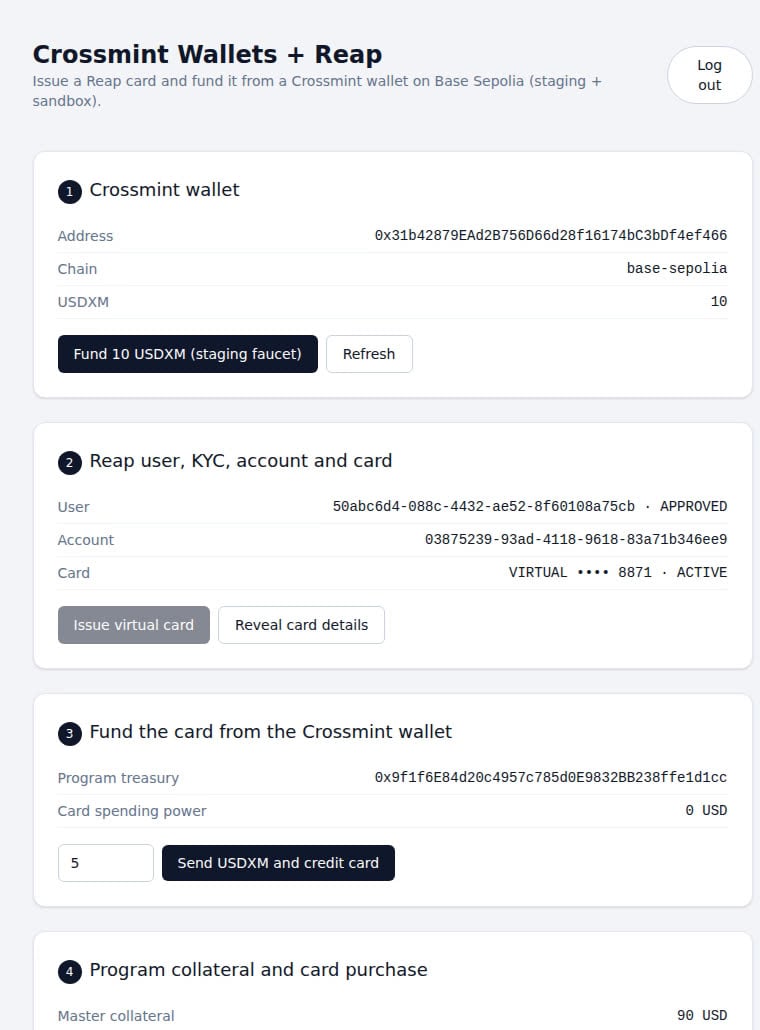
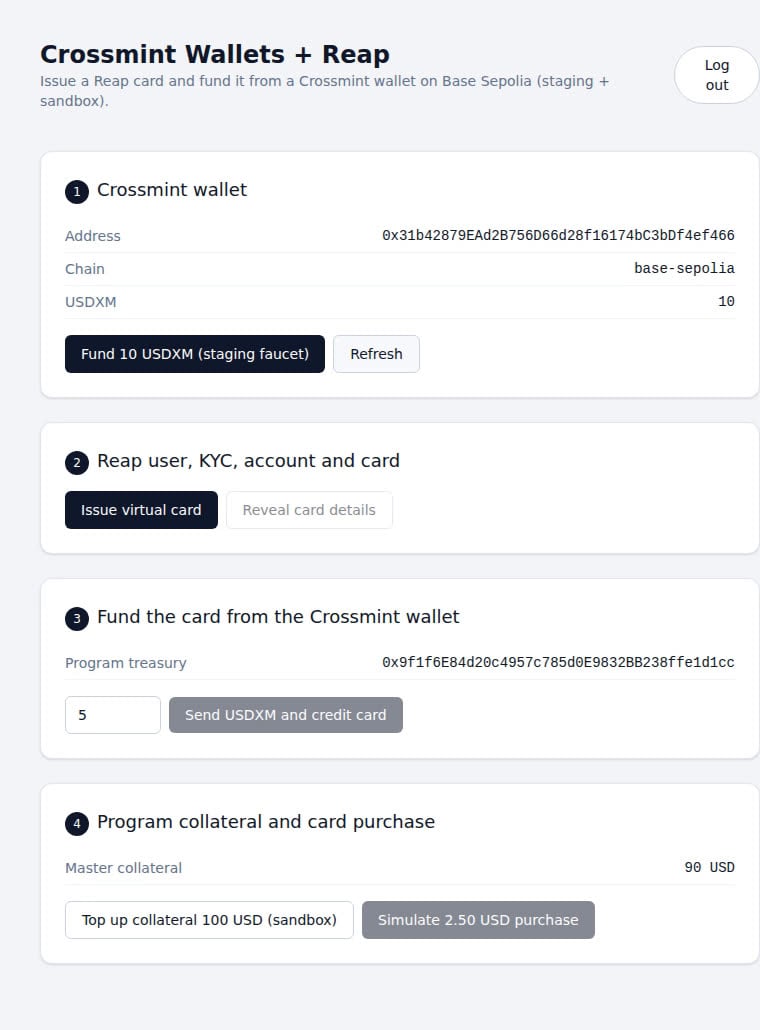
    After login, the wallet card shows the `base-sepolia` address and the USDXM balance:

    <Frame type="simple" caption="Wallet created on login and funded with 10 USDXM from the staging faucet">
      <img src="https://mintcdn.com/crossmint/6hYOq7sXCzkCGZDa/images/wallets/wallet-extensions/reap/wallet-funded.jpg?fit=max&auto=format&n=6hYOq7sXCzkCGZDa&q=85&s=908dcdd7c19ff9be843aaea3d085d229" alt="Demo app showing the Crossmint wallet address, base-sepolia chain, and a 10 USDXM balance after the staging faucet" width="760" height="1030" data-path="images/wallets/wallet-extensions/reap/wallet-funded.jpg" />
    </Frame>
  </Step>

  <Step title="Add environment variables">
    The Reap API key is only read in server actions, so it has no `NEXT_PUBLIC_` prefix.

    ```bash .env.local theme={null}
    NEXT_PUBLIC_CROSSMINT_API_KEY=YOUR_CROSSMINT_CLIENT_API_KEY
    NEXT_PUBLIC_PROGRAM_TREASURY_ADDRESS=YOUR_TREASURY_ADDRESS

    REAP_API_KEY=YOUR_REAP_API_KEY
    REAP_API_URL=https://sg.sandbox.api.reap.global
    TREASURY_TOKEN_ADDRESSES=0x14196f08a4fa0b66b7331bc40dd6bcd8a1deea9f
    ```

    `TREASURY_TOKEN_ADDRESSES` lists the stablecoin contracts your treasury accepts; the value above is USDXM on `base-sepolia`.
  </Step>
</Steps>

## Build the Reap Integration Layer

Reap authenticates with a bearer token and pins the API version through the `Reap-Version` header. Create-style requests also require an `Idempotency-Key`. Keep every Reap call in Next.js server actions so the API key never reaches the browser.

<Steps>
  <Step title="Create a Reap client">
    ```typescript actions/reap.ts theme={null}
    "use server";

    import { randomUUID } from "crypto";

    const REAP_API_URL = process.env.REAP_API_URL ?? "https://sg.sandbox.api.reap.global";
    const REAP_VERSION = "2025-02-14";

    interface ReapError {
        error?: { code?: string; message?: string };
    }

    async function reap<T>(
        path: string,
        init: { method?: "GET" | "POST"; body?: object; idempotencyKey?: string } = {}
    ): Promise<T> {
        const apiKey = process.env.REAP_API_KEY;
        if (apiKey == null) {
            throw new Error("REAP_API_KEY is not set");
        }
        const headers: Record<string, string> = {
            Authorization: `Bearer ${apiKey}`,
            "Reap-Version": REAP_VERSION,
            "Content-Type": "application/json",
        };
        if (init.idempotencyKey != null) {
            headers["Idempotency-Key"] = init.idempotencyKey;
        }
        const response = await fetch(`${REAP_API_URL}${path}`, {
            method: init.method ?? "GET",
            headers,
            body: init.body == null ? undefined : JSON.stringify(init.body),
            cache: "no-store",
        });
        if (response.status === 204) {
            return undefined as T;
        }
        const json = (await response.json()) as T & ReapError;
        if (!response.ok) {
            const code = json.error?.code ?? response.status;
            const message = json.error?.message ?? response.statusText;
            throw new Error(`Reap ${init.method ?? "GET"} ${path} failed: ${code} ${message}`);
        }
        return json;
    }
    ```
  </Step>

  <Step title="Add user, account, and card operations">
    Store the Crossmint wallet address as Reap's `externalId` so a returning user maps to the same Reap user. List endpoints return results under `items`.

    ```typescript actions/reap.ts theme={null}
    // Uses the reap client from the previous step

    export interface ReapUser {
        id: string;
        email: string;
        application: { status: "NOT_STARTED" | "PENDING" | "IN_REVIEW" | "APPROVED" | "REJECTED" } | null;
    }

    export interface ReapAccount {
        id: string;
        ownerId: string;
        status: string;
    }

    export interface ReapCard {
        id: string;
        accountId: string;
        type: "VIRTUAL" | "PHYSICAL";
        status: string;
        last4: string;
    }

    export async function findOrCreateReapUser(params: {
        walletAddress: string;
        email: string;
        firstName: string;
        lastName: string;
        phoneNumber: string;
    }): Promise<ReapUser> {
        const existing = await reap<{ items: ReapUser[] }>(
            `/users?externalId=${encodeURIComponent(params.walletAddress)}`
        );
        if (existing.items.length > 0) {
            return existing.items[0];
        }
        return reap<ReapUser>("/users", {
            method: "POST",
            idempotencyKey: randomUUID(),
            body: {
                externalId: params.walletAddress,
                email: params.email,
                firstName: params.firstName,
                lastName: params.lastName,
                phoneNumber: params.phoneNumber,
            },
        });
    }

    export async function getReapUser(userId: string): Promise<ReapUser> {
        return reap<ReapUser>(`/users/${userId}`);
    }

    // Sandbox only. In production, users complete KYC through Reap's hosted flow.
    export async function simulateKycApproval(userId: string): Promise<void> {
        await reap<void>(`/simulation/users/${userId}/application`, {
            method: "POST",
            body: { status: "APPROVED" },
        });
    }

    export async function findOrCreateReapAccount(userId: string): Promise<ReapAccount> {
        const existing = await reap<{ items: ReapAccount[] }>(`/accounts?ownerType=USER&ownerId=${userId}`);
        if (existing.items.length > 0) {
            return existing.items[0];
        }
        return reap<ReapAccount>("/accounts", {
            method: "POST",
            idempotencyKey: randomUUID(),
            body: { ownerId: userId },
        });
    }

    export async function findOrCreateVirtualCard(params: {
        userId: string;
        accountId: string;
    }): Promise<ReapCard> {
        const existing = await reap<{ items: ReapCard[] }>(`/cards?accountId=${params.accountId}`);
        const active = existing.items.find((card) => card.status === "ACTIVE");
        if (active != null) {
            return active;
        }
        return reap<ReapCard>("/cards", {
            method: "POST",
            idempotencyKey: randomUUID(),
            body: { userId: params.userId, accountId: params.accountId, type: "VIRTUAL" },
        });
    }
    ```
  </Step>

  <Step title="Add balance, funding, and reveal operations">
    A Program-Funded project mirrors each user's spending power as a Reap Virtual Asset balance. Create one fixed 1:1 USD asset for the project and post a `DEPOSIT` against the user's account after their on-chain transfer settles.

    ```typescript actions/reap.ts theme={null}
    // Uses the reap client from the previous step

    export interface ReapBalance {
        currency: string;
        availableBalance: number;
        totalAssetValue: number;
        liabilities: { cardDebt: { pending: number; cleared: number; total: number } };
    }

    export async function getReapBalance(accountId: string): Promise<ReapBalance> {
        return reap<ReapBalance>(`/accounts/${accountId}/balance`);
    }

    async function findOrCreateUsdVirtualAsset(): Promise<{ id: string }> {
        const symbol = "XUSD";
        const existing = await reap<{ items: { id: string; symbol: string }[] }>("/virtual-assets");
        const match = existing.items.find((asset) => asset.symbol === symbol);
        if (match != null) {
            return match;
        }
        return reap<{ id: string }>("/virtual-assets", {
            method: "POST",
            idempotencyKey: randomUUID(),
            body: { symbol, name: "Program USD", decimals: 6, rateSource: "FIXED", rate: "1" },
        });
    }

    // Derive idempotencyKey from the verified on-chain transfer so a retried call
    // returns the original posting instead of crediting the deposit twice.
    export async function creditReapAccount(params: { accountId: string; amount: string; idempotencyKey: string }) {
        const asset = await findOrCreateUsdVirtualAsset();
        return reap<{ id: string; type: string }>("/postings", {
            method: "POST",
            idempotencyKey: params.idempotencyKey,
            body: {
                accountId: params.accountId,
                type: "DEPOSIT",
                entries: [{ virtualAssetId: asset.id, amount: params.amount }],
            },
        });
    }

    // Sandbox only. In production, collateralize the master account through Reap.
    export async function simulateCollateralTopUp(amount: number) {
        return reap<{ id: string; status: string; amount: number }>("/simulation/fiat-deposits", {
            method: "POST",
            body: { amount, currency: "USD", senderName: "Program Treasury" },
        });
    }

    export async function createCardRevealUrl(cardId: string): Promise<{ revealUrl: string; expiresAt: string }> {
        return reap(`/cards/${cardId}/reveal`, { method: "POST", body: {} });
    }
    ```

    <Warning>
      These actions are callable from the browser and run with your program's Reap API key. Before production, every
      action must verify the signed-in Crossmint user (for example by validating the Crossmint JWT on the server) and
      only act on the Reap user, account, and card that belong to that user. Never accept an `accountId`, `cardId`, or
      `amount` from the client without that ownership check. The PoC omits this to keep the flow short.
    </Warning>
  </Step>

  <Step title="Verify the deposit on-chain">
    Before crediting Reap, confirm that the user's transaction to the program treasury succeeded and read the transferred amount from the ERC-20 `Transfer` event. Only accept transfers emitted by the stablecoin contracts you trust (USDXM in staging, USDC in production) and sent from the signed-in user's wallet; otherwise any token transfer to the treasury would count as USD funding.

    ```typescript actions/treasury.ts theme={null}
    "use server";

    const RPC_URL = process.env.BASE_SEPOLIA_RPC_URL ?? "https://sepolia.base.org";
    const TRANSFER_TOPIC = "0xddf252ad1be2c89b69c2b068fc378daa952ba7f163c4a11628f55a4df523b3ef";
    const TOKEN_DECIMALS = 6;
    // Comma-separated list of ERC-20 contracts accepted as USD, for example USDXM on base-sepolia
    const ACCEPTED_TOKENS = (process.env.TREASURY_TOKEN_ADDRESSES ?? "").toLowerCase().split(",");

    interface Receipt {
        status: string;
        logs: { address: string; topics: string[]; data: string; logIndex: string }[];
    }

    function topicToAddress(topic: string): string {
        return `0x${topic.slice(26)}`.toLowerCase();
    }

    export async function confirmTreasuryDeposit(
        transactionHash: string,
        senderAddress: string
    ): Promise<{ amount: string; tokenAddress: string; depositKey: string }> {
        const treasury = process.env.NEXT_PUBLIC_PROGRAM_TREASURY_ADDRESS;
        if (treasury == null) {
            throw new Error("NEXT_PUBLIC_PROGRAM_TREASURY_ADDRESS is not set");
        }

        let receipt: Receipt | null = null;
        for (let attempt = 0; attempt < 15 && receipt == null; attempt++) {
            const response = await fetch(RPC_URL, {
                method: "POST",
                headers: { "Content-Type": "application/json" },
                body: JSON.stringify({
                    jsonrpc: "2.0",
                    id: 1,
                    method: "eth_getTransactionReceipt",
                    params: [transactionHash],
                }),
                cache: "no-store",
            });
            const json = (await response.json()) as { result: Receipt | null };
            receipt = json.result;
            if (receipt == null) {
                await new Promise((resolve) => setTimeout(resolve, 2000));
            }
        }
        if (receipt == null) {
            throw new Error(`Transaction ${transactionHash} was not found on chain`);
        }
        if (receipt.status !== "0x1") {
            throw new Error(`Transaction ${transactionHash} reverted`);
        }

        const transfer = receipt.logs.find(
            (log) =>
                log.topics[0] === TRANSFER_TOPIC &&
                ACCEPTED_TOKENS.includes(log.address.toLowerCase()) &&
                topicToAddress(log.topics[1]) === senderAddress.toLowerCase() &&
                topicToAddress(log.topics[2]) === treasury.toLowerCase()
        );
        if (transfer == null) {
            throw new Error("No accepted stablecoin transfer from the user to the program treasury in this transaction");
        }

        const raw = BigInt(transfer.data);
        const unit = BigInt(10) ** BigInt(TOKEN_DECIMALS);
        const whole = raw / unit;
        const fraction = (raw % unit).toString().padStart(TOKEN_DECIMALS, "0").replace(/0+$/, "");
        return {
            amount: fraction === "" ? whole.toString() : `${whole}.${fraction}`,
            tokenAddress: transfer.address,
            depositKey: `${transactionHash}:${transfer.logIndex}`,
        };
    }
    ```
  </Step>
</Steps>

## Issue and Fund the Card

<Steps>
  <Step title="Create the user, approve KYC, and issue a card">
    Reap's sandbox KYC simulation is asynchronous: the request returns `204` immediately and the application flips to `APPROVED` a few seconds later, so poll the user until it does.

    ```tsx components/reap-card.tsx theme={null}
    "use client";

    import { useState } from "react";
    import { useCrossmintAuth, useWallet } from "@crossmint/client-sdk-react-ui";
    import {
        findOrCreateReapAccount,
        findOrCreateReapUser,
        findOrCreateVirtualCard,
        getReapUser,
        simulateKycApproval,
        type ReapAccount,
        type ReapCard,
    } from "@/actions/reap";

    const KYC_POLL_MS = 5000;
    const KYC_POLL_ATTEMPTS = 24;

    export function ReapCard() {
        const { wallet } = useWallet();
        const { user } = useCrossmintAuth();
        const [account, setAccount] = useState<ReapAccount | null>(null);
        const [card, setCard] = useState<ReapCard | null>(null);

        const setUpCard = async () => {
            if (wallet == null || user?.email == null) {
                return;
            }
            let reapUser = await findOrCreateReapUser({
                walletAddress: wallet.address,
                email: user.email,
                firstName: "Jane",
                lastName: "Doe",
                phoneNumber: "+14155550123",
            });

            if (reapUser.application?.status !== "APPROVED") {
                await simulateKycApproval(reapUser.id);
                for (let i = 0; i < KYC_POLL_ATTEMPTS; i++) {
                    await new Promise((resolve) => setTimeout(resolve, KYC_POLL_MS));
                    reapUser = await getReapUser(reapUser.id);
                    if (reapUser.application?.status === "APPROVED") {
                        break;
                    }
                }
                if (reapUser.application?.status !== "APPROVED") {
                    throw new Error(`KYC still ${reapUser.application?.status ?? "missing"}`);
                }
            }

            const reapAccount = await findOrCreateReapAccount(reapUser.id);
            setAccount(reapAccount);
            setCard(await findOrCreateVirtualCard({ userId: reapUser.id, accountId: reapAccount.id }));
        };

        return (
            <div>
                <button onClick={setUpCard}>Issue virtual card</button>
                {card != null && <p>Card •••• {card.last4} · {card.status}</p>}
            </div>
        );
    }
    ```

    <Frame type="simple" caption="User approved, account active, and virtual card issued">
      <img src="https://mintcdn.com/crossmint/6hYOq7sXCzkCGZDa/images/wallets/wallet-extensions/reap/card-issued.jpg?fit=max&auto=format&n=6hYOq7sXCzkCGZDa&q=85&s=0df7bd99747db93d8d7cf5e9acfc2158" alt="Demo app showing a Reap user with APPROVED status, an ACTIVE account, and an ACTIVE virtual card ending in 8871" width="760" height="1030" data-path="images/wallets/wallet-extensions/reap/card-issued.jpg" />
    </Frame>

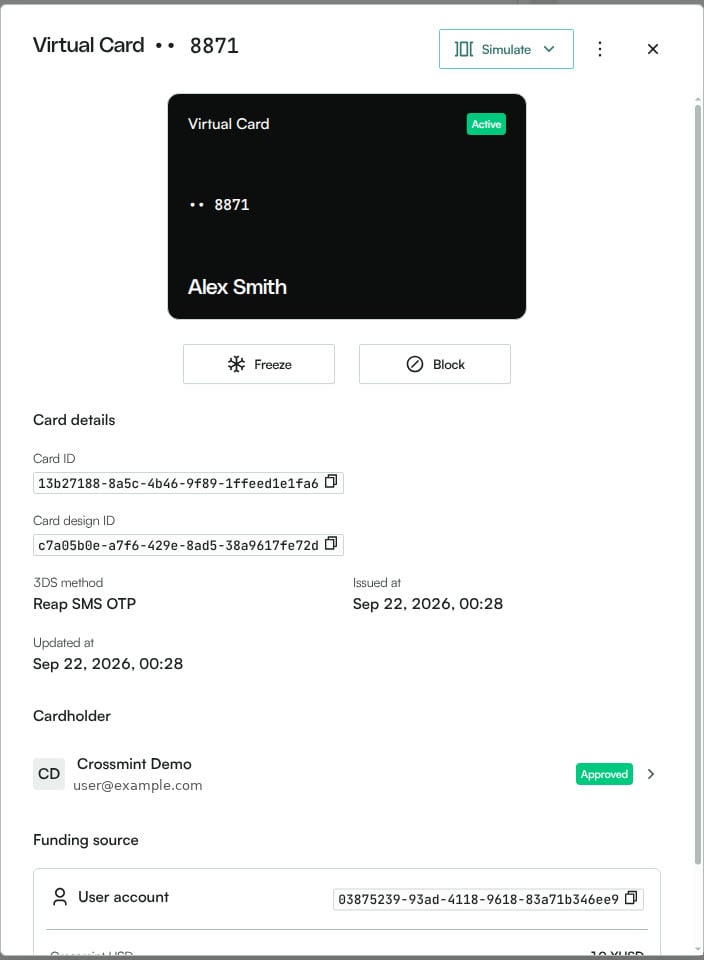
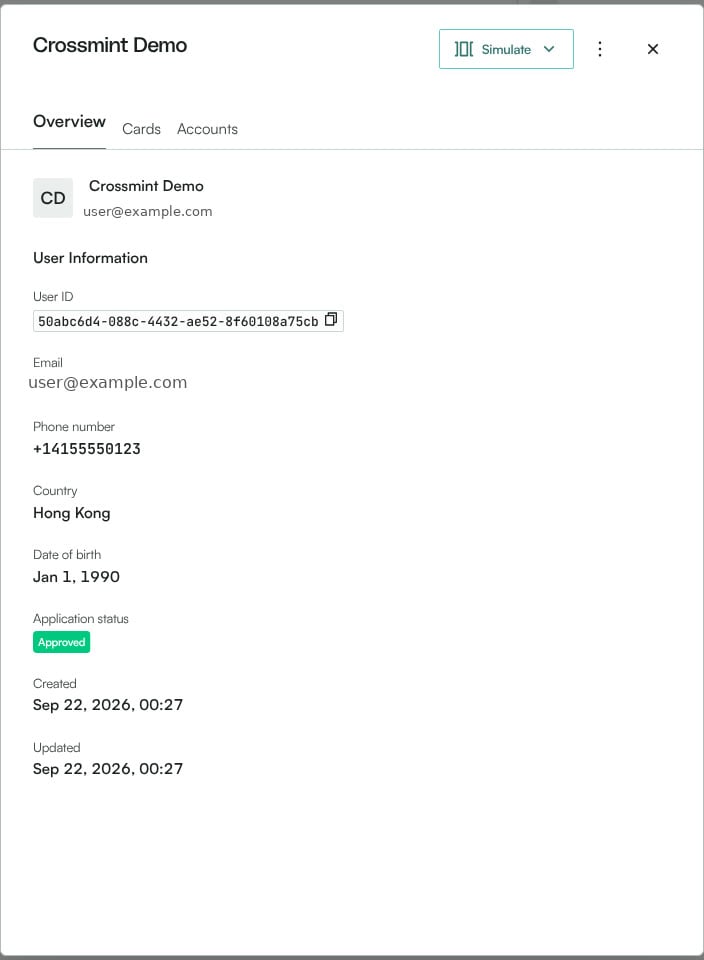
    The same objects appear in the Reap platform under **Users** and **Cards** (sandbox):
    <Columns cols={2}>
      <Frame type="simple">
        <img src="https://mintcdn.com/crossmint/6hYOq7sXCzkCGZDa/images/wallets/wallet-extensions/reap/console-user.jpg?fit=max&auto=format&n=6hYOq7sXCzkCGZDa&q=85&s=32e6e5eb4dd64afd63e8cf97441babc7" alt="Reap platform user drawer showing the user ID, country, and an Approved application status" width="704" height="960" data-path="images/wallets/wallet-extensions/reap/console-user.jpg" />
      </Frame>

      <Frame type="simple">
        <img src="https://mintcdn.com/crossmint/6hYOq7sXCzkCGZDa/images/wallets/wallet-extensions/reap/console-card.jpg?fit=max&auto=format&n=6hYOq7sXCzkCGZDa&q=85&s=914c487095e5835d8c0f96d0645bbe5d" alt="Reap platform card drawer showing an Active virtual card, card ID, cardholder, and the user account as funding source" width="704" height="960" data-path="images/wallets/wallet-extensions/reap/console-card.jpg" />
      </Frame>
    </Columns>
  </Step>

  <Step title="Fund the card from the wallet">
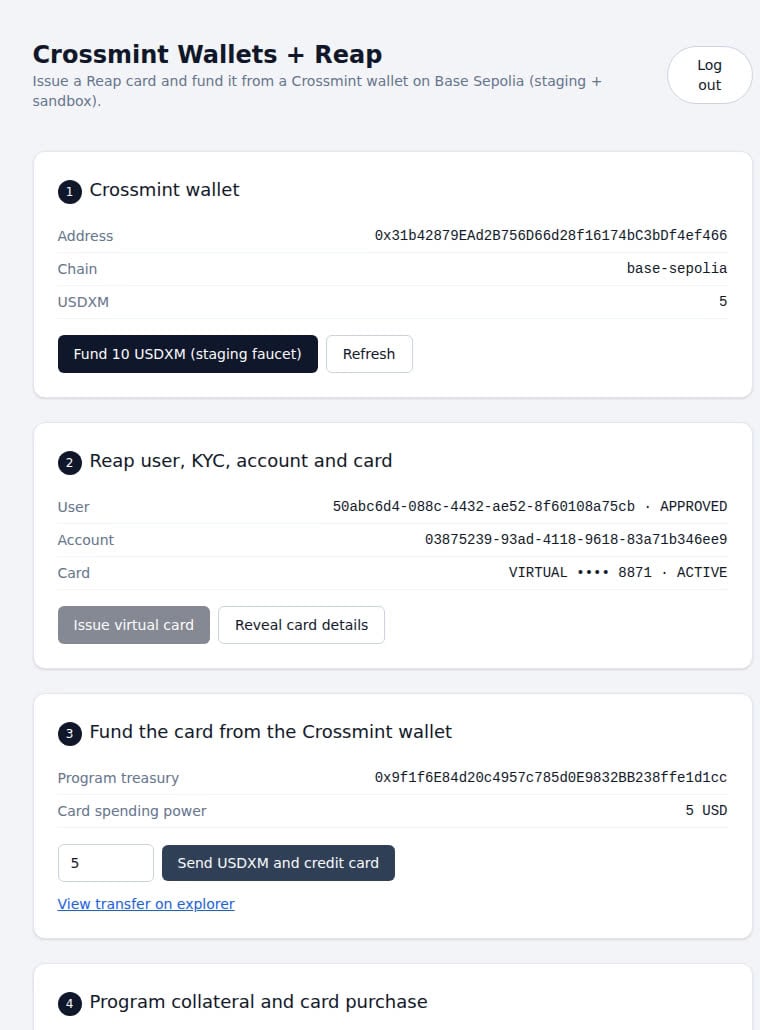
    Send stablecoins from the Crossmint wallet to your program treasury, confirm the receipt on-chain, then mirror the amount into Reap. In staging, `wallet.stagingFund()` mints USDXM, so read and send `"usdxm"`; in production use `"usdc"`.

    ```tsx components/reap-card.tsx theme={null}
    // Uses the component state from the previous step
    import { confirmTreasuryDeposit } from "@/actions/treasury";
    import { creditReapAccount, getReapBalance } from "@/actions/reap";

    const TREASURY = process.env.NEXT_PUBLIC_PROGRAM_TREASURY_ADDRESS ?? "";
    const STABLECOIN = "usdxm";

    const fundCard = async (amount: string) => {
        if (wallet == null || account == null) {
            return;
        }
        await wallet.stagingFund(10);

        const tx = await wallet.send(TREASURY, STABLECOIN, amount);
        const deposit = await confirmTreasuryDeposit(tx.hash, wallet.address);
        await creditReapAccount({ accountId: account.id, amount: deposit.amount, idempotencyKey: deposit.depositKey });

        const balance = await getReapBalance(account.id);
        console.log(`Spending power: ${balance.availableBalance} ${balance.currency}`);
    };

    // Add to the component's returned JSX
    {account != null && <button onClick={() => fundCard("5")}>Fund card with 5 {STABLECOIN.toUpperCase()}</button>}
    ```

    <Frame type="simple" caption="5 USDXM sent to the treasury and mirrored as 5 USD of Reap spending power">
      <img src="https://mintcdn.com/crossmint/6hYOq7sXCzkCGZDa/images/wallets/wallet-extensions/reap/card-funded.jpg?fit=max&auto=format&n=6hYOq7sXCzkCGZDa&q=85&s=a7fe6897e160dbadc5e97b3650234915" alt="Demo app showing the wallet balance reduced to 5 USDXM and Reap card spending power of 5 USD with an explorer link for the transfer" width="760" height="1030" data-path="images/wallets/wallet-extensions/reap/card-funded.jpg" />
    </Frame>

    In the Reap platform, each mirrored deposit appears under **Activities → Virtual asset postings**, and the user account balance reflects the credited units:
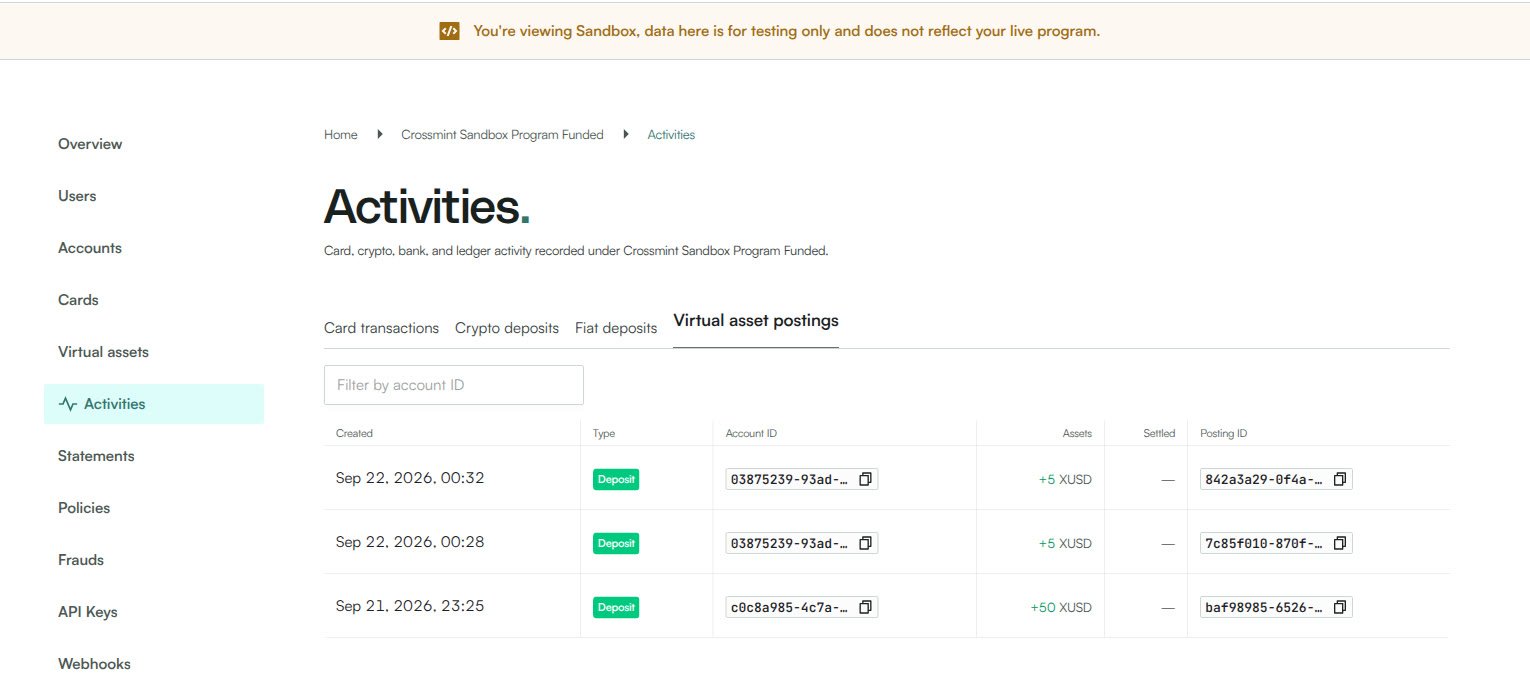
    <Frame type="simple" caption="Virtual asset postings credited to the user account after each wallet transfer">
      <img src="https://mintcdn.com/crossmint/6hYOq7sXCzkCGZDa/images/wallets/wallet-extensions/reap/console-postings.jpg?fit=max&auto=format&n=6hYOq7sXCzkCGZDa&q=85&s=55c137f039be77fad98ddb9bcd662106" alt="Reap platform Activities page listing Deposit postings of +5 XUSD to the user account" width="1530" height="674" data-path="images/wallets/wallet-extensions/reap/console-postings.jpg" />
    </Frame>

    See [Transfer Tokens](/wallets/guides/transfer-tokens) and the [React SDK reference](/sdk-reference/wallets/react/hooks#wallet-methods) for `send` and `balances` parameters.
  </Step>

  <Step title="Simulate a purchase and reveal the card">
    Card authorizations draw on the program's master collateral, so top it up in the sandbox before the first purchase. Approved authorizations return `amount` as a running total (`{ authorized, reversed, current }`), while declines omit `amount` and return a scalar `originalAmount` with a `declineReason`.

    ```typescript actions/reap.ts theme={null}
    // Uses the reap client from the create step

    export interface ReapTransaction {
        id: string;
        status: string;
        amount: number;
        currency: string;
        merchant: { name: string };
        declineReason: { code: string; message: string } | null;
    }

    interface ReapTransactionResponse extends Omit<ReapTransaction, "amount" | "declineReason"> {
        amount?: { authorized: number; reversed: number; current: number };
        originalAmount: number | { current: number };
        declineReason?: { code: string; message: string } | null;
    }

    // Sandbox only
    export async function simulateCardPurchase(params: {
        cardId: string;
        amount: number;
        merchantName: string;
    }): Promise<ReapTransaction> {
        const tx = await reap<ReapTransactionResponse>("/simulation/card-transactions/authorization", {
            method: "POST",
            body: { cardId: params.cardId, amount: params.amount, merchant: { name: params.merchantName } },
        });
        const amount =
            tx.amount?.current ??
            (typeof tx.originalAmount === "number" ? tx.originalAmount : tx.originalAmount.current);
        return { ...tx, amount, declineReason: tx.declineReason ?? null };
    }
    ```

    Reap's reveal endpoint returns a single-use URL that expires after about 5 minutes. Load it directly in an `<iframe>` so the PAN and CVV are rendered by Reap and never pass through your servers.

    ```tsx components/reap-card.tsx theme={null}
    // Uses the component state from the previous step
    import { createCardRevealUrl, simulateCardPurchase, simulateCollateralTopUp } from "@/actions/reap";

    const [revealUrl, setRevealUrl] = useState<string | null>(null);

    const purchaseAndReveal = async () => {
        if (card == null) {
            return;
        }
        await simulateCollateralTopUp(100);
        const purchase = await simulateCardPurchase({ cardId: card.id, amount: 2.5, merchantName: "Coffee Shop" });
        console.log(`${purchase.status}: ${purchase.amount} ${purchase.currency}`);

        const session = await createCardRevealUrl(card.id);
        setRevealUrl(session.revealUrl);
    };

    // Add to the component's returned JSX
    {card != null && <button onClick={purchaseAndReveal}>Simulate purchase and reveal card</button>}
    {revealUrl != null && <iframe src={revealUrl} title="Card details" width={400} height={260} />}
    ```

    <Columns cols={2}>
      <Frame type="simple">
        <img src="https://mintcdn.com/crossmint/6hYOq7sXCzkCGZDa/images/wallets/wallet-extensions/reap/purchase.jpg?fit=max&auto=format&n=6hYOq7sXCzkCGZDa&q=85&s=a968385149d7173701cf8917fbeea939" alt="Demo app showing master collateral, a PENDING 2.50 USD purchase, and the event log" width="760" height="1030" data-path="images/wallets/wallet-extensions/reap/purchase.jpg" />
      </Frame>

      <Frame type="simple">
        <img src="https://mintcdn.com/crossmint/6hYOq7sXCzkCGZDa/images/wallets/wallet-extensions/reap/reveal.jpg?fit=max&auto=format&n=6hYOq7sXCzkCGZDa&q=85&s=633a0d6cb0d55e7ce0f32f3fe9f4f250" alt="Demo app showing the Reap secure reveal iframe with card details redacted" width="760" height="1030" data-path="images/wallets/wallet-extensions/reap/reveal.jpg" />
      </Frame>
    </Columns>

    On the program side, the authorization appears under **Activities → Card transactions** and reduces the user account's available balance against the master account collateral:

    <Columns cols={2}>
      <Frame type="simple">
        <img src="https://mintcdn.com/crossmint/6hYOq7sXCzkCGZDa/images/wallets/wallet-extensions/reap/console-transaction.jpg?fit=max&auto=format&n=6hYOq7sXCzkCGZDa&q=85&s=7def200e1bda27c0361c7373ea822656" alt="Reap platform transaction drawer showing a Pending 2.50 USD e-commerce authorization at Crossmint Coffee" width="704" height="960" data-path="images/wallets/wallet-extensions/reap/console-transaction.jpg" />
      </Frame>

      <Frame type="simple">
        <img src="https://mintcdn.com/crossmint/6hYOq7sXCzkCGZDa/images/wallets/wallet-extensions/reap/console-account.jpg?fit=max&auto=format&n=6hYOq7sXCzkCGZDa&q=85&s=e9287f1342576b9c01122f90820ce3b6" alt="Reap platform account drawer showing 4.50 USD available balance, 10 XUSD asset value, 5.50 USD liabilities, and the master account balance behind it" width="704" height="960" data-path="images/wallets/wallet-extensions/reap/console-account.jpg" />
      </Frame>
    </Columns>
  </Step>
</Steps>

## Verify the Integration

Run `npm run dev`, sign in with an email, and click through the flow. A successful run shows:

* The wallet address on `base-sepolia` with a USDXM balance after `stagingFund`.
* A Reap user with `application.status: "APPROVED"`, an `ACTIVE` account, and an `ACTIVE` virtual card.
* The wallet balance decreasing by the funded amount and `availableBalance` on the Reap account increasing by the same amount.
* A `PENDING` authorization after the simulated purchase, with `availableBalance` reduced by the purchase amount.
* Card number, expiry, and CVV rendered inside the reveal iframe.

<Frame type="simple" caption="Reap PoC after funding, a simulated purchase, and a secure reveal">
  <img src="https://mintcdn.com/crossmint/6hYOq7sXCzkCGZDa/images/wallets/wallet-extensions/reap/reap-poc-e2e.jpg?fit=max&auto=format&n=6hYOq7sXCzkCGZDa&q=85&s=626f18f713b9ccb6f1c98aaa8baaecdc" alt="Demo app showing an approved Reap user, an active virtual card, wallet and Reap balances, and a pending purchase" width="752" height="1068" data-path="images/wallets/wallet-extensions/reap/reap-poc-e2e.jpg" />
</Frame>

## Troubleshooting

<AccordionGroup>
  <Accordion title="KYC status stays PENDING after the simulation call">
    The `/simulation/users/{id}/application` endpoint returns `204` when the request is accepted, not when the application is approved. Poll `GET /users/{id}` until `application.status` is `APPROVED`; the sandbox usually takes 5 to 15 seconds.
  </Accordion>

  <Accordion title="Wallet balance shows 0 after stagingFund">
    `wallet.stagingFund()` mints Crossmint's staging stablecoin USDXM, not testnet USDC. Read the balance with `wallet.balances(["usdxm"])` and send with `wallet.send(recipient, "usdxm", amount)`. Base Sepolia has several USDC-like tokens, so do not assume a single USDC address.
  </Accordion>

  <Accordion title="Card authorization is declined with INSUFFICIENT_MASTER_BALANCE">
    Authorizations are backed by the project's master collateral account, not only by the user's balance. In the sandbox, call `/simulation/fiat-deposits` to add collateral; in production, fund the master account through Reap.
  </Accordion>

  <Accordion title="Purchase amount renders as [object Object]">
    Approved authorizations return `amount` as an object with `authorized`, `reversed`, and `current`, while declines return a scalar `originalAmount`. Normalize the response in the server action as shown above before rendering it.
  </Accordion>

  <Accordion title="Reveal URL fails to load or shows an expired session">
    Reveal URLs are single-use and expire after about 5 minutes. Request a new URL each time the user opens the card details, and load it directly in an iframe or WebView rather than fetching it from your backend.
  </Accordion>
</AccordionGroup>

## Next Steps

<CardGroup cols={2}>
  <Card title="Check Wallet Balances" icon="wallet" href="/wallets/guides/check-balances">
    Show the wallet balance alongside the card's spending power
  </Card>

  <Card title="Gas Sponsorship" icon="gas-pump" href="/wallets/guides/gas-sponsorship">
    Cover gas fees so users can fund their card without holding ETH
  </Card>

  <Card title="Rain Card Issuance" icon="credit-card" href="/wallets/guides/wallet-extensions/credit-cards">
    Compare with the Rain integration for collateral-backed Visa cards
  </Card>
</CardGroup>