> ## Documentation Index
> Fetch the complete documentation index at: https://docs.crossmint.com/llms.txt
> Use this file to discover all available pages before exploring further.
# Checkout Trigger Node (x402 Paywall)
> Accept cryptocurrency payments via the x402 protocol to gate access to your n8n workflows
The Crossmint Checkout Trigger node lets you create payment-gated webhook endpoints using the x402 payment protocol. When set to **Paywall** mode, the node acts as an x402 server: it returns a `402 Payment Required` response to any request that does not include a valid payment header, and only triggers your workflow once payment is verified and confirmed on-chain.
This node uses Faremeter under the hood for payment handling and the Corbits facilitator for on-chain confirmation.
The x402 Paywall mode works with **EVM wallets** only (e.g., Base). Crossmint wallets are on Solana, so for this trigger you need an external EVM wallet such as MetaMask or any wallet that exposes a private key on an EVM chain.
## Trigger Fields
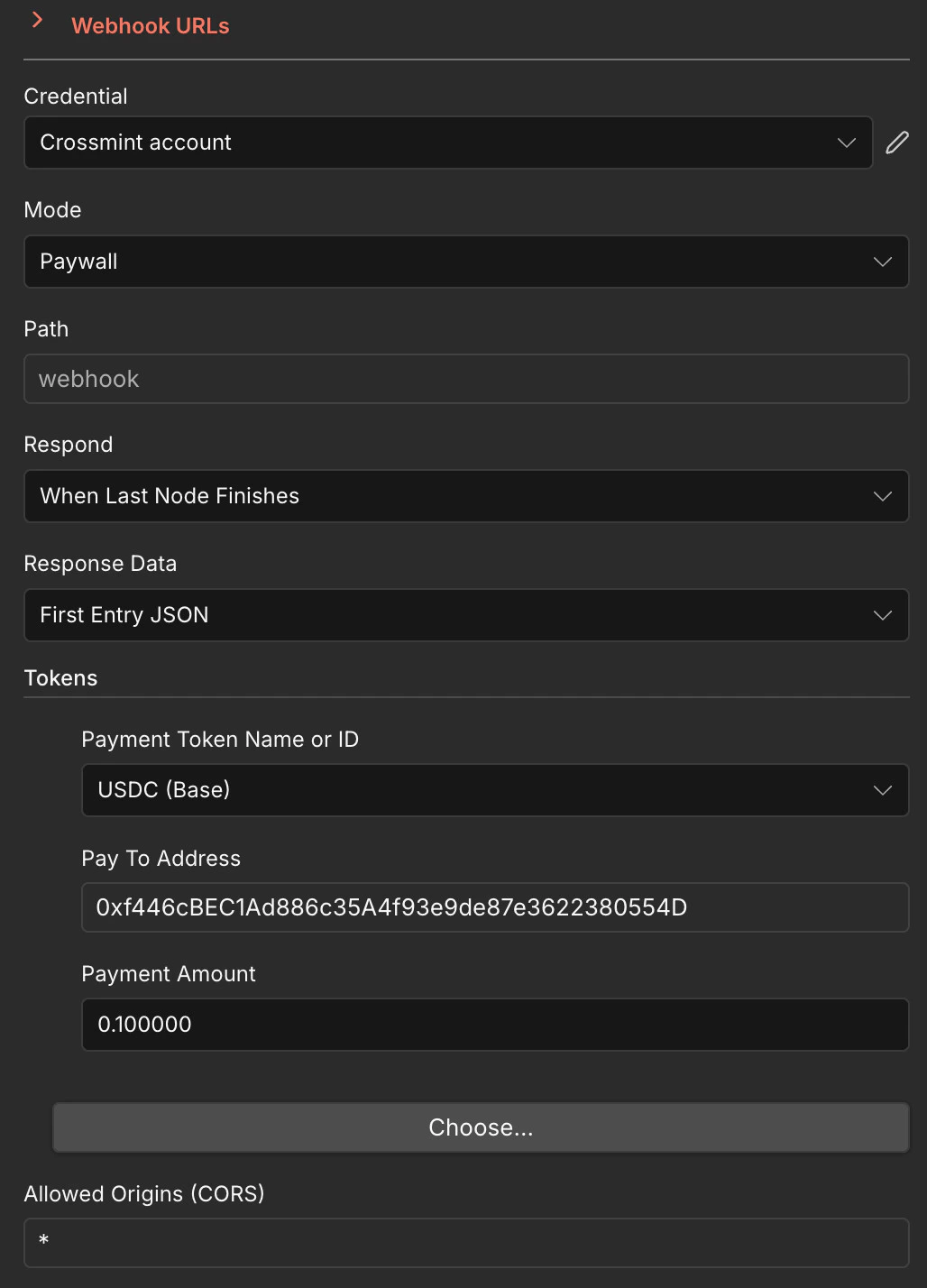
When you add a **Crossmint Checkout Trigger** node and select the **Paywall** mode, the following fields are available:
 ### Credential
* **Crossmint account** — Your Crossmint API credential. See the Quickstart for how to set this up.
### Mode
* **Paywall** — Enables x402 payment verification. Every incoming request must include a valid `X-PAYMENT` header or the node responds with `402 Payment Required`.
### Path
* **Path** — The webhook path appended to your n8n instance URL. For example, setting this to `webhook` produces a URL like `https://your-instance.app.n8n.cloud/webhook/webhook`.
### Respond
* **Respond** — Controls when the webhook sends its HTTP response back to the caller:
* `When Last Node Finishes` — Waits until the entire workflow completes before responding
* `Immediately` — Responds right away, before the workflow finishes
* `Using 'Respond to Webhook' Node` — Lets you control the response manually with a dedicated node
### Response Data
* **Response Data** — Determines what data is returned in the webhook response:
* `First Entry JSON` — Returns the JSON output of the first item produced by the workflow
* `All Entries JSON` — Returns all items as a JSON array
* `No Response Body` — Returns an empty body
### Tokens
The **Tokens** section defines which cryptocurrency payments the paywall accepts. You can configure one or more token entries:
* **Payment Token Name or ID** — The token to accept for payment. Select from available options such as `USDC (Base)`, `USDC (Base Sepolia)`, etc.
* **Pay To Address** — The EVM wallet address that receives the payment (e.g., `0xf446cBEC1Ad886c35A4f93e9de87e3622380554D`)
* **Payment Amount** — The amount of the token required per request (e.g., `0.100000` for 0.1 USDC)
You can add multiple token entries by clicking **Choose...** to accept different tokens or amounts.
### Allowed Origins (CORS)
* **Allowed Origins (CORS)** — Controls which origins can call the webhook. Set to `*` to allow all origins, or specify a comma-separated list of allowed domains (e.g., `https://myapp.com, https://another.com`).
## How It Works
A client sends an HTTP request to your webhook URL. If no `X-PAYMENT` header is present, the node responds with `402 Payment Required` along with the payment requirements (token, amount, recipient).
The client uses an x402-compatible library (like Faremeter) to generate a signed payment proof and retries the request with the `X-PAYMENT` header.
The node verifies the payment proof via the Corbits facilitator and confirms the transaction on-chain. Once confirmed, your workflow executes.
The workflow runs and returns its output to the caller, depending on your **Respond** and **Response Data** settings.
## Testing with a Client Script
Below is a complete client-side script that sends an x402 payment to your Paywall webhook. It uses Faremeter's `@faremeter/fetch`, `@faremeter/payment-evm`, and `@faremeter/wallet-evm` packages.
**Private Key Security**
Replace the placeholder private key below with your own EVM wallet private key. Never use real private keys in code — always store them in environment variables or secure vaults.
```javascript theme={null}
import { wrap } from '@faremeter/fetch';
import { createPaymentHandler } from '@faremeter/payment-evm/exact';
import { createLocalWallet } from '@faremeter/wallet-evm';
const PRIVATE_KEY = process.env.EVM_PRIVATE_KEY; // Your EVM wallet private key
const URL = 'https://your-instance.app.n8n.cloud/webhook/your-webhook-path';
const wallet = await createLocalWallet({ id: 8453, name: 'Base' }, PRIVATE_KEY);
const handler = createPaymentHandler(wallet);
// Server sends extra.name "USDC" but the Base USDC contract's EIP-712 domain
// uses name() = "USD Coin". Patch the 402 response so the client signs with
// the correct domain, otherwise transferWithAuthorization reverts on-chain.
async function patchedFetch(input, init) {
const res = await fetch(input, init);
if (res.status !== 402) return res;
const body = await res.json();
if (body.accepts) {
for (const req of body.accepts) {
if (req.extra?.name === 'USDC') {
req.extra.name = 'USD Coin';
}
}
}
return new Response(JSON.stringify(body), {
status: 402,
headers: res.headers,
});
}
const payFetch = wrap(fetch, {
handlers: [handler],
phase1Fetch: patchedFetch,
returnPaymentFailure: true,
});
console.log('Wallet:', wallet.address);
console.log('Sending x402 payment to', URL);
const response = await payFetch(URL, {
method: 'POST',
headers: { 'Content-Type': 'application/json' },
body: JSON.stringify({}),
});
const body = await response.text();
console.log('Status:', response.status);
if (response.ok) {
console.log('Payment succeeded!');
console.log('Response:', body);
} else {
console.error('Payment failed');
try {
const parsed = JSON.parse(body);
if (parsed.error) console.error('Error:', parsed.error);
} catch {
console.error('Body:', body);
}
}
```
To run this script:
1. Install the required packages:
```bash theme={null}
npm install @faremeter/fetch @faremeter/payment-evm @faremeter/wallet-evm
```
2. Save the script as `x402-client.mjs` and set your environment variables:
```bash theme={null}
export EVM_PRIVATE_KEY="0xYOUR_PRIVATE_KEY_HERE"
```
3. Update the `URL` constant in the script to point to your own Paywall webhook URL.
4. Run it:
```bash theme={null}
node x402-client.mjs
```
For full Faremeter documentation and additional wallet/chain options, see the Faremeter docs.
## Example Use Cases
* **Paid API Endpoints** — Monetize any n8n workflow by gating it behind a micropayment
* **AI Agent Services** — Let AI agents pay per-request for access to data or actions
* **Premium Webhooks** — Offer paid webhook integrations to third-party developers
* **Content Paywalls** — Gate access to generated content, reports, or data feeds
## Next Steps
Learn about managing wallets for payments
Automate purchases from Amazon and Shopify
Full x402 protocol and Faremeter documentation
Ask Crossmint Expert GPT for n8n guidance
### Credential
* **Crossmint account** — Your Crossmint API credential. See the Quickstart for how to set this up.
### Mode
* **Paywall** — Enables x402 payment verification. Every incoming request must include a valid `X-PAYMENT` header or the node responds with `402 Payment Required`.
### Path
* **Path** — The webhook path appended to your n8n instance URL. For example, setting this to `webhook` produces a URL like `https://your-instance.app.n8n.cloud/webhook/webhook`.
### Respond
* **Respond** — Controls when the webhook sends its HTTP response back to the caller:
* `When Last Node Finishes` — Waits until the entire workflow completes before responding
* `Immediately` — Responds right away, before the workflow finishes
* `Using 'Respond to Webhook' Node` — Lets you control the response manually with a dedicated node
### Response Data
* **Response Data** — Determines what data is returned in the webhook response:
* `First Entry JSON` — Returns the JSON output of the first item produced by the workflow
* `All Entries JSON` — Returns all items as a JSON array
* `No Response Body` — Returns an empty body
### Tokens
The **Tokens** section defines which cryptocurrency payments the paywall accepts. You can configure one or more token entries:
* **Payment Token Name or ID** — The token to accept for payment. Select from available options such as `USDC (Base)`, `USDC (Base Sepolia)`, etc.
* **Pay To Address** — The EVM wallet address that receives the payment (e.g., `0xf446cBEC1Ad886c35A4f93e9de87e3622380554D`)
* **Payment Amount** — The amount of the token required per request (e.g., `0.100000` for 0.1 USDC)
You can add multiple token entries by clicking **Choose...** to accept different tokens or amounts.
### Allowed Origins (CORS)
* **Allowed Origins (CORS)** — Controls which origins can call the webhook. Set to `*` to allow all origins, or specify a comma-separated list of allowed domains (e.g., `https://myapp.com, https://another.com`).
## How It Works
A client sends an HTTP request to your webhook URL. If no `X-PAYMENT` header is present, the node responds with `402 Payment Required` along with the payment requirements (token, amount, recipient).
The client uses an x402-compatible library (like Faremeter) to generate a signed payment proof and retries the request with the `X-PAYMENT` header.
The node verifies the payment proof via the Corbits facilitator and confirms the transaction on-chain. Once confirmed, your workflow executes.
The workflow runs and returns its output to the caller, depending on your **Respond** and **Response Data** settings.
## Testing with a Client Script
Below is a complete client-side script that sends an x402 payment to your Paywall webhook. It uses Faremeter's `@faremeter/fetch`, `@faremeter/payment-evm`, and `@faremeter/wallet-evm` packages.
**Private Key Security**
Replace the placeholder private key below with your own EVM wallet private key. Never use real private keys in code — always store them in environment variables or secure vaults.
```javascript theme={null}
import { wrap } from '@faremeter/fetch';
import { createPaymentHandler } from '@faremeter/payment-evm/exact';
import { createLocalWallet } from '@faremeter/wallet-evm';
const PRIVATE_KEY = process.env.EVM_PRIVATE_KEY; // Your EVM wallet private key
const URL = 'https://your-instance.app.n8n.cloud/webhook/your-webhook-path';
const wallet = await createLocalWallet({ id: 8453, name: 'Base' }, PRIVATE_KEY);
const handler = createPaymentHandler(wallet);
// Server sends extra.name "USDC" but the Base USDC contract's EIP-712 domain
// uses name() = "USD Coin". Patch the 402 response so the client signs with
// the correct domain, otherwise transferWithAuthorization reverts on-chain.
async function patchedFetch(input, init) {
const res = await fetch(input, init);
if (res.status !== 402) return res;
const body = await res.json();
if (body.accepts) {
for (const req of body.accepts) {
if (req.extra?.name === 'USDC') {
req.extra.name = 'USD Coin';
}
}
}
return new Response(JSON.stringify(body), {
status: 402,
headers: res.headers,
});
}
const payFetch = wrap(fetch, {
handlers: [handler],
phase1Fetch: patchedFetch,
returnPaymentFailure: true,
});
console.log('Wallet:', wallet.address);
console.log('Sending x402 payment to', URL);
const response = await payFetch(URL, {
method: 'POST',
headers: { 'Content-Type': 'application/json' },
body: JSON.stringify({}),
});
const body = await response.text();
console.log('Status:', response.status);
if (response.ok) {
console.log('Payment succeeded!');
console.log('Response:', body);
} else {
console.error('Payment failed');
try {
const parsed = JSON.parse(body);
if (parsed.error) console.error('Error:', parsed.error);
} catch {
console.error('Body:', body);
}
}
```
To run this script:
1. Install the required packages:
```bash theme={null}
npm install @faremeter/fetch @faremeter/payment-evm @faremeter/wallet-evm
```
2. Save the script as `x402-client.mjs` and set your environment variables:
```bash theme={null}
export EVM_PRIVATE_KEY="0xYOUR_PRIVATE_KEY_HERE"
```
3. Update the `URL` constant in the script to point to your own Paywall webhook URL.
4. Run it:
```bash theme={null}
node x402-client.mjs
```
For full Faremeter documentation and additional wallet/chain options, see the Faremeter docs.
## Example Use Cases
* **Paid API Endpoints** — Monetize any n8n workflow by gating it behind a micropayment
* **AI Agent Services** — Let AI agents pay per-request for access to data or actions
* **Premium Webhooks** — Offer paid webhook integrations to third-party developers
* **Content Paywalls** — Gate access to generated content, reports, or data feeds
## Next Steps
Learn about managing wallets for payments
Automate purchases from Amazon and Shopify
Full x402 protocol and Faremeter documentation
Ask Crossmint Expert GPT for n8n guidance