
active account with an IBAN in the user’s name, and every transfer to that IBAN arrives in the user’s wallet as EURC or USDC. Opening the account moves no money. Money moves only when the user sends a transfer.
Prerequisites
- Verified user: the user has passed KYC. See User Onboarding and KYC. For a user who has not, the create call is refused. See When the User Is Not Eligible.
- Wallet: a wallet on Solana or Base that the user controls, or the user’s own Crossmint wallet. An exchange deposit address is not supported.
- API Key: a server API key with the
virtual-accounts.create,virtual-accounts.read, andusers.createscopes. In staging, all scopes are included by default.
Integration Steps
1
Record the Terms and Privacy Policy
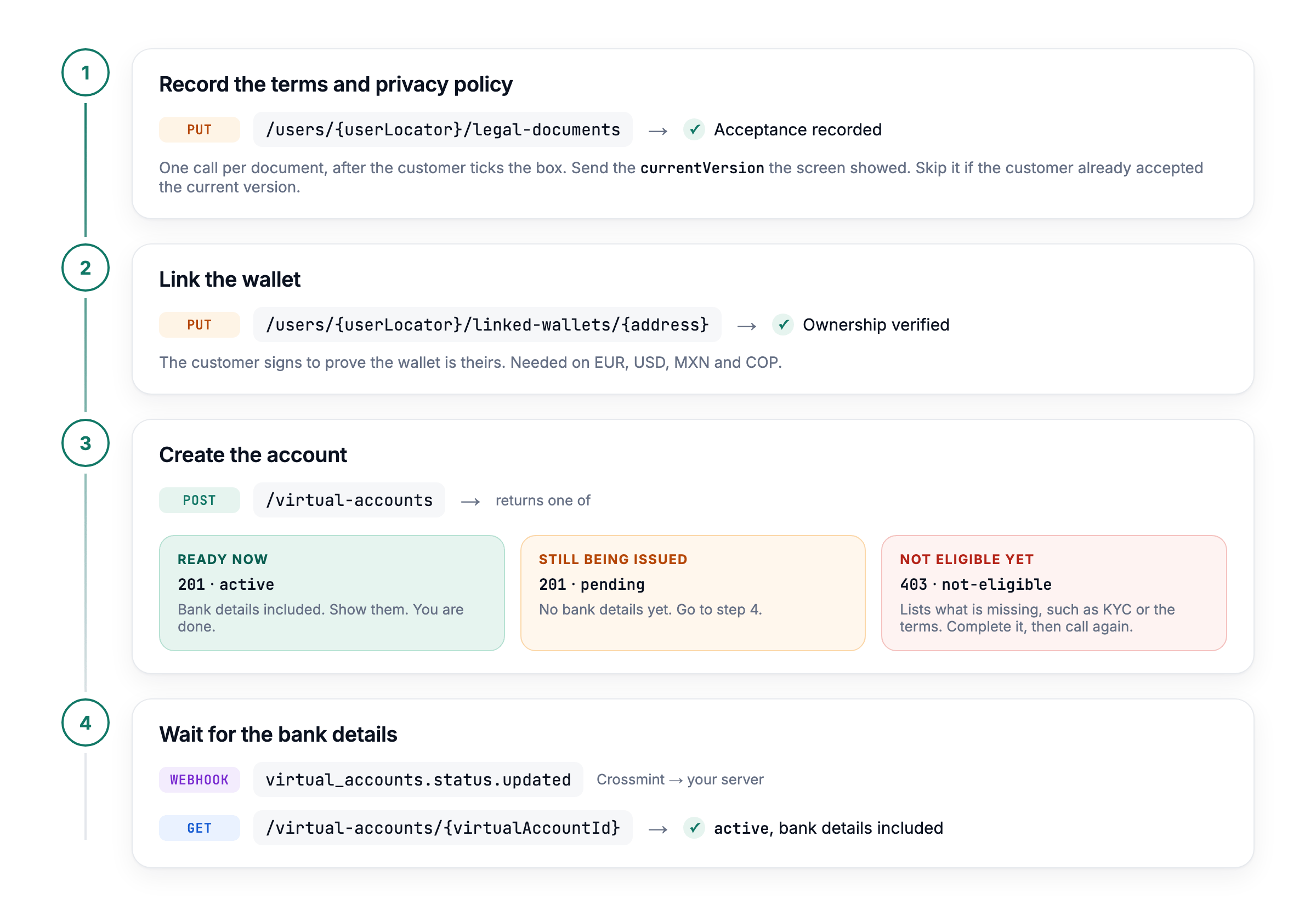
Before the user gives any KYC data, the first screen of your app shows one checkbox that accepts the Crossmint terms of service and acknowledges the Crossmint privacy policy. After the user ticks it, record each document with the Accept Legal Document API, one call per document. Crossmint records the latest version of the document.EUR accounts use
Response
region eu. For the privacy policy, send the same call with type crossmint-privacy-policy and no region.2
Link the Wallet
Link the wallet that deposits go to, on Solana or Base, to the user with the Link Wallet API, and send the Without
proof that verifies ownership. Skip this step for the user’s own Crossmint wallet.proof, the call answers with a verificationChallenge. The user signs it with the wallet, and you send the call again with the signature as proof. Onramp to Non-Crossmint Wallets shows the signing flow.3
Create the Account
Send the user, the currency, and the destination. The destination is the A new account returns The response has no
walletAddress of the wallet and the tokenLocator of the token deposits arrive in.201:Response
source block. Read the currency and the issuing country from depositInstructions.bankAccount.When the user has not passed KYC, the call answers 403 payments:virtual-account.not-eligible. Complete the verification, then send the call again. See When the User Is Not Eligible.Creating the account is safe to retry. A request with the same user, currency, and destination returns the open account with 200, as it is, and never opens a second IBAN. A different label on the repeat is ignored.4
Wait for the Bank Details
When the banking partner has not issued the bank details by the time the create call responds, the account returns The response is the account object of the create call. When
201 with status pending and depositInstructions set to null. A pending account is open: the same create call returns it with 200. Crossmint keeps asking the banking partner for the bank details in the background, so you do not need to send the create call again.Subscribe to the virtual_accounts.status.updated webhook, and read the account when it arrives:status is active, show the bank details to the user. When it is failed, create the account again. See Account Statuses for every status and Handle Account Status Changes for the event payload.Request Fields
Opening an account never creates a wallet. The request takes no amount, payment method, or line items.
When the User Is Not Eligible
When the user has not passed KYC, or the banking partner cannot open an account for the user, the create call answers403 payments:virtual-account.not-eligible and opens nothing:
Response
message says which case applies.
Errors
Every refusal has the bodyerror, message, and code. Some also carry parameters.
Fix the Request
User and Wallet Checks
Conflicts and Retries
Next Steps
Manage Virtual Accounts
List accounts, change the wallet or token, and close an account
Track Deposits
Follow each bank transfer as an order