

Prerequisites
- Account: an
activevirtual account, opened as in Open a Virtual Account. - API Key: a server API key with the
orders.readscope. In staging, all scopes are included by default. - Webhook endpoint: an endpoint subscribed to the order events, set up as in Webhooks.
Read a Deposit
Read a deposit with Get Order. A deposit order has three fields of its own insidepayment:
Deposit order (excerpt)
Use
payment.reference to match deposits to invoices in your system. Do not assume it is unique: two transfers can carry the same reference, and each is its own order.
List the Deposits of an Account
Response (orders abbreviated)
data, and the history stays readable after the account closes. To list deposits across accounts, add virtualAccountId to the project-wide list at GET /api/2025-06-15/orders, with up to 20 comma-separated account IDs.
Deposit States
Readphase, payment.status, and payment.returnStatus together to know where a deposit is.
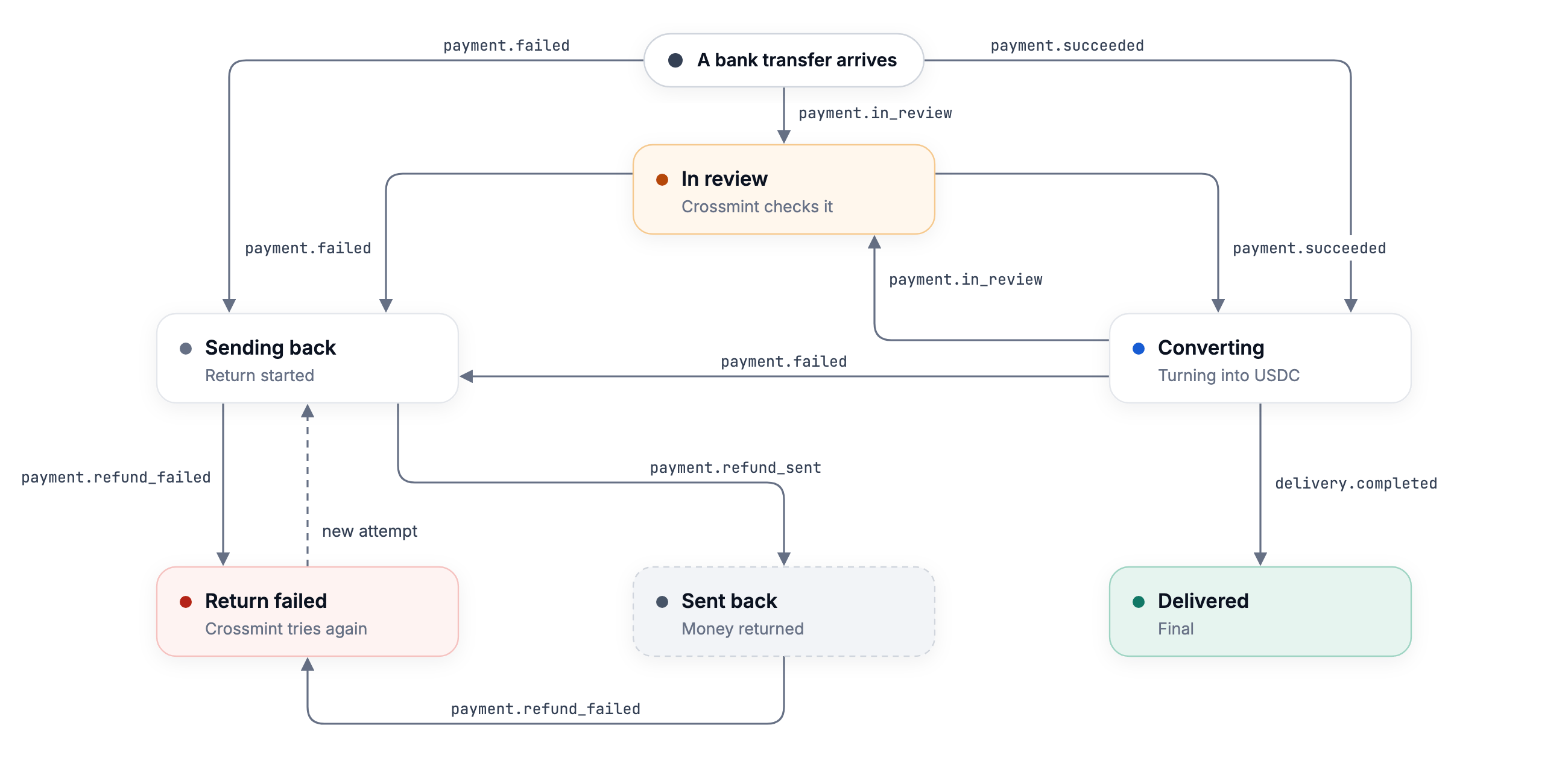
A deposit in review waits on a check. No action from you or the user ends a review, and the API gives no reason and no date for it.
A deposit that goes back returns in full to the sending account, with nothing deducted.
sent means the return left for the sender’s bank, not that the bank credited it. payment.refunded appears together with sent:
Returned deposit (excerpt)
payment.status, payment.returnStatus, and failureReason.code as extensible.
Events
Each step of a deposit sends an order webhook that carries the full order asdata. A delivered deposit sends orders.quote.created, orders.payment.succeeded, orders.delivery.initiated, and orders.delivery.completed, in that order. See Virtual Account Webhooks for every event, its payload, and the order of events for each outcome.
Why a Deposit Goes Back
payment.failureReason.code says why, and payment.failureReason.message is the text to show the user.
failureReason.railCode holds the code of the rail when the bank or the rail sent the transfer back, and is null otherwise.
Read the Delivered Amount
The wallet receives the amount received minus the fees on the order, timesquote.exchangeRate.rate, in the token of the account. The rate is fixed when the deposit converts. For a USDC account it already includes the markup, so the fees on the order do not list it.
Delivered deposit (excerpt)
Next Steps
Test in Staging
Simulate deposits and force each outcome
Get Order API
Every field of an order