

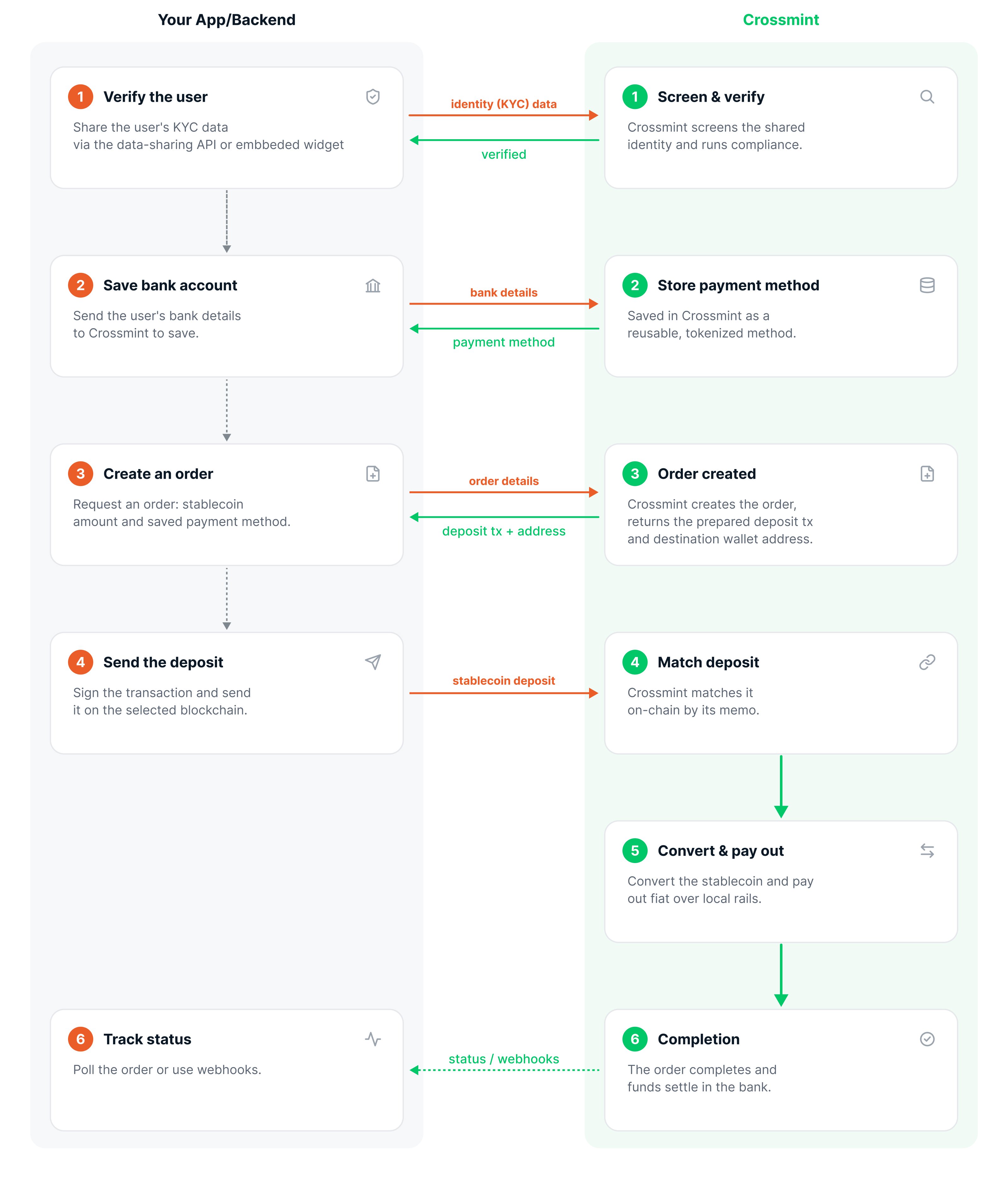
The Offramp Flow
1
Verify the user
Each user completes identity verification once. Verification runs asynchronously, so you trigger it and then poll until the user is verified. If your users are already KYC’d, you can bring them over by passing their identity data, so they skip the in-flow verification. See KYC & Compliance.
2
Save the user's bank account
The user’s bank details are saved as a reusable payment method. Bank details are tokenized at vault.crossmint.com. Crossmint keeps the token and the last digits, not the account number.
3
Create an offramp order
Your backend creates an order specifying the amount of USDC to cash out and the bank account to pay. The order comes back with a prepared deposit transaction that already carries a memo tying the deposit to this order.
4
Send the deposit
Your app broadcasts the prepared transaction from the user’s wallet. Crossmint matches the on-chain deposit to the order by its memo, so no extra confirmation call is needed.
5
Conversion and payout
The USDC is converted to fiat, and the payout goes to the user’s bank account over local rails.
6
Completion
The order completes and the funds settle in the user’s bank. You can track status by polling the order or via webhooks.
Key Concepts
Exact-In Amounts
You specify the amount of USDC the user sends (exact-in). The user sends exactly that amount of crypto, and the equivalent fiat, minus any applicable fees, is deposited into their bank account.
First-Party Payouts
The destination bank account must belong to the same user who owns the wallet and completed verification. The wallet the user pays from is linked to that verified identity, and the order resolves KYC through it. Offramp pays users out to their own bank accounts, never to third parties.Settlement Timing
Once the USDC deposit is confirmed, fiat arrival depends on the payout rail, ranging from minutes to a few business days. Crossmint uses the account’s default rail unless you pin one withrecipient.rail when creating the order. See Countries and Rails for the current rail catalog and settlement times.
In the staging environment, payouts are simulated, so you can run the full flow end to end without funds moving. Funds only move in production.
SEPA in the Embedded Component
SEPA bank accounts appear in the component only when the payer wallet’s chain has EURC and your project has euro payouts set up. In a consumer (B2C) project, the user’s verified country of residence must also be in SEPA. Otherwise Add a bank account does not offer SEPA, and a SEPA account the user already saved is shown greyed out as unavailable.Saved Bank Accounts in the Embedded Component
Users can rename and remove their saved bank accounts in the component. Removing one deletes it from the user’s saved payment methods, so it also disappears from the bank accounts API. The component refuses a removal once the session’s withdrawal was sent, and while another withdrawal from the same wallet is still being confirmed.What Crossmint Handles vs. What You Build
Next Steps
Quickstart
Build your first offramp end to end
KYC & Compliance
How verification works for offramp