

- Check an order’s status and know which fields to watch
- Follow an order through each phase of its lifecycle
- Map each status to the right UI state and next action
- Receive order updates through webhooks instead of polling
- Troubleshoot expired quotes and rejected payouts
Check Order Status
Fetch an order any time with itsorderId (see the Get Order API reference for the complete response schema):
phase: the high-level stage of the orderpayment.status: whether the stablecoin deposit has been receivedlineItems[0].delivery.status: whether the fiat payout is pending, in transit, completed, or failedlineItems[0].delivery.rail: the payout rail the order routed through, snapshotted once resolved and never changed afterward (see Countries and Rails)lineItems[0].delivery.completedAt: the ISO 8601 timestamp when the payout reached its terminal success signal at the rail; on instant rails (RTP, SEPA Instant, SPEI) this is the real credit-confirmation time, while on delayed rails (ACH, standard SEPA) it reflects settlement and is approximate
A completed order can still show
quote.status: "expired" because the quote time window closes independently of payment and delivery. By itself, this does not indicate a problem. Rely on phase, payment.status, and lineItems[].delivery.status to determine the order outcome.Order Lifecycle
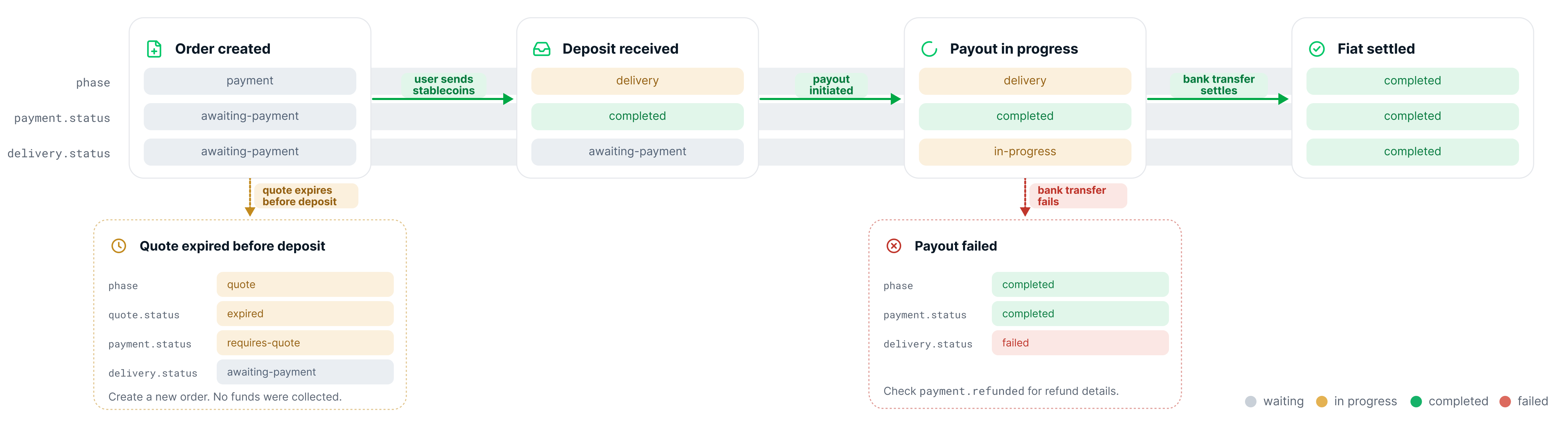
The full status model has four phases. Offramp orders start inpayment, with the quote included inside the order, then move through delivery to completed when the payout reaches a terminal outcome. The quote phase appears if the quote expires before the deposit arrives.
1
Payment: waiting for the deposit
After the order is created and the quote is locked, the order sits in the If no deposit arrives before the quote expires, the order returns to the
payment phase until the stablecoin deposit arrives on-chain and is matched by memo.quote phase with payment.status: "requires-quote". See Quote expired below.2
Delivery: fiat payout in progress
Once the deposit lands, Crossmint converts the stablecoin and initiates the fiat payout. The order moves to the
delivery phase.Offramp settlement has two asynchronous parts: receiving the stablecoin deposit and completing the fiat payout. After
payment.status becomes completed, the order may remain in delivery while the payout is being prepared, processed by the rail, or delayed by weekends and bank holidays. For rail-specific timing, see Countries and Rails.3
Completed: terminal state
Once the bank transfer completes, the order moves to
completed with a successful delivery status.delivery.completedAt records when the payout reached its terminal success signal at the rail. On instant rails (RTP, SEPA Instant, SPEI) it is the real credit-confirmation time; on delayed rails (ACH, standard SEPA) it reflects settlement and is approximate, not the exact instant the funds were credited.Order Status Reference
Each field below returns one of a fixed set of values. Expand a field for the full list.phase
phase
payment.status
payment.status
In the standard offramp flow,
payment.status typically moves through awaiting-payment, in-progress, and completed. The other statuses listed below represent missing setup steps, verification requirements, or payer-wallet conditions.lineItems[0].delivery.status
lineItems[0].delivery.status
Failure reasons
Failure reasons
When a deposit cannot be processed or a payout fails, the order response may include a structured failure reason:
payment.failureReason: may be present when the deposit cannot be processed. Shape:{ code, message?, developerMessage? }.lineItems[].delivery.failureReason: may be present when the fiat payout fails. Shape:{ code, message? }. Possible codes:transfer-failed,insufficient-funds,invalid-account,payout-unauthorized,slippage-tolerance-exceeded,payment-refunded. Branch oncode—messageis human-readable copy and not a stable contract.
Payment failure reasons are returned on the order object. If you need to detect deposit-processing issues before a delivery event fires, refetch the order with the Get Order API and inspect
payment.status and payment.failureReason.Status-Handling Reference
Use this table to decide what to show the user and what action to take:Less common payment statuses
Less common payment statuses
These statuses may appear during order setup or when the payer wallet has issues. Use
payment.status as the key to decide what to show:The two insufficient-funds statuses come from Crossmint’s balance check when it prepares the deposit transaction, before anything is signed. Errors raised by the wallet while signing or broadcasting are not reflected on the order, which stays in
awaiting-payment; handle them in your app, then refetch the order.Webhooks
Instead of polling, subscribe to order events so Crossmint notifies your backend as the order progresses. Configure an endpoint in the Crossmint console and subscribe to events using the Webhooks guide. The events relevant to the standard offramp progression are:
Use these events to drive your UI updates. For example, show the user “payout on the way” when you receive
orders.delivery.initiated and “funds sent” when you receive orders.delivery.completed.
To receive a payment method status change as an event, see Status Webhook.
Troubleshooting
An offramp order spans two independent systems: an on-chain stablecoin deposit and a fiat payout over banking rails. Most orders complete on their own, but a few situations can interrupt the standard flow, most often a quote that expires before the deposit arrives or a payout the bank declines. Both are expected and recoverable. Expand a case below to see how to detect and resolve it.Quote expired
Quote expired
quote.expiresAt is the deadline for the deposit to be confirmed on-chain and matched to the order, not merely broadcast. If no deposit has been matched by then, the order returns to the quote phase.payment.status: "in-progress") but only confirms afterwards, Crossmint refunds it to the payer wallet instead of paying out at the stale rate. The order completes with payment.refunded set, lineItems[].delivery.status: "failed", failureReason.code: "payment-refunded", and an orders.delivery.failed webhook. Create a new order to retry.Bank rejection
Bank rejection
If the bank rejects the payout after the stablecoin deposit has been received (for example, invalid account details), the order moves to Check
completed with a failed delivery. The buyer deposit is automatically refunded.payment.refunded to confirm the refund details. Listen for orders.delivery.failed so you can surface the issue in your app and prompt the user to try again with corrected bank details.To exercise this path on staging, use the test bank accounts that fail every payout.Next Steps
Quickstart
Build the full flow
Launch in Production
Move from staging to live payouts