

owner property. Wallet creation, transaction signing, and balance reads all work the same way regardless of which auth provider you use.
If you are just getting started or prototyping, Crossmint Auth is a great way to move fast in staging before connecting your own provider.
Prerequisites
- API Key: Ensure you have an API key with the scopes:
wallets.create.
Using your own auth provider
- React
- React Native
- Kotlin
- Swift
- Flutter
1
Configure JWT Authentication in the Crossmint Console
- Navigate to your project in the Crossmint Console.
- Go to the API Keys section from the sidebar.
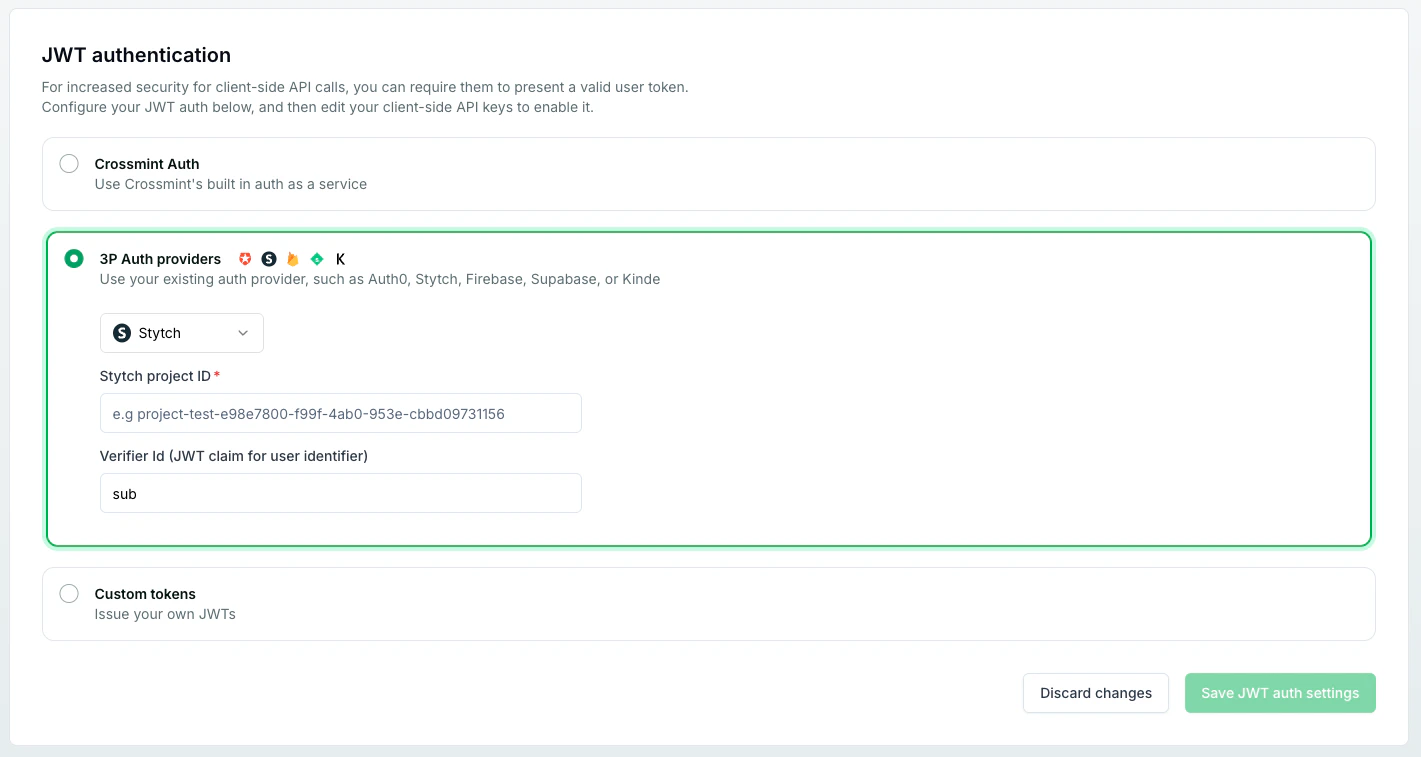
- Scroll down to the JWT authentication section.
- Choose your preferred authentication method:
- 3P Auth providers: Select from supported providers such as Auth0, Stytch, Cognito, Firebase, Kinde, or Supabase. Enter any required environment IDs or configuration details.
- Custom tokens: Opt to issue and manage your own JWTs.
- After making your selection and providing any necessary details, click Save JWT auth settings to apply your configuration.
2
Add the Crossmint providers to your app
Add the necessary Crossmint providers to your app together with your own auth provider.
3
Pass the JWT and create or retrieve the wallet
Once the JWT is available, use
getWallet to retrieve an existing wallet. If no wallet exists, it throws a WalletNotAvailableError — catch it and call createWallet instead.getOrCreateWallet has been removed in V1. Use getWallet to retrieve an existing wallet. If it throws a WalletNotAvailableError, call createWallet instead. See the migration guide for details.